InstantTranscriber vs HappyScribe: Which Should You Use?
Category: Tech & Gear | Reading time: 5 min | Last updated: June 2026
Disclosure: This post contains affiliate links. If you buy through our links we may earn a small commission at no extra cost to you.
Quick picks
If you spend any part of your workday on calls, interviews, or meetings, a transcription tool turns spoken conversation into searchable, usable text. We’ve already reviewed HappyScribe in depth. Here’s how InstantTranscriber stacks up if you’re deciding between the two.
Side by side
| Feature | InstantTranscriber | HappyScribe |
|---|---|---|
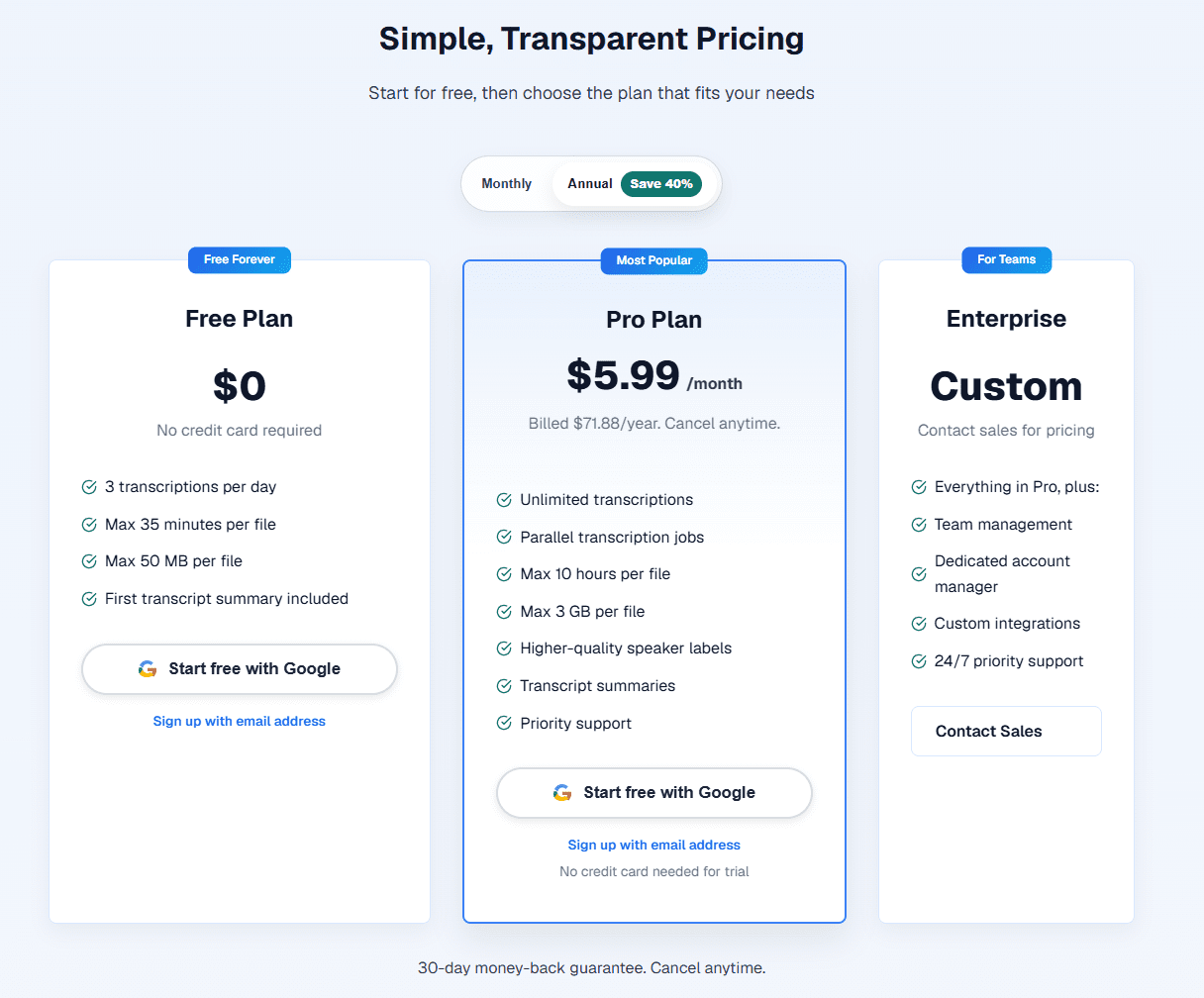
| Free tier | 3 transcripts/day, 35 min max | Limited free trial |
| Paid plan | $5.99/mo (billed annually) | See current pricing |
| Max file length (paid) | 10 hours | Varies by plan |
| Languages | 90+ | Multiple supported |
| Export formats | TXT, DOCX, PDF, SRT, VTT | Standard formats |
| Speaker labels | Yes | Yes |
| Extra tools | Audio trimmer, converter, noise reducer, and more | Standard transcription only |
| Data privacy | Audio auto-deleted after processing, not used for AI training | Standard privacy policy |
InstantTranscriber — what stands out
The free tier is genuinely usable, not just a limited trial. Three transcripts a day with no credit card required means you can run it indefinitely for light use without ever paying. For remote workers who only need to transcribe an occasional call or meeting, that free tier alone may cover your needs.
Beyond core transcription, InstantTranscriber includes a full suite of free browser-based audio tools: trimming, format conversion, noise reduction, silence removal, and volume normalization. None of these require downloads or sign-up. If you’re cleaning up audio before or after transcription, having these built in saves jumping between separate tools.
The paid Pro plan at $5.99/month (billed annually) supports files up to 10 hours and 3GB, with unlimited transcriptions and parallel processing. That’s a low price point relative to most transcription tools on the market.
Worth knowing: audio is auto-deleted after processing and not used to train AI models, which matters if you’re transcribing anything sensitive like client calls or research interviews.
HappyScribe — what stands out
HappyScribe is the more established name in this space, and our full review covers its accuracy, pricing tiers, and feature set in detail. If you want the complete breakdown before deciding, read our HappyScribe review.
Which should you choose?
Choose InstantTranscriber if: you want a generous free tier to test before committing, need built-in audio editing tools alongside transcription, or want the lowest-cost paid plan in this comparison.
Choose HappyScribe if: you’ve already read our full review and its specific feature set or pricing fits your workflow better.
For most remote workers handling occasional meeting or interview transcription, InstantTranscriber’s free tier is worth trying first since there’s no cost or commitment required.
Frequently asked questions
Can I use a transcription tool for free?
Yes. InstantTranscriber offers 3 free transcripts daily with no credit card required, which covers light, occasional use. For heavier daily use, a paid plan removes the daily limit.
How accurate is AI transcription?
Most modern AI transcription tools, including InstantTranscriber, claim up to 99% accuracy on clear audio in English. Accuracy drops with background noise, heavy accents, or overlapping speakers, so reviewing the output is still worthwhile for anything important.
Is my audio data private with these tools?
InstantTranscriber states that audio is automatically deleted after processing and not used to train AI models. Always check a tool’s specific privacy policy if you’re transcribing sensitive or confidential conversations.
Pricing and features subject to change. Check each provider’s site for current details. Last updated June 2026.