HappyScribe Review 2026 — Is It Worth It for Remote Workers?
Category: Software & Tools | Reading time: 7 min | Last updated: June 2026
Disclosure: This post contains affiliate links. If you buy through our links we may earn a small commission at no extra cost to you.
If you’ve ever sat through a two-hour meeting, taken notes the entire time, and still missed half of what was said — HappyScribe solves that problem.
HappyScribe is an AI transcription and meeting recording tool that automatically converts speech to text across 60+ languages. You record your meeting, it transcribes it, you get a searchable document of everything that was said. No more frantic note-taking, no more “wait, what did they say about the deadline?”
For remote workers specifically — where every important conversation happens on Zoom, Teams, or Google Meet and there’s no whiteboard to refer back to — automatic transcription is one of those tools that becomes hard to work without once you’ve used it.
This review covers what HappyScribe actually does, who it’s for, the honest limitations, and whether the free plan is enough or you need to pay.
What HappyScribe does
At its core HappyScribe does three things:
1. Meeting recording and transcription
Connect HappyScribe to your Google Meet, Zoom, or Microsoft Teams account and it joins your meetings as a notetaker — recording audio and generating a transcript automatically. The transcript includes automatic speaker detection so you can see who said what rather than one long undifferentiated block of text.
2. AI transcription of uploaded files
Upload any audio or video file and HappyScribe converts it to text. Useful for transcribing recorded presentations, interviews, podcast episodes, or any audio content you need in written form.
3. AI Chat for analysis
Ask questions about your transcripts — “what were the action items from this meeting?” or “summarize the key decisions” — and HappyScribe’s AI Chat pulls the relevant information. This is where it goes beyond basic transcription into genuine productivity tool territory.
HappyScribe pricing
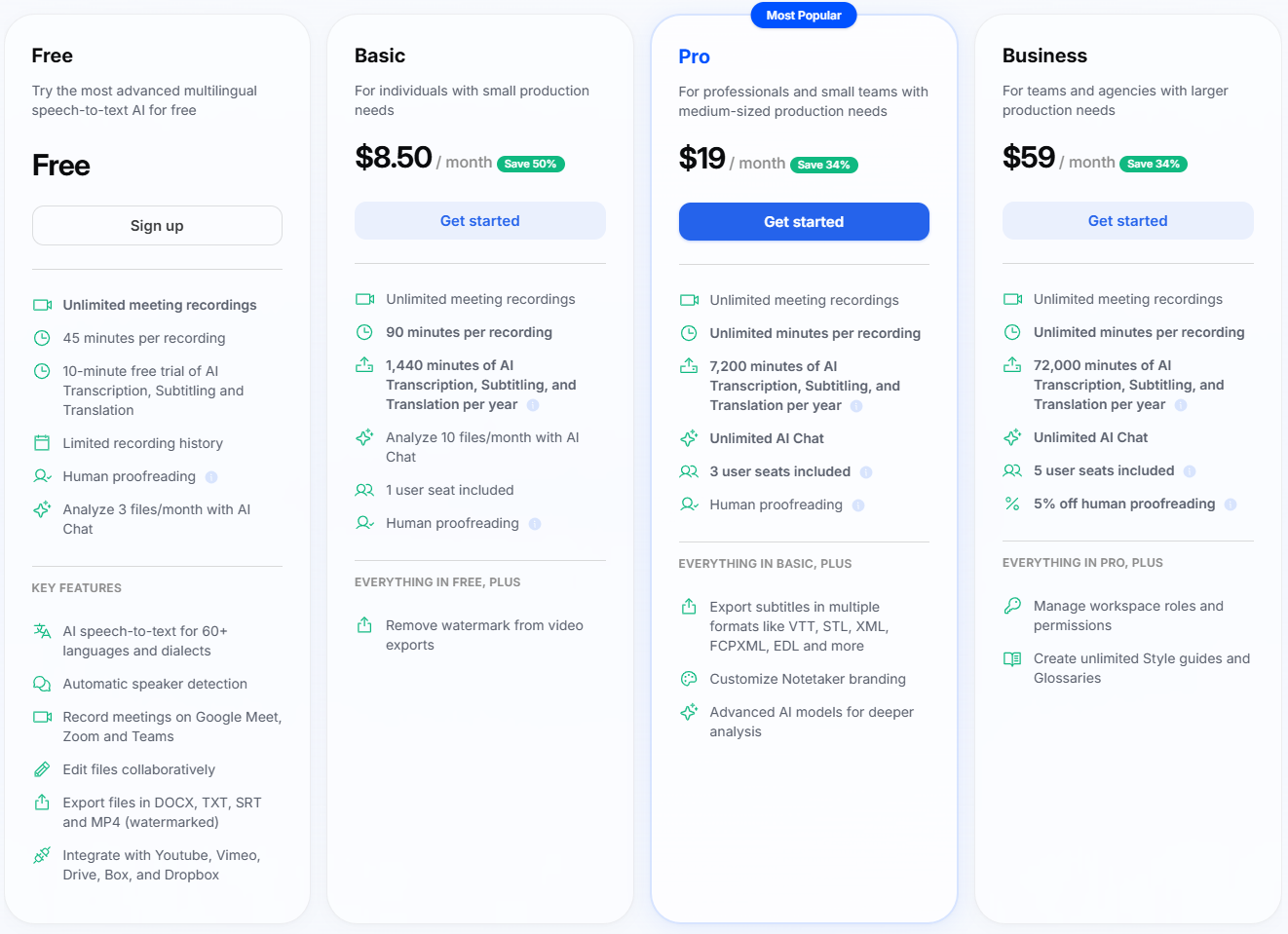
Free plan — $0:
- Unlimited meeting recordings
- 45 minutes per recording
- 10-minute free trial of AI Transcription
- 3 files/month with AI Chat
- Exports with watermark
Basic — $8.50/month (billed annually):
- Unlimited meeting recordings
- 90 minutes per recording
- 1,440 minutes of AI transcription per year
- 10 files/month with AI Chat
- No watermark on exports
Pro — $19/month (billed annually):
- Unlimited meeting recordings
- Unlimited minutes per recording
- 7,200 minutes of AI transcription per year
- Unlimited AI Chat
- 3 user seats
- Advanced AI models
- Export in multiple subtitle formats
Business — $59/month (billed annually):
- 72,000 minutes of AI transcription per year
- 5 user seats
- Workspace management and roles
- Style guides and glossaries
For most remote workers the Pro plan at $19/month is the right choice — unlimited recording length means you never get cut off mid-meeting, unlimited AI Chat lets you analyze as many transcripts as you need, and 7,200 minutes per year is 120 hours of transcription which covers heavy meeting loads.
Who HappyScribe is actually for
HappyScribe makes the most sense if you:
- Attend multiple meetings per week and struggle to keep up with notes
- Work across time zones and need to share meeting summaries with colleagues who couldn’t attend
- Record client calls, interviews, or presentations that need to be referenced later
- Work in content creation — podcasters, video creators, or anyone who needs transcripts for subtitles or show notes
- Collaborate with international teams and need transcription across multiple languages
HappyScribe is less useful if you:
- Have very few meetings per week — the free plan may be enough
- Work primarily solo without regular calls or meetings
- Only need basic note-taking rather than full transcription
The honest limitations
AI transcription accuracy isn’t perfect.
HappyScribe’s AI transcription is very good — better than most alternatives — but it’s not 100% accurate, especially with strong accents, technical jargon, or poor audio quality. You’ll want to review important transcripts rather than treating them as verbatim records.
The free plan is genuinely limited.
45 minutes per recording sounds reasonable until you have a 90-minute strategy meeting. If your meetings regularly run long the free plan will frustrate you quickly. The Basic plan at $8.50/month is the realistic entry point for regular use.
AI Chat file limits on lower plans.
The free plan limits you to 3 files per month for AI Chat analysis and Basic gives you 10. If you want to ask questions about all your meeting transcripts you’ll need Pro for unlimited access.
It’s a subscription not a one-time purchase.
At $19/month for Pro that’s $228/year. Worth it if you’re in meetings constantly — less justifiable if meetings are occasional.
Is the free plan enough?
For occasional use — yes. The free plan gives you:
- Unlimited meeting recordings
- 45 minutes per recording
- A 10-minute trial of AI transcription to test the quality
Start with the free plan and upgrade if you hit the limits. Most remote workers with a regular meeting schedule will find the 45-minute recording cap and limited AI Chat access frustrating within the first week.
The Basic plan at $8.50/month is the sensible upgrade for individuals. Pro at $19/month makes sense if you’re recording longer meetings, want unlimited AI Chat, or need to share access with teammates.
HappyScribe vs alternatives
HappyScribe vs Otter.ai:
Both offer AI meeting transcription. Otter.ai has a more established brand and slightly better name recognition. HappyScribe’s advantage is stronger multilingual support — 60+ languages versus Otter’s more limited language support. If you work with international teams HappyScribe is the better choice.
HappyScribe vs Rev:
Rev uses human transcriptionists for higher accuracy — useful for legal, medical, or high-stakes transcription. HappyScribe is AI-powered and significantly cheaper. For most remote work meeting notes the AI accuracy is sufficient and the cost difference is substantial.
HappyScribe vs built-in meeting transcription:
Zoom and Teams both have basic built-in transcription. HappyScribe’s advantage is the AI Chat analysis — being able to ask questions about your transcripts and get summaries is significantly more useful than a raw transcript sitting in your recordings folder.
The verdict
HappyScribe is a genuinely useful tool for remote workers who spend significant time in meetings. The core value proposition is simple: stop taking notes during meetings, start actually paying attention, and let HappyScribe capture everything.
The free plan is worth trying to evaluate the transcription quality for your specific accent and meeting environment. If it works well — and for most people it will — the Pro plan at $19/month pays for itself if it saves you even 30 minutes of note-taking and follow-up time per week.
For content creators, podcasters, or anyone producing regular audio or video content the value is even clearer — subtitle generation and transcript exports alone justify the subscription cost.
Continue reading
Frequently asked questions
Is HappyScribe free?
Yes — HappyScribe has a free plan with unlimited meeting recordings up to 45 minutes per recording and a 10-minute trial of AI transcription. Paid plans start at $8.50/month for Basic and $19/month for Pro.
Is HappyScribe legit?
Yes — HappyScribe is a legitimate established transcription service used by individuals, content creators, and teams worldwide. It supports 60+ languages and integrates with Google Meet, Zoom, and Microsoft Teams.
How accurate is HappyScribe’s transcription?
HappyScribe’s AI transcription is highly accurate for clear audio in standard accents — typically 85-95% accuracy. Accuracy decreases with strong accents, heavy background noise, or technical jargon. Human proofreading is available as an add-on for critical transcripts.
Does HappyScribe work with Zoom?
Yes — HappyScribe integrates directly with Zoom, Google Meet, and Microsoft Teams. It joins meetings as an automatic notetaker and records and transcribes in real time.
What languages does HappyScribe support?
HappyScribe supports 60+ languages and dialects for AI transcription including English, Spanish, French, German, Portuguese, Italian, Dutch, Polish, and many more.
Can I try HappyScribe before paying?
Yes — the free plan gives you unlimited meeting recordings and a 10-minute trial of AI transcription with no credit card required. Start free and upgrade only if you need more.
Pricing is subject to change — check happyscribe.com for current plans. Last updated June 2026.