Best Standing Desks for Every Budget — Home Office 2026
Category: Desk Setups | Reading time: 14 min | Last updated: May 2026
Disclosure: This post contains affiliate links. If you buy through our links we may earn a small commission at no extra cost to you.
Quick picks
- Best budget: FEZIBO Electric Standing Desk (~$113) — Check price →
- Best entry level: Flexispot EN2 (~$160–$210) — Check price →
- Best mid range: Flexispot E6 (~$284) — Check price →
- Best overall: Vari Essential Electric (~$400) — Check price →
- Best converter: Flexispot Converter 42″ (~$152) — Check price →
- Premium DIY pick: Uplift V2 Frame (~$588) — Check price →
Do you actually need a standing desk?
Honest answer: maybe not.
A standing desk is the most expensive single upgrade you can make to a home office. Before spending $200–$400, it’s worth asking whether your current setup is actually the problem. If you have a good chair, proper monitor height, and you’re taking regular breaks — you might get more value from a $30 footrest than a $300 standing desk.
That said, there’s a real case for them. Prolonged sitting compresses your spine, tightens your hip flexors, and — past a certain number of hours — genuinely affects how sharp you feel in the afternoon. Standing for even 30–60 minutes per day makes a difference for a lot of people. Not because standing is inherently better than sitting, but because alternating between the two is better than doing either one for 8 hours straight.
A good chair can help with sitting for a long time and we have a post for you Best Ergonomic Office Chair Under $400 for Working From Home All Day.
If you want a fixed desk rather than a sit-stand option our home office desk guide covers eight of the best options at every budget.
If you already know you want one, let’s get into it.
What to look for before buying
Motor quality. Cheap standing desks have cheap motors that whine, shake, and fail within a year. A dual-motor setup is more stable and quieter than single-motor on wider desks. If a desk doesn’t list motor specs prominently, that’s usually a sign they’re not worth bragging about.
Weight capacity. A desk loaded with two monitors, a laptop, speakers, and accessories can easily hit 40–50 lbs. Make sure the desk’s rated capacity comfortably exceeds what you’ll put on it.
Height range. The standard range of 28″–48″ works for most people between 5’2″ and 6’4″. If you’re shorter or taller than that range check the specific minimum and maximum heights before buying.
Desktop size. Most home office desks sit between 48″–60″ wide and 24″–30″ deep. 48×24 is the minimum for a single monitor setup with keyboard and mouse. 60×24 or wider if you’re running dual monitors.
Warranty. A standing desk motor is a mechanical part that wears out. A company confident in their product offers 5+ years on the frame and motor. A company offering 1 year is telling you something.
A standing desk pairs best with a wireless keyboard and mouse so you’re not fighting cables when you adjust height — our full keyboard and mouse guide covers the best options.
Cable management matters even more with a standing desk since cables need to move with the desk — our complete cable management guide covers the best solutions for sit/stand setups.
If budget is your primary concern our best budget standing desks guide covers six options from $74.98 to $189.87 including a personally tested compact pick.
The 7 best standing desks for every budget
1. FEZIBO Electric Standing Desk — Best budget pick
Check current price on Amazon →

Rating: 4.6 average · 78% of buyers give it 5 stars
At $113 ($99 on sale) the FEZIBO is genuinely surprising. Electric height adjustment, multiple color options, multiple size options, and enough stability for a basic single-monitor setup. For a budget pick it checks boxes that desks at twice the price sometimes miss.
At this price there are tradeoffs. The motor is single, the frame is lighter than mid-range options, and the wobble at full extension is more noticeable than on pricier desks. But for someone who wants to try standing work without committing $300, this is the honest entry point. I like this pick because you can buy two desks for the price of one if you and your partner want a full setup.
The color and size options are a genuine plus. If your home office has a specific aesthetic you want to match, FEZIBO gives you more flexibility than most budget competitors.
“Perfect for a dual screen setup and only took 20 minutes to assemble. The color matches the pictures exactly. One honest note: it’s a little noisier than expected when raising or lowering — not a dealbreaker but worth knowing if you’re in a quiet shared space. Great option for a small place without losing usability.”
— Verified Amazon Buyer, February 2026 · ⭐⭐⭐⭐ · FEZIBO Electric Standing Desk 48×24
“Exceeded my expectations. The frame feels sturdy even when adjusting height — no wobbling while typing, which was my main concern. Motor is quiet and transitions smoothly between sitting and standing. Surface is spacious enough for a laptop, notebooks, and daily essentials without feeling cramped. The wood finish looks genuinely good in a home office — clean and modern without trying too hard. Assembly was straightforward and didn’t take long.”
— Verified Amazon Buyer, April 2026 · ⭐⭐⭐⭐⭐ · FEZIBO Electric Standing Desk 48×24
Who it’s for: First-time standing desk buyers who want to test the concept before investing more. Light setups — one monitor, keyboard, mouse, maybe a laptop stand.
For a hands-on personal review of the most popular compact budget standing desk see our budget standing desks guide.
Pros:
- Electric adjustment at a genuinely low price
- Multiple colors and sizes available
- Easy assembly reported across reviews
Cons:
- Single motor — more wobble at full extension than dual motor desks
- Lighter frame than mid-range options
- Warranty shorter than premium competitors
| Spec | Detail |
|---|---|
| Price | ~$113 ($99 on sale) |
| Size options | Multiple — 48×24 standard |
| Motor | Single |
| Height range | 28″–46″ |
| Weight capacity | 176 lbs |
2. Flexispot EN2 — Best entry level
Check current price on Amazon →

Rating: 4.5 average · 76% of buyers give it 5 stars
The Flexispot EN2 is where most people should start if they’re serious about standing desks but not ready to spend $300+. At $160 on sale (regular $210) it’s the most recommended entry-level motorized standing desk in home office communities — and the reputation is earned.
Dual-motor stability at this price is the key selling point. You get a noticeably more stable surface than single-motor budget desks, which matters when you have $500+ worth of monitors on top. The motor is quiet, the height adjustment is smooth, and Flexispot has been making standing desks long enough that their build quality is consistent.
The control panel is basic — up and down buttons with memory presets. No frills, does the job. The desktop surface is decent though not exceptional. If you’re picky about desk surface quality, buying the EN2 frame separately and pairing it with an IKEA tabletop is a popular upgrade path. This desk also comes with a 5-year frame and 2-year motor warranty, which is something to keep in mind.
“Researched 50 desks across Amazon, the web, and 11 furniture stores before landing on Flexispot — and it hit every need. Build quality is strong and stable, very little vibration on the desktop and none in the legs. Assembly took 39 minutes start to finish using the included hex tool. Everything is pre-drilled which makes the process straightforward. The 55-inch width gave me exactly the workspace I needed and the height goes as low as 28.1 inches which solved a specific clearance issue I had. Five year warranty on parts and frames, two years on electronics. Top of the line manufacturer in my opinion after all that research.”
— Verified Amazon Buyer, January 2026 · ⭐⭐⭐⭐⭐ · SHW Electric Standing Desk 55×28″
Who it’s for: Anyone who wants a reliable, dual-motor standing desk without the premium price. The sweet spot for most home office workers.
A footrest is useful when your sit-to-stand desk is in seated mode — our office foot rest guide covers six options including a tall-user specific pick.
Pros:
- Dual motor — noticeably more stable than budget single-motor desks
- Quiet operation
- Memory presets for your favorite heights
- Flexispot’s track record for reliability
Cons:
- Basic control panel
- Desktop surface is functional but not premium
- On sale pricing varies — worth watching for deals
| Spec | Detail |
|---|---|
| Price | ~$160–$210 |
| Motor | Dual |
| Height range | 28″–48″ |
| Weight capacity | 154 lbs |
| Warranty | 5 years frame, 2 years motor |
3. SHW Electric Standing Desk 55″ — Best for wide setups
Check current price on Amazon →
Rating: 4.5 average · 75% of buyers give it 5 stars
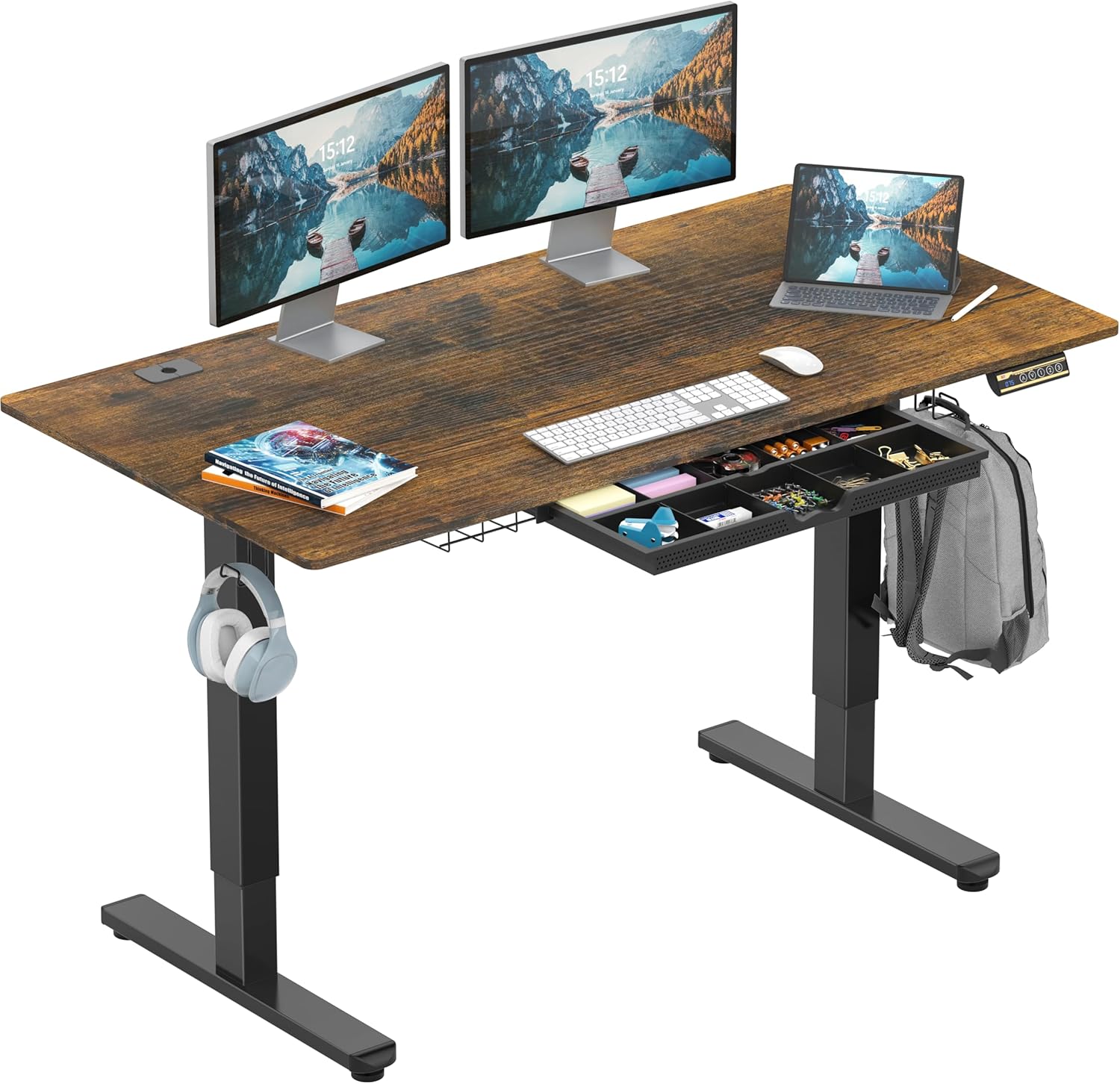
Most standing desks at this price are 48″ wide. The SHW gives you 55″ at $189 — and that extra 7 inches matters more than people expect when you’re spreading out dual monitors, a laptop stand, and the coffee that never seems to have a permanent home.
But the width isn’t even the most interesting thing about this desk. The SHW comes loaded with features that more expensive desks often charge extra for: integrated headphone hooks, a cable management tray, desktop grommets for running wires through the surface cleanly, a built-in storage drawer, adjustable floor levelers for uneven surfaces, and a curved front edge for ergonomic wrist support. At $189 that’s a lot of desk for the money.
The dual motor means stability is better than you’d expect at this price — less wobble at full extension than single motor competitors in the same range. The motor runs quietly and transitions smoothly between sitting and standing.
Worth knowing: the SHW desktop ships in two pieces joined at a seam 18.75 inches from the front edge. For computer use you’ll never notice it. Only relevant if you’re doing large paper-based work across the full surface
The height range tops out at 45″ which is slightly lower than some competitors — worth checking against your standing height before buying.
“Bought this a year ago and it’s probably the single best purchase I’ve ever made on Amazon. The stability is honestly hard to believe — as stable as the name-brand standing desk at my office, even on carpet at full height. I raise and lower it 5-6 days a week and have had zero issues. One thing worth knowing: the desktop surface comes in two pieces joined at a seam. Don’t let that deter you — the seam is 18.75 inches back from the front edge and you’d never notice it during normal computer work. Assembly tip: loosely place all screws first, then tighten proportionally — don’t overtighten one side before the others or the desktop can bow. For the price, the quality is unlike anything else at this range.”
— Verified Amazon Buyer, April 2024 · ⭐⭐⭐⭐⭐ · SHW Electric Standing Desk 55″
“Happy with the purchase overall. Easy to put together though two people makes it significantly easier — might be a struggle solo. Relatively quiet when raising and lowering. Two honest concerns worth knowing: the motor sounds a bit weak which raises some questions about long-term durability. And the height range is a real limitation — I’m 5’8″ using a walk pad that adds 4 inches and I’ve maxed the desk out. Anyone over 6 feet would have a hard time using this for standing. Factor your actual standing height in before buying.”
— Verified Amazon Buyer, February 2026 · ⭐⭐⭐⭐ · SHW Electric Standing Desk 55″
Who it’s for: Dual monitor users who need the width without paying for it. Anyone who wants built-in cable management and storage without buying accessories separately.
Pros:
- 55″ width at entry-level pricing
- Dual motor — more stable than single motor alternatives
- Built-in storage drawer — rare at this price
- Cable management tray and grommets included
- Headphone hooks built in
- Curved edge for wrist comfort
Cons:
- Max height 45″ — lower than some competitors
| Spec | Detail |
|---|---|
| Price | ~$189 |
| Size | 55″, 48”, 40” wide |
| Motor | Dual |
| Height range | 28” to 45” |
| Weight capacity | 110 lbs |
4. Flexispot Standing Desk Converter 42″ — Best for people who don’t want a new desk
Check current price on Amazon →

Rating: 4.8 average · 81% of buyers give it 5 stars
Here’s the thing about standing desks nobody tells you upfront: you don’t necessarily need to replace your entire desk to stand while you work.
A standing desk converter sits on top of your existing desk and raises your monitor, keyboard, and mouse to standing height. When you want to sit, it lowers back down. Your desk stays. Your setup stays. You just add the converter.
The Flexispot 42″ converter is the most space you can get in this format — wide enough for dual monitors, with a separate keyboard tray that keeps your arms at the right angle whether sitting or standing. At $152 (usually $200) it’s a fraction of the cost of a full standing desk and takes about 10 minutes to set up.
The honest limitation: converters don’t feel as clean as a proper standing desk. The mechanism adds height and bulk to your existing desk, and the keyboard tray positioning can feel slightly awkward depending on your desk depth. But for renters, people who love their current desk, or anyone who wants to test standing work cheaply — this is the smartest entry point.
“Wasn’t expecting to like this as much as I do. The lift is smooth — no jerking or flimsy feeling going up or down. Once set it stays stable even with a monitor and laptop on it, no wobble while typing. Setup took under 5 minutes with clear instructions, no extra tools needed. Surface is spacious enough for daily work gear without feeling cramped. Switching between sitting and standing is effortless — the kind of thing you actually use every day rather than letting collect dust.”
— Verified Amazon Buyer, May 2026 · ⭐⭐⭐⭐⭐ · Flexispot Standing Desk Converter 36″
Who it’s for: Anyone who doesn’t want to replace their current desk. Renters. People testing standing work before committing to a full desk. Budget-conscious home office workers who already have a desk they like.
Pros:
- No new desk required
- 42″ is generous width for this format
- Separate keyboard tray for proper ergonomics
- Quick setup
- Available in multiple sizes — 28″, 32″, 36″, 40″, 42″
Cons:
- Adds bulk and height to existing desk
- Keyboard tray positioning less flexible than a full standing desk
- Not as clean aesthetically as a dedicated standing desk
| Spec | Detail |
|---|---|
| Price | ~$152 (usually $200) |
| Sizes available | 28″, 32″, 36″, 40″, 42″ |
| Type | Converter — sits on existing desk |
| Weight capacity | Top Surface 33 lbs, keyboard tray 4.4 lbs |
5. Flexispot E6 — Best mid range
Check current price on Amazon →

Rating: 4.4 average · 72% of buyers give it 5 stars
The E6 is where Flexispot gets serious. At $284 (usually $469 — worth watching for sales) it’s a significant step up from the E2 in two areas that matter: the control panel and frame stability.
The E6’s control panel is more ergonomic than the basic up/down buttons on the E2 — smoother to use, better positioned, and the memory presets are more intuitive. The frame is more rigid too, which you notice most when the desk is at full standing height with a loaded surface.
If you’re planning to keep this desk for 5+ years, the E6 is the better long-term investment. The jump from E2 to E6 in daily use quality is more noticeable than the price difference suggests — especially at standing height where frame rigidity directly affects how stable your monitors feel.
“What a nice surprise. The bamboo tabletop quality is excellent — no warping, perfect finish. Instructions were clear, dual motors are perfectly synchronized, and the desk is stable throughout the height range. The control pad works well. I’m 6’4″ and the extended height range on this desk provides real comfort — a specific win for taller users who find most standing desks max out too low. One honest improvement needed: the included wire clips are low quality. We swapped them for 3M Velcro straps secured with a small screw underneath the desktop. Small fix but worth knowing going in so you can pick up better cable management before assembly.”
— Verified Amazon Buyer, February 2026 · ⭐⭐⭐⭐⭐ · Flexispot E6 Standing Desk 72″x30″
Who it’s for: Anyone who plans to use their standing desk seriously and daily. People who want premium feel without premium price. Anyone who found the E2 slightly wobbly at full extension.
Pros:
- More ergonomic control panel than E2
- Noticeably more rigid frame at standing height
- Better long-term investment than entry level options
- Frequently on significant sale
Cons:
- Regular price of $469 is steep — buy on sale
- Desktop surface still functional rather than premium
| Spec | Detail |
|---|---|
| Price | ~$284 (usually $469) |
| Motor | Dual |
| Control panel | Advanced ergonomic |
| Height range | 23.6″–48.8″ |
| Weight capacity | 220 lbs |
| Warranty | 5 years motor and frame, 2 years control panel |
6. Vari Essential Electric Standing Desk 48×24 — Best overall
Check current price on Amazon →

Rating: 4.4 average · 72% of buyers give it 5 stars
Vari is one of the better known standing desk brands for a reason. The Essential Electric at $400 is their entry point and it delivers a noticeably more premium experience than anything below it — better surface quality, cleaner cable management, smoother motor, and a build that feels like it was designed for daily professional use rather than assembled to hit a price point.
Available in white, black, and hazel wood — the hazel wood finish in particular looks genuinely good in a home office without trying too hard. It’s the kind of desk that doesn’t need a mat to look intentional.
At 48×24 it’s sized for a single monitor setup or a laptop plus external monitor. If you need more width, Vari makes larger sizes but they push the price past $500.
Real talk: at $400 you’re paying partly for the brand and the surface quality. The Flexispot E6 at $284 is a more mechanically similar desk for less money. What Vari gives you for the extra $116 is build polish and aesthetics — which matters more to some people than others.
“First standing desk and my biggest fear was bad tolerances making assembly a nightmare. Don’t worry — it’s super easy. The guide was perfect, all holes and bolts lined up, and hardware bags are labeled by bolt type so you’re never guessing. The included hex wrenches are actually good quality, not the cheap ones you throw away after one use. Took 30 minutes going slow and careful. The motor is quick and quiet and feels like a quality unit. One thing to know: this is a smaller desk — 48×24 is compact. Works perfectly for a 27″ monitor with wireless keyboard and mouse but if you need more surface area look at larger sizes. Small desk means less clutter which was exactly what I wanted.”
— Verified Amazon Buyer, December 2024 · ⭐⭐⭐⭐⭐ · Vari Essential Electric Standing Desk — Hazel Wood
Who it’s for: Anyone who wants a standing desk that looks and feels premium without crossing into $600+ territory. People who care about desk aesthetics as much as function.
Pros:
- Premium surface quality and finish options
- Clean cable management built in
- Smooth, quiet motor
- Vari’s customer service reputation is strong
- Hazel wood finish looks excellent
Cons:
- $400 is real money when the E6 exists at $284
- 48×24 is the only size at this price — bigger sizes cost more
- You’re paying a brand premium
| Spec | Detail |
|---|---|
| Price | ~$400 |
| Size | 48×24 |
| Colors | White, Black, Hazel Wood |
| Motor | Single |
| Height range | 27.5″–47.2″ |
| Weight capacity | 200 lbs |
| Warranty | 3 years |
7. Uplift V2 C-Frame — Premium DIY/Longevity pick
Check current price on Amazon →

Rating: 4.7 average · 89% of buyers give it 5 stars
This one is different from everything else on this list. The Uplift V2 C-Frame is a frame only — no desktop included. You supply your own tabletop.
That sounds like a disadvantage. It’s actually an opportunity.
Here’s the use case: if you already have an IKEA LINNMON tabletop sitting on static legs — or any other tabletop you like — you can pair it with the Uplift V2 frame and build a custom standing desk for less than most pre-built options at this quality level. The Uplift V2 is one of the most respected standing desk frames available. Commercial grade, advanced memory keypad, free wire tray included, and a warranty that backs it properly.
The LINNMON tabletop from IKEA runs $30–$50. Combined with this frame at $588 you’re building a standing desk with a premium frame and your choice of desktop surface — potentially for less than a fully assembled premium standing desk would cost. In our $500 Home Office Setup That Beats Most $2,000 Ones guide we talked about the LINNMON tabletop as a great budget pick.
It’s also the right choice if you want a specific desktop size, material, or finish that no pre-built standing desk offers. Butcher block, glass, reclaimed wood — whatever you want on top is now possible.
If you’re pairing with a third-party desktop, you’ll need to drill your own mounting holes. Basic tools required — a drill and someone comfortable with a straightforward DIY step. Not difficult but go in knowing it’s part of the process.
“Converted my regular desk into a standing desk with this frame and couldn’t be happier. The four saved height settings are genuinely useful — no holding down buttons, just push and it goes straight to your preferred height. Sturdiness is impressive: I have a 72″ solid wood butcher block, a full tower PC, two large monitors, and various daily items on it and the legs handle the weight without issue. Two honest notes: the support brace connecting the legs can be slightly obstructive at standing height, making it harder to slide your chair fully underneath. And if you’re pairing with a third-party desktop you’ll need to drill your own mounting holes — manageable if you have basic tools but worth knowing before you start assembly. Overall it exceeded my expectations and I’d recommend it to anyone who wants standing desk quality without being locked into a manufacturer’s desktop options.”
— Verified Amazon Buyer, June 2023 · ⭐⭐⭐⭐⭐ · Uplift V2 C-Frame · 72″ butcher block + dual monitors
Who it’s for: Anyone who already has a desktop they want to keep. People who want a custom size or surface. Anyone who’s done the math and realizes a frame plus IKEA top beats the pre-built alternatives at this quality level.
Pros:
- Uplift V2 frame quality is among the best available
- Advanced memory keypad
- Free wire tray included
- Pair with any desktop you choose
- LINNMON + this frame = custom standing desk at a competitive price
Cons:
- No desktop included — you need to source your own
- $588 is the highest price on this list
- Requires more planning than a pre-built desk
| Spec | Detail |
|---|---|
| Price | ~$588 (frame only) |
| Type | C-Frame — desktop not included |
| Motor | Dual |
| Memory keypad | Advanced |
| Wire tray | Included |
| Warranty | Limited Manufacturer Warranty |
How to choose
A wireless keyboard is a practical upgrade for standing desks — our Logitech K270 review covers the most popular budget option at under $24.
A good chair pairs with a standing desk — our most comfortable office chair guide covers five picks for people who sit long hours.
A standing desk works best within a fully ergonomic setup — our ergonomic home office guide covers how desk height fits alongside chair, monitor, and keyboard positioning.
You have a desk you like and don’t want to replace it:
→ Flexispot Converter 42″. Sits on top, done.
You want your first standing desk under $150:
→ FEZIBO Electric. Budget entry point, test the concept.
You want a reliable dual-motor desk under $250:
→ Flexispot EN2. The most recommended entry-level motorized desk for a reason.
You need a wide desk for dual monitors on a budget:
→ SHW 55″. Most width for the money.
You want the best mid-range option:
→ Flexispot E6 on sale. Better frame and control panel than the E2, worth the wait for a sale price.
You want premium build quality and good aesthetics:
→ Vari Essential Electric. The hazel wood finish alone is worth considering.
You already have a desktop or want something custom:
→ Uplift V2 C-Frame + IKEA LINNMON. Build your own, better quality than most pre-builts at this price.
Spend a lot of time on Zoom?
Setting up dual monitors?
Want to increase productivity?
Frequently asked questions
Is a standing desk actually worth it for working from home?
For most people who sit 6+ hours a day — yes, but with realistic expectations. The benefit isn’t that standing is better than sitting. It’s that alternating between the two every 60–90 minutes reduces the negative effects of prolonged static posture. If you’re disciplined about actually using the height adjustment, a standing desk is genuinely useful. If it becomes a very expensive regular desk, it’s not.
How long does it take to get used to standing while working?
Longer than most people expect. Your feet and legs aren’t used to standing for extended periods and it takes 2–4 weeks to build up to comfortable 45–60 minute standing sessions. Start with 15–20 minutes standing, sit down, repeat. Don’t try to stand for 3 hours on day one.
Do I need an anti-fatigue mat?
Yes, if you plan to stand for meaningful periods. Standing on a hard floor for 45+ minutes without cushioning causes foot and leg fatigue that makes you want to sit down immediately. An anti-fatigue mat ($30–$80) extends how long you can comfortably stand. It’s almost a required accessory with a standing desk.
What’s the difference between single and dual motor?
Single motor desks use one motor to drive both legs through a shaft. Dual motor desks have a motor in each leg. Dual motor is more stable, handles more weight, and typically lasts longer. At the budget end of this list the single motor desks are fine for light setups. If you’re putting serious weight on the desk, dual motor is worth the premium.
Can I pair the Uplift V2 frame with an IKEA LINNMON top?
Yes — this is a popular combination. The LINNMON at 59″ wide fits the Uplift V2 C-Frame well. Make sure you check the frame’s desktop size compatibility before ordering. You’ll need to drill mounting holes in the tabletop to attach the frame — straightforward if you’re comfortable with basic tools.
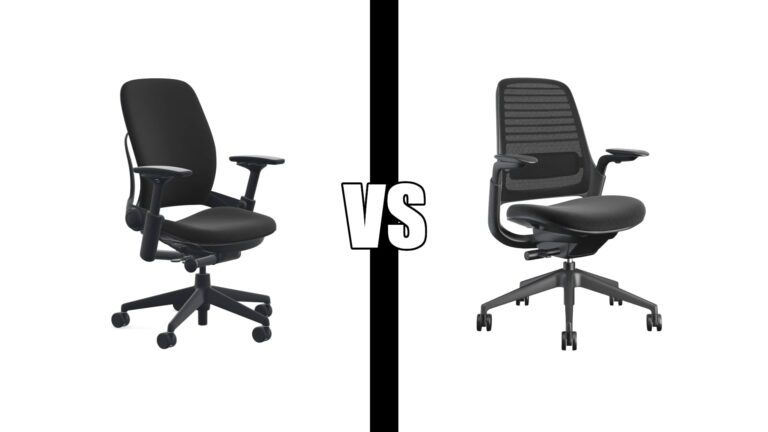
A great chair pairs with a great desk — our Steelcase Leap vs Series 1 comparison covers the two most recommended Steelcase options.
The full comparison
| Desk | Price | Motor | Best for |
|---|---|---|---|
| FEZIBO Electric | ~$113 | Single | Budget/testing |
| Flexispot EN2 | ~$160–$210 | Dual | Best entry level |
| SHW Electric 55″ | ~$189 | Single | Wide dual monitor setups |
| Flexispot Converter 42″ | ~$152 | N/A | Keeping your existing desk |
| Flexispot E6 | ~$284 | Dual | Best mid range |
| Vari Essential Electric | ~$400 | Dual | Premium build, aesthetics |
| Uplift V2 C-Frame | ~$588 | Dual | Custom desktop, DIY builds |
All prices approximate and subject to change. Check current pricing at checkout. Sale prices on Flexispot products vary — worth checking regularly as significant discounts appear frequently.