Best Under Desk Keyboard Tray for Home Office 2026
Category: Desk Setups | Reading time: 11 min | Last updated: September 2026
Disclosure: This post contains affiliate links. If you buy through our links we may earn a small commission at no extra cost to you.
All 5 picks at a glance
An under desk keyboard tray moves your keyboard and mouse off your desk surface and positions them lower, which brings your elbows closer to the correct ergonomic angle and frees up space on the desktop. This guide covers five picks across screw mount, clamp-on, fully adjustable, standing desk, and small desk options. No drilling required on four of the five.
By chance you are also looking for a webcam? See our Elgato Facecam vs Logitech Brio comparison for two premium 4K options.
Jump to a pick
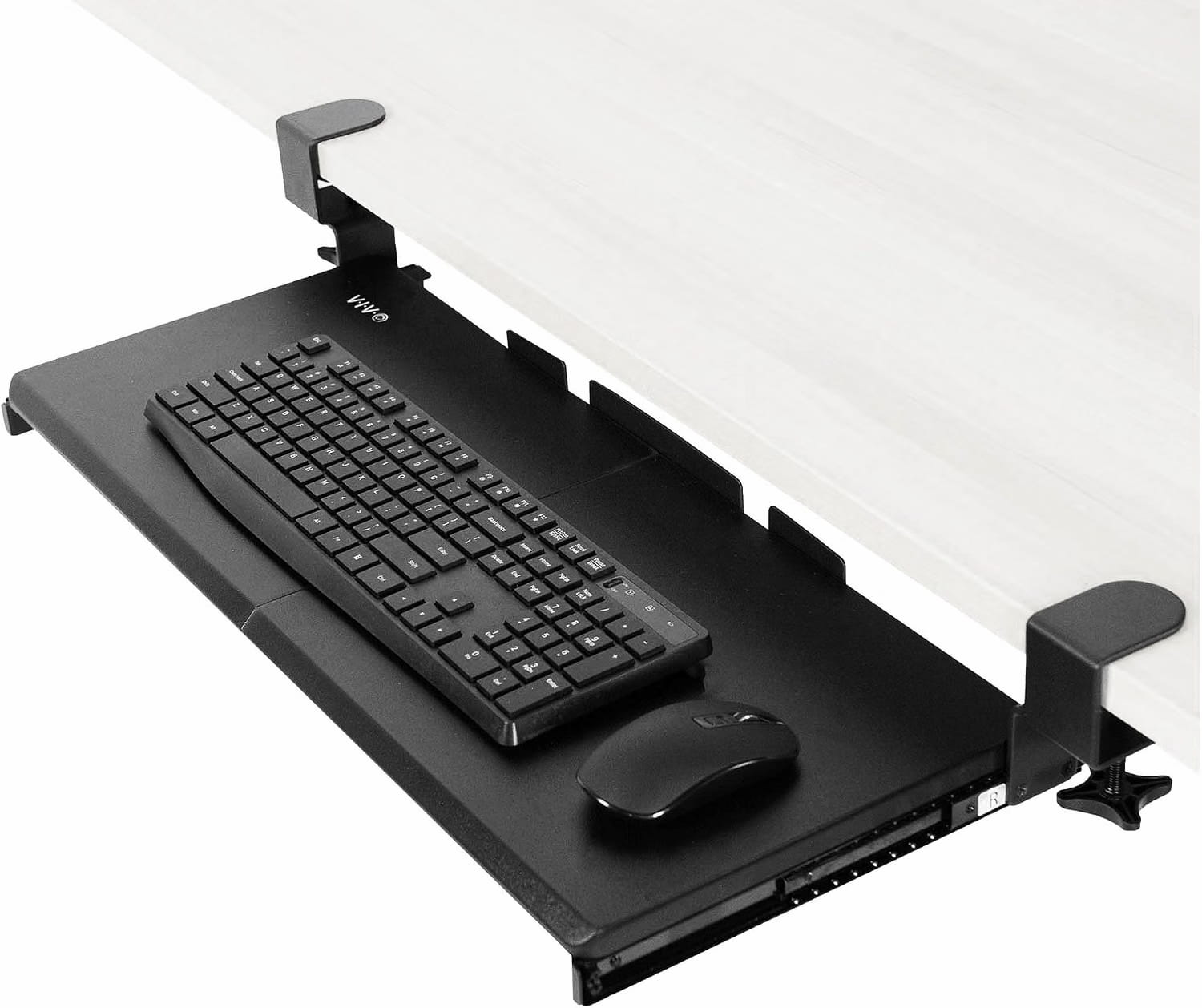
1. VIVO 27×11 Clamp-On Keyboard Tray: Best overall

The VIVO is the most proven keyboard tray in this guide at 14,122 reviews and Amazon’s Choice. The C-clamp system attaches to the desk edge without drilling and holds firmly in place once tightened. At 27 inches wide it fits full-size keyboards plus a mouse with room left over. Multiple size options at 20, 27, and 34 inches cover everything from compact to ultrawide setups.
The color range is the widest in this guide: black, white, vintage brown, bamboo, dark walnut, gray, and light wood let you match the tray to your desk aesthetic rather than settling for whatever comes in the box.
Before buying confirm your desk edge is not beveled and the total width from clamp to clamp of 32.5 inches fits your desk. Desk thickness must not exceed 1.25 inches.
“The instructions were incredibly easy to understand, setup only took under 30 minutes with a single tool and it came with spare screws. I still have room for other objects such as my phone and notepads. I absolutely would recommend it.”
Who it’s for: Anyone who wants the most proven clamp-on keyboard tray with no drilling, wide color options, and multiple size choices.
Pros:
- 14,122 reviews, most validated tray in this guide
- No drilling required
- 7 color options
- 3 size options: 20, 27, 34 inches
- Hardware and instructions included
- Spare screws included
Cons:
- Not compatible with beveled desk edges
- Desk thickness limit of 1.25 inches
- Not compatible with desks thinner than the clamp range
| Spec | Detail |
|---|---|
| Platform size | 27 x 11 inches |
| Mount type | C-clamp, no drilling |
| Max desk thickness | 1.25 inches |
| Extension | 8.5 inches from desk edge |
| Weight capacity | 11 lbs |
| Colors | Black, white, brown, bamboo, walnut, gray, light wood |
2. Fellowes Office Suites Keyboard Drawer: Best budget

The Fellowes is the most affordable option in this guide and the second most reviewed at 6,603 reviews. The ball bearing slides make it noticeably smoother to pull in and out than cheaper alternatives. The included mouse tray mounts on either side for left or right-handed users and stows underneath when not needed.
Two things to know before buying. First, this is screw mount only. It requires drilling into the underside of your desk. Second, the mounting screws are not included. Pick up Phillips Rounded Head Screws #7 three quarter inch long from any hardware store. Phillips Rounded Head Screws #7 three quarter inch long which are inexpensive and available at any hardware store. Pick them up before your tray arrives.
Fellowes customer service is worth mentioning. The verified buyer review describes Fellowes sending a replacement part free of charge even when the damage was the buyer’s own fault. That kind of brand support is rare at this price point.
“It is really sturdy. Based on the low price, I expected it to feel cheap. It really doesn’t. The slides are on ball bearings and move easily. The little mouse tray can be easily moved to either side depending on whether you are a leftie or a righty. Fellowes really stand behind their brand.”
Who it’s for: Anyone comfortable with screw mounting who wants the lowest price option with strong brand support and ball bearing slides.
Pros:
- Most affordable tray in this guide
- 6,603 reviews at 4.4 stars
- Ball bearing slides, smooth operation
- Mouse tray included, left or right configurable
- Fellowes brand support
Cons:
- Screw mount only, drilling required
- Mounting screws not included
- Fits keyboards up to 20 inches only
- Requires 23.5 inch clearance underneath desk
| Spec | Detail |
|---|---|
| Platform size | 20 x 7.6 inches |
| Mount type | Screw mount, drilling required |
| Height settings | 3 positions |
| Mouse tray | Included, left or right |
| Slides | Ball bearing |
| Screws | Not included (Phillips #7, 3/4 inch) |
3. HUANUO 360 Degree Keyboard Tray: Most adjustable

The HUANUO offers more adjustment than any other tray in this guide. The platform swivels 180 degrees left and right, tilts 6 degrees up and 22 degrees down, and adjusts 6.3 inches in height. That range covers the difference between a too-high fixed desk and the correct ergonomic position for most people. A wrist rest is included in the box.
One honest note from the verified buyer review. The included screws are poor quality and one snapped during hand tightening. Worth picking up replacement screws from a hardware store before installation to avoid the same issue. The tray itself is solid and well-built once mounted correctly.
Before buying confirm your desk has no crossbar underneath and at least 25 inches of width clearance for the rotation to work properly.
“The tray is nice and seems pretty sturdy and robust for its price. Works well. Only thing I would critique is the hardware included. The screws are definitely cheap. I’d recommend you get black screws from the store instead of using theirs.”
Who it’s for: Anyone whose desk is set at the wrong height and needs maximum adjustment range to find the right ergonomic position.
Pros:
- 6.3 inches of height adjustment, most in this guide
- 360 degree swivel
- 6 to 22 degree tilt range
- Wrist rest included
- 4,427 reviews
Cons:
- Screw mount only, drilling required
- Included screws are poor quality, replace before installing
- Keyboard size limit of 17.3 inches
- Requires 25 inch width clearance for full rotation
| Spec | Detail |
|---|---|
| Platform size | 25 x 9.84 inches |
| Mount type | Screw mount, drilling required |
| Height adjustment | 6.3 inches |
| Swivel | 180 degrees left and right |
| Tilt | 6 degrees up, 22 degrees down |
| Wrist rest | Included |
4. VIVO Rotating Clamp Keyboard Tray: Best for standing desks

The VIVO rotating tray is purpose-built for standing desk setups. The single center clamp allows the tray to rotate a full 360 degrees which means it swings completely under the desk and out of the way when you switch to standing mode. With a standard two-clamp tray you have to remove it or leave it hanging. With this one you just rotate it out of the way in seconds.
The single clamp also works on smaller or oddly-shaped desks where two-clamp systems do not fit. The 2 inch maximum desk thickness is the most generous in this guide and covers most standing desk frames. You need 32 inches of clearance for the full rotation arc.
“This item is as described. It was very easy to assemble and came with everything needed for assembly. It is very sturdy and the perfect size. The idea of one clamp is great for smaller or oddly-shaped desks.”
Who it’s for: Anyone with a standing desk who wants to rotate the tray completely out of the way when standing, or anyone with a smaller or oddly-shaped desk where two-clamp trays do not fit.
Pros:
- 360 degree rotation, swings fully under desk when not needed
- Single clamp works on smaller and oddly-shaped desks
- 2 inch max desk thickness, most generous in this guide
- No drilling required
- Hardware included
Cons:
- 202 reviews, lowest review count in this guide
- Requires 32 inch clearance for full rotation arc
- Not compatible with lipped or beveled desk edges
- Smaller platform at 22.8 x 9.8 inches
| Spec | Detail |
|---|---|
| Platform size | 22.8 x 9.8 inches |
| Mount type | Single C-clamp, no drilling |
| Rotation | 360 degrees |
| Max desk thickness | 2 inches |
| Weight capacity | 11 lbs |
| Clearance needed | 32 inches for full rotation |
5. Sisyphy Ergonomic Desk Extender: Best for small desks

Worth being clear about what the Sisyphy is. It is a desk extender not a traditional under desk keyboard tray. Instead of hanging below the desk it extends horizontally from the desk edge at the same height as your desk surface. This gives your arms and elbows full support across the entire typing area rather than just at wrist level.
For small desks where there is not enough room to spread out a keyboard and mouse the Sisyphy extends your usable surface without replacing the desk. Multiple width options from 5.9 inches to 31.5 inches let you choose how much additional space you need. Folds down under the desk in seconds when not in use.
“Works as intended and very helpful for a small desk situation. Easy to assemble and sturdy once attached to my desk. Highly recommend.”
Who it’s for: Anyone with a small desk who needs more surface area for typing, or anyone who wants full arm support rather than just a keyboard platform below desk level.
Pros:
- Extends desk surface rather than hanging below
- Multiple width options up to 31.5 inches
- No drilling required
- 5 minute installation
- Folds under desk when not in use
- 12-month warranty
Cons:
- Not a traditional under desk keyboard tray
- 194 reviews, low review count
- Sits at desk height not below it
- Desk thickness limit of 4.5cm
| Spec | Detail |
|---|---|
| Type | Desk extender, not under desk tray |
| Available widths | 5.9 to 31.5 inches |
| Mount type | Clamp-on, no drilling |
| Max desk thickness | 4.5cm |
| Installation | 5 minutes |
| Warranty | 12 months |
How to choose
You want the most proven clamp-on option: VIVO 27×11. 14,122 reviews, no drilling, 7 color options, 3 size options.
You want the lowest price and are comfortable drilling: Fellowes. Ball bearing slides, mouse tray included, strong brand support.
Your desk is too high and you need maximum height adjustment: HUANUO. 6.3 inches of height range, 360 degree swivel, wrist rest included. Replace the included screws before installing.
You have a standing desk and want to swing the tray out of the way when standing: VIVO Rotating. 360 degree rotation on a single clamp, swings completely under the desk.
Your desk is small and you need more surface area: Sisyphy. Extends horizontally from the desk edge rather than hanging below it.
Not sure if your desk height is correct? Use our standing desk height calculator to find your ideal sitting and standing measurements before adding a keyboard tray.
Frequently asked questions
Do I need an under desk keyboard tray?
A keyboard tray is worth it if your desk is slightly too high for your chair height. Lowering your keyboard and mouse by a few inches brings your elbows closer to 90 degrees which reduces shoulder and wrist strain over long sessions. If your desk is already at the correct height for your body a tray adds little benefit.
Can I install a keyboard tray on a standing desk?
Yes. Clamp-on trays work well on standing desks. The VIVO rotating tray is specifically designed for this. It swings completely under the desk when you switch to standing mode so it is not in the way. Standard clamp-on trays can also work but you either leave them in place or remove them manually when standing.
Will a keyboard tray fit my desk?
Check three things before buying. First, your desk thickness. Most clamp-on trays have a maximum of 1.25 to 2 inches. Second, the width clearance underneath your desk. Third, whether your desk edge is beveled. Beveled edges are not compatible with C-clamp trays.
Do keyboard trays require drilling?
The Fellowes and HUANUO in this guide require drilling. The VIVO 27×11, VIVO Rotating, and Sisyphy all use clamp systems that require no drilling and no permanent modification to your desk.
What size keyboard tray do I need?
Measure your keyboard width first. Full-size keyboards are typically 17 to 18 inches wide. Add at least 8 to 10 inches for a mouse area. The VIVO 27 inch tray covers most setups. If you have a compact or tenkeyless keyboard the 20 inch VIVO or the Fellowes are sufficient.
Continue reading
All prices approximate and subject to change. Check current pricing at checkout. Last updated September 2026.