Best Webcam for Zoom and Video Calls – Home Office 2026
Category: Tech & Gear | Reading time: 13 min | Last updated: August 2026
Disclosure: This post contains affiliate links. If you buy through our links we may earn a small commission at no extra cost to you.
All 6 picks at a glance
Your laptop webcam was fine in 2020. Four years of daily video calls later, the people on the other end of your Zoom meetings can tell the difference between a built-in camera and a dedicated webcam. This guide covers the six best webcam for Zoom, every use case and budget, from the most proven budget option to a 4K60 creator-grade camera.
Pairing a good webcam with a dedicated microphone is the biggest upgrade you can make to your video call setup. See our Blue Yeti vs Rode NT-USB Mini comparison.
Jump to a pick
1. Logitech C920x – Best overall

The C920x is the most proven webcam available. 21,988 reviews at 4.6 stars and 10,000+ bought last month makes it the benchmark that every other webcam in this guide is measured against. For Zoom calls, Teams meetings, and Google Meet, this is the webcam that just works.
The autofocus is reliable and the HD light correction handles most home office lighting situations without you needing to adjust anything. Dual stereo mics keep your voice clear on calls. Setup is plug and play with no software or driver installation required.
The main limitation is that it caps at 1080p 30fps. If you want higher resolution or 60fps for streaming you need the C922x or a step up. For pure Zoom and Teams call quality the C920x is all you need.
“Its 1080p video is sharp, the autofocus is reliable, and the dual microphones do a good job of keeping your voice clear during calls. It’s easy to set up, works well with major video chat apps, and offers great value for the price.”
Who it’s for: Anyone who wants a proven, reliable 1080p webcam for daily Zoom and Teams calls without spending on 4K they do not need.
Pros:
- 21,988 reviews – most validated webcam in this guide
- 10K+ bought last month
- Plug and play, no drivers needed
- Reliable autofocus and light correction
- Works with every major video call platform
- Amazon’s Choice
Cons:
- 1080p 30fps only – no 60fps option
- No privacy shutter
- No 4K
| Spec | Detail |
|---|---|
| Resolution | 1080p |
| Frame rate | 30fps |
| Autofocus | Yes |
| Microphone | Dual stereo |
| Connectivity | USB |
2. Anker PowerConf C200 – Best for meetings

The Anker C200 is built specifically for meetings. The 2K resolution is a step above the C920x, and the AI noise cancellation with 360 degree voice coverage makes a meaningful difference on calls from noisy home offices. The adjustable field of view at three presets lets you frame exactly how much of your space you want to show.
The built-in privacy cover is a small detail the C920x and C922x both skip. For anyone who values being able to physically block the lens between calls it is a practical advantage. At 9,412 reviews with an Overall Pick badge it is one of the most trusted webcams at this price point.
“Camera was about as close to plug and play as you can get. Color, lighting and picture quality is excellent. The color coded privacy shield is brilliant. This is more than basic but if you need a more professional setup you need to look elsewhere and spend more.”
Who it’s for: Anyone who spends most of their day on video calls and wants 2K resolution with AI noise cancellation and a privacy shutter.
Pros:
- 2K resolution – step above C920x
- AI noise cancellation
- Adjustable field of view – 3 presets
- Built-in privacy cover
- 9,412 reviews
- Overall Pick
Cons:
- 2K not 4K
- No 60fps
| Spec | Detail |
|---|---|
| Resolution | 2K |
| Field of view | 65, 78, or 95 degrees |
| Noise cancellation | AI-powered |
| Privacy cover | Built-in |
| Connectivity | USB |
3. Logitech C922x – Best for streaming

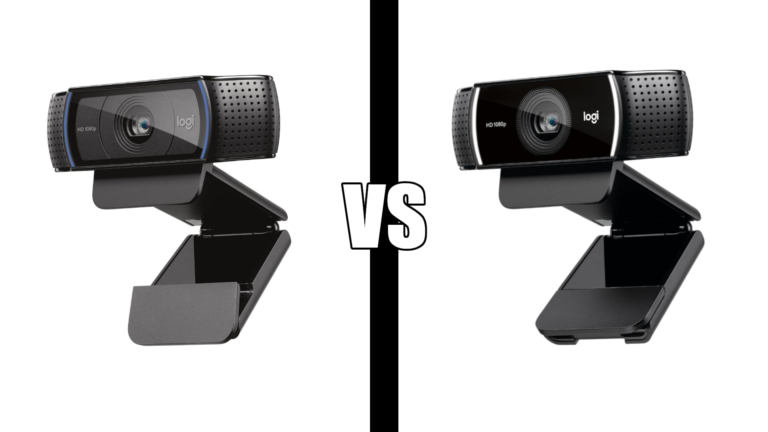
The C922x is the C920x with 60fps capability added at 720p. For streaming and gaming content where smooth motion matters more than resolution the 720p 60fps mode is the right choice. For Zoom calls both cameras perform nearly identically at 1080p 30fps.
The XSplit VCam license included lets you remove or blur your background without a green screen. If you are on calls from a home office that is not always tidy that is a practical bonus. 17,129 reviews at 4.6 stars confirms it is as proven as the C920x.
Deciding between the C920x and C922x? See our full Logitech C920 vs C922 comparison for a detailed breakdown of which one is right for your setup.
“Setup was quick, it worked right away, and the video quality has been excellent. The picture is clear, the microphone works well, and it has been reliable every time I’ve used it. For the price, I couldn’t be happier.”
Who it’s for: Anyone who streams or records video content alongside using a webcam for calls, or anyone who wants 60fps capability.
Pros:
- 720p at 60fps for smooth streaming
- 17,129 reviews at 4.6 stars
- XSplit VCam license included
- Same call quality as C920x at 1080p 30fps
- Works with Nintendo Switch 2 GameChat
Cons:
- No privacy shutter
- 60fps only at 720p, not 1080p
- More expensive than C920x for similar call quality
| Spec | Detail |
|---|---|
| Resolution | 1080p at 30fps, 720p at 60fps |
| Microphone | Dual stereo |
| Included software | 3-month XSplit VCam |
| Connectivity | USB |
4. Razer Kiyo V2 – Best low light

The Razer Kiyo V2 uses a Sony STARVIS sensor which is the same sensor technology found in professional security cameras. It is built for capturing usable video in low light conditions where the C920x and C922x struggle. If your home office faces away from windows or you work evenings under artificial light this is the webcam to consider.
The AI-powered auto-framing keeps you centered in frame as you move around, which matters for anyone who does not sit perfectly still during long calls. HDR and manual controls through Razer Synapse give you more image control than any other webcam in this guide.
“I was about to completely rig up a new lighting system, thinking that the webcam I had was adequate. Boy, was I wrong. It absolutely does a phenomenal job in low light situations.”
Who it’s for: Anyone working in a dimly lit home office, anyone who works evenings, or anyone who wants AI auto-framing and manual camera controls.
Pros:
- Sony STARVIS sensor – best low light performance in this guide
- 4K at 30fps
- AI auto-framing
- HDR
- Privacy cover
- Manual controls via Razer Synapse
Cons:
- 168 reviews – lowest review count in this guide
- Requires Razer Synapse for full feature access
- No 60fps
| Spec | Detail |
|---|---|
| Sensor | Sony STARVIS |
| Resolution | 4K at 30fps |
| Auto-framing | AI-powered |
| HDR | Yes |
| Connectivity | USB-C |
5. Logitech Brio Ultra 4K – Best 4K

The Logitech Brio is the 4K webcam that serious remote workers and professionals reach for. RightLight 3 handles challenging lighting including backlit home office setups where cheaper webcams blow out the image. Windows Hello facial recognition means you log in by looking at the camera rather than typing a password.
The three field of view presets at 65, 78, and 90 degrees give you control over how much of your space is visible. The attachable privacy shutter is a step above the built-in covers on other webcams. At 3,000+ bought last month it is selling well despite the higher price point.
“Nothing like 4K, absolutely nothing. Obvious huge improvement in image quality, autofocus actually works and quite well. Could not be more pleased with it.”
Who it’s for: Anyone who wants the best 4K image quality from a Logitech webcam, or anyone who uses Windows Hello for login.
Pros:
- 4K at 30fps
- RightLight 3 handles backlighting well
- Windows Hello support
- Three field of view presets
- Dual noise-cancelling mics
- Attachable privacy shutter
- USB-A and USB-C compatible
Cons:
- Higher price than C920x and C922x
- 4K requires a capable computer to run smoothly
- No 60fps
| Spec | Detail |
|---|---|
| Resolution | 4K at 30fps |
| Light correction | RightLight 3 |
| Field of view | 65, 78, 90 degrees |
| Windows Hello | Yes |
| Privacy shutter | Attachable |
| Connectivity | USB-A and USB-C |
6. Elgato Facecam 4K – Best for creators
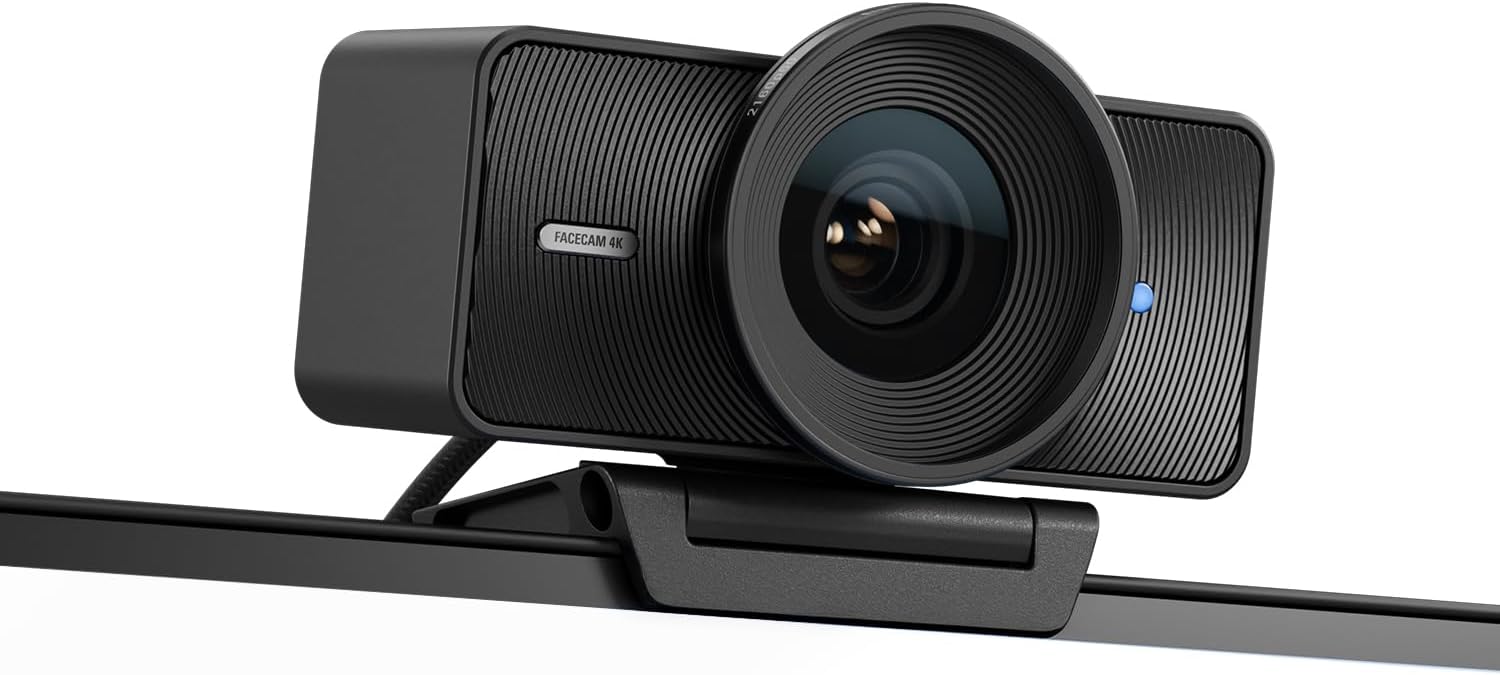
The Elgato Facecam 4K is the only webcam in this guide that shoots 4K at 60fps. That distinction matters for content creators, streamers, and anyone recording video for YouTube or podcasts where smooth high-resolution footage is the standard. The Sony STARVIS 2 sensor and Elgato Prime Lens combination delivers image quality that competes with entry-level mirrorless cameras.
The 49mm lens filter support is a feature borrowed from professional photography – you can attach standard camera filters to the webcam for creative control over your image. Camera Hub software gives you control over exposure, white balance, and framing with a clean interface. For anyone already in the Elgato ecosystem with a Stream Deck or other Elgato gear the integration is seamless.
“The image quality is outstanding. The jump to true 4K60 is immediately noticeable, sharp detail, excellent color, and smooth motion. Once everything was set up, it just worked. No constant tweaking or fighting with settings before every recording session.”
Who it’s for: Content creators, streamers, and podcasters who want the best image quality available from a webcam, or anyone already using Elgato gear.
Deciding between these two? See our Elgato Facecam vs Logitech Brio comparison for a full head to head breakdown.
Pros:
- 4K at 60fps – only webcam in this guide with this spec
- Sony STARVIS 2 sensor
- 49mm lens filter support
- Uncompressed video output
- HDR
- Elgato ecosystem integration
- Eco-friendly build
Cons:
- Most expensive webcam in this guide
- No built-in microphone
- Requires capable computer for 4K60
| Spec | Detail |
|---|---|
| Resolution | 4K at 60fps |
| Sensor | Sony STARVIS 2 |
| Lens filter | 49mm standard |
| Video output | Uncompressed |
| HDR | Yes |
| Connectivity | USB-C |
How to choose
You want the most proven option for daily Zoom calls: Logitech C920x. 21,988 reviews, plug and play, does everything you need.
You are on calls all day and want better audio: Anker PowerConf C200. 2K resolution, AI noise cancellation, built-in privacy cover.
You stream or record video alongside your calls: Logitech C922x. 60fps at 720p, XSplit VCam included, same proven reliability as the C920x.
Your home office has poor lighting: Razer Kiyo V2. Sony STARVIS sensor handles low light better than any other webcam in this guide.
You want the best 4K image for professional calls: Logitech Brio Ultra 4K. RightLight 3, Windows Hello, three field of view presets.
You create content and want the best quality available: Elgato Facecam 4K. The only 4K60 webcam in this guide, Sony STARVIS 2 sensor, lens filter support.
Not sure whether to get the C920x or C922x? See our Logitech C920 vs C922 comparison for a full side-by-side breakdown. For a complete home office setup see our ergonomic home office guide and our best home office gadgets guide.
Frequently asked questions
Do I need a 4K webcam for Zoom calls?
No. Zoom compresses video regardless of your webcam resolution. A 1080p webcam like the C920x delivers excellent call quality without the extra cost of 4K. 4K is worth it for recording video content that you will publish or share at full resolution.
What is the best webcam for a dark home office?
The Razer Kiyo V2. The Sony STARVIS sensor captures usable video in low light conditions where standard webcam sensors struggle. If adding a desk lamp is not an option the Kiyo V2 is the right pick.
Does webcam quality matter for Zoom?
Yes, noticeably. The difference between a built-in laptop webcam and a dedicated 1080p webcam is immediately visible to everyone on the call. A dedicated webcam also typically has better microphones which reduces the chance of your audio cutting out or picking up background noise.
Which Logitech webcam should I get?
For most people the C920x is the right answer. It has the most reviews, the lowest price among the Logitech options, and delivers 1080p quality that covers all call platforms. Get the C922x if you stream or record video. Get the Brio if you want 4K and Windows Hello support.
Continue reading
All prices approximate and subject to change. Check current pricing at checkout. Last updated August 2026.