Best Home Office Gadgets for Remote Workers 2026
Category: Tech & Gear | Reading time: 10 min | Last updated: June 2026
Disclosure: This post contains affiliate links. If you buy through our links we may earn a small commission at no extra cost to you.
Quick Picks


See all 7 gadgets below ↓
Most home office upgrades get talked about constantly — standing desks, ergonomic chairs, webcams. The stuff on this list doesn’t. These are the home office gadgets that solve specific problems most remote workers don’t realize they have until they fix them.
Eye strain from poor desk lighting. Cables everywhere. A laptop that throttles performance because it’s running hot. No wireless charging on your desk so your phone is always dead by 3pm. A power strip that can’t tell you what’s drawing power or let you turn off individual outlets remotely.
If cables are your main problem our complete home office setup guide covers the full picture including desk organization and cable management solutions.
A docking station is one of the highest impact purchases for a home office. See our best docking stations guide for the top picks.
None of these are glamorous upgrades. All of them make a real difference to how a home office functions day to day.
Here are seven worth knowing about.
1. BenQ ScreenBar LED Monitor Light Bar
Check current price on Amazon →

Rating: 4.7 average · 84% of buyers give it 5 stars · 5,376 reviews
Most people light their home office wrong. A lamp behind you creates glare on your screen. Overhead lighting creates the same problem. The result is your eyes are constantly fighting between a bright screen and a dim or poorly positioned room light — and by the end of a long work day you feel it.
The BenQ ScreenBar sits on top of your monitor and angles light downward onto your desk rather than at your screen. The ASYM-Light technology is specifically engineered to prevent screen reflections — light hits your keyboard and desk surface, not your eyes or the display.
The auto-dimming feature uses a built-in light sensor to adjust brightness based on ambient light automatically. You stop thinking about your lighting because it handles itself. The color temperature range of 2700K-6500K covers everything from warm evening light to cool daylight depending on your preference and time of day.
At $109 it’s the most expensive item on this list. It’s also the one that makes the most noticeable immediate difference to how comfortable your workspace feels. People who buy it consistently say they didn’t realize how much their desk lighting was affecting them until they fixed it.
The patented counterweight clamp mounts on monitors 0.4″-1.2″ thick without drilling or adhesive. It works on ultrawide and curved monitors. Powered via USB-A so no extra power outlet needed.
“Bright, even light and the auto mode always seems to land at exactly the right amount. Color quality under this light is excellent. One honest complaint worth knowing: if your monitor is at proper ergonomic eye level the light angle becomes a problem — tilting it forward creates glare in your eyes, tilting it back creates glare at the top of the monitor. It works best when the monitor sits lower than eye level. I ended up tilting it toward the monitor which creates some glare off the bezel but that’s preferable to directly in the eyes. Despite that limitation it has noticeably reduced my eye strain in low light situations and the light quality is genuinely excellent.”
— Verified Amazon Buyer, April 2023 · ⭐⭐⭐⭐ · BenQ ScreenBar
Who it’s for: Anyone who works long hours on screens and gets headaches or eye fatigue by the afternoon. The fix that makes every hour at your desk slightly more comfortable.
For a full breakdown of monitor light bar options at every price point our complete monitor light bars guide covers six options from $40 to $199.
Pros:
- Auto-dimming adjusts to ambient light automatically
- No screen glare — light hits your desk not your display
- Color temperature adjustable 2700K-6500K
- Mounts on monitor without drilling
- USB-A powered — no extra outlet needed
- 17-year LED lifespan
Cons:
- $109 is the highest price on this list
- Requires USB-A port on monitor or hub
- May not fit monitors with unusual back designs
| Spec | Detail |
|---|---|
| Price | ~$109 |
| Power | USB-A |
| Color temperature | 2700K–6500K |
| Coverage | 23.6″ x 11.8″ |
| CRI | >95 |
| Rating | 4.7/5 · 5,376 reviews |
2. Anker Nano 13-in-1 Laptop Docking Station
Check current price on Amazon →
Rating: 4.3 average · 71% of buyers give it 5 stars · 220 reviews
Modern laptops have too few ports. If you’re running a home office with a monitor, keyboard, mouse, webcam, external drive, and ethernet connection from a MacBook or thin Windows laptop you’re probably living with a tangle of individual adapters or constantly swapping what’s plugged in.
A docking station replaces all of that with one cable. Plug the single USB-C upstream cable into your laptop and everything else — monitors, peripherals, ethernet, power — connects through the dock.
The Anker Nano 13-in-1 is the right balance of ports and price for most home office setups. Two HDMI outputs and one DisplayPort support a triple monitor setup at up to 4K. Three USB-A ports and two USB-C data ports cover your peripherals. Ethernet port for a stable wired connection. SD and TF card slots. 100W power delivery to your laptop while everything else runs simultaneously.
The detachable 6-in-1 hub is the feature that makes this stand out — it separates from the main dock so you can take the essential ports with you when you leave your desk without unplugging the whole setup.
One important note for Mac users: on macOS all external monitors mirror the same content rather than extending independently. This is an Apple limitation not an Anker one — worth knowing before buying if you’re planning a true multi-display setup on a Mac.
“Setup was easy — USB-C cable included, plug in and go. Tested with a Dell Latitude: single monitor worked in both mirror and extended mode without issues, Logitech Unify receiver on the USB-A port worked perfectly with keyboard and mouse, wired ethernet registered full gigabit speeds, and the laptop charged without problems. The detachable mini hub pops out and back in with a simple slider button — genuinely useful for quick SD card access without unplugging the whole dock. Placed it horizontally under a 27″ monitor and it fits neatly under the monitor base. One thing to know: the button on the back isn’t a power switch, it controls the blue light strip around the front hub.”
— Verified Amazon Buyer, June 2026 · ⭐⭐⭐⭐⭐ · Anker Nano 13-in-1 Docking Station
Who it’s for: Laptop users who want a clean single-cable desk setup. Anyone tired of plugging and unplugging individual adapters every time they sit down or leave their desk.
If you’re setting up multiple displays our complete dual monitor guide walks through the full configuration on Windows and Mac.
A desk power strip is one of the most practical upgrades for any home office. See our best desk power strip guide for six picks.
Pros:
- One cable connects everything
- Triple display support up to 4K
- 100W laptop power delivery
- Detachable hub for portability
- 10 Gbps USB-C data transfer
- Ethernet port for stable connection
Cons:
- Mac users: external monitors mirror rather than extend
- 220 reviews — newer product, less long-term data
- Requires USB-C port on laptop
| Spec | Detail |
|---|---|
| Price | ~$109.99 (from $149.99) |
| Ports | 13 total |
| Display outputs | 2x HDMI + 1x DisplayPort |
| Max resolution | 4K |
| Power delivery | 100W |
| Data transfer | 10 Gbps |
3. Kasa Smart Plug Power Strip KP303
Check current price on Amazon →
Rating: 4.6 average · 81% of buyers give it 5 stars · 16,384 reviews
A standard power strip is a passive piece of equipment. You plug things in, they have power, that’s it. The Kasa KP303 is a smart power strip — three individually controllable outlets that you can turn on and off from your phone, by voice through Alexa or Google Assistant, or on a schedule.
For a home office this is more useful than it sounds. Schedule your monitor, desk lamp, and laptop charger to turn on automatically when your workday starts and off when it ends. Turn off your monitor from the couch without getting up. Check remotely whether you left something on. The USB ports stay always-on for charging regardless of the outlet states.
16,384 reviews at 4.6 stars is one of the strongest review profiles on this entire list — this product has been battle-tested across a huge number of buyers and the satisfaction rate reflects it.
At $30 it’s the easiest yes on this list. ETL-certified surge protection covers your electronics. Works on 2.4GHz WiFi — no hub required, just download the Kasa app.
“Works exactly as advertised — three independently controllable outlets, easy app setup, Google Home integration works well. The individual LED indicators on each outlet are more useful than they sound: you can tell at a glance whether an outlet is on or off which removes a lot of guesswork. One honest issue worth knowing: occasionally the strip silently disconnects from the network. The lights show it’s powered and connected to WiFi but the app says it can’t reach the device. Manual toggles still work but smart control is lost until you unplug and replug to reset it. It hasn’t happened in weeks at a time but it does happen unpredictably. Not a dealbreaker for most uses but worth knowing if you’re planning to rely on it for anything critical.”
— Verified Amazon Buyer, September 2023 · ⭐⭐⭐⭐ · Kasa Smart Power Strip KP303
Who it’s for: Anyone who wants more control over their desk setup without spending much. The smart home upgrade that actually makes practical sense in a home office.
Pros:
- 3 individually controllable outlets
- Voice control via Alexa and Google Assistant
- Schedule outlets to turn on/off automatically
- ETL-certified surge protection
- 2 always-on USB charging ports
- No hub required
- 16,000+ reviews at 4.6 stars
Cons:
- 2.4GHz WiFi only — no 5GHz support
- Requires Kasa app for full functionality
- Three outlets may not be enough for complex setups
| Spec | Detail |
|---|---|
| Price | ~$29.99 |
| Smart outlets | 3 individually controlled |
| USB ports | 2 always-on |
| Voice control | Alexa, Google Assistant |
| Surge protection | ETL-certified |
| WiFi | 2.4GHz |
4. TopMade Wireless Charging Mouse Pad
Check current price on Amazon →

Rating: 4.5 average · 75% of buyers give it 5 stars · 433 reviews
Two problems solved with one product: a large desk surface that unifies your keyboard and mouse area, and wireless charging built directly into the pad so your phone charges while you work without a separate charger taking up desk space or adding another cable.
The 31.5″ x 15.75″ XXL size covers your full keyboard and mouse area — significantly larger than standard mouse pads. The wireless charging spot supports up to 15W fast charging for iPhone and Samsung and includes a MagSafe compatible area for iPhone 12 and later. A separate charging zone handles AirPods.
The waterproof surface wipes clean easily — relevant if you keep coffee nearby. Non-slip rubber base keeps it in place during long work sessions.
Real talk: the wireless charging requires a 9V 3A adapter for 15W fast charging which isn’t included. Standard 5W charging works with any USB-C adapter. Worth buying a compatible adapter separately if fast charging matters to you.
For all different types of desk mats, our desk mats guide covers an all the options.
“Using this 10+ hours a day as a developer. iPhone charging works well and AirPods charging works but requires precise placement — there’s less than half an inch of margin in all directions for it to connect properly, so you’ll need to position the case carefully each time. The black surface shows dirt and food crumbs easily which will likely lead to visible fading where your wrists rest after 12-18 months of heavy use. For keyboard and mouse space: I use a tenkeyless keyboard and have about 6 inches on the right for my Logitech mouse — tight but workable. If you use a full-size keyboard with numpad and a larger mouse it gets cramped. Could I have found a better desk mat and separate charger? Probably. Do I regret buying this? Not at all — fair price, high quality, meets my needs.”
— Verified Amazon Buyer, June 2025 · ⭐⭐⭐⭐⭐ · TopMade Wireless Charging Mouse Pad · Developer, 10+ hours daily
Who it’s for: Anyone who wants a cleaner desk surface and is tired of their phone running low during the day. The desk upgrade that does two things at once.
If you want a dedicated charging stand instead of a desk pad our Belkin vs Anker comparison breaks down which one to buy.
Pros:
- XXL size covers full keyboard and mouse area
- 15W fast wireless charging built in
- MagSafe compatible charging zone
- AirPods charging area included
- Waterproof — easy to wipe clean
- Non-slip rubber base
Cons:
- 9V 3A adapter needed for 15W — not included
- Not compatible with Apple Watch
- 433 reviews — newer product
| Spec | Detail |
|---|---|
| Price | ~$36.54 |
| Size | 31.5″ x 15.75″ |
| Wireless charging | Up to 15W |
| MagSafe | Compatible |
| Surface | Smooth textile weave |
| Base | Non-slip rubber |
5. Bluelounge CableBox
Check current price on Amazon →

Rating: 4.7 average · 81% of buyers give it 5 stars · 2,975 reviews
Cable management is the home office upgrade most people keep putting off. The cables behind your desk accumulate over time — power strips, chargers, adapters — until the floor behind your desk looks like a nest. You stop noticing it until someone sees your desk on a video call.
The Bluelounge CableBox is a simple, effective fix. It’s a box. Your power strip and excess cable slack go inside it. The lid closes. The cables disappear.
That’s it. No tools, no installation, no complicated cable routing. The box sits on your floor or desk, hides everything inside it, and has openings at each end for cables to run in and out cleanly.
At $26 with a 4.7 star rating across 2,975 reviews it’s one of the most proven products on this list. Available in black, white, moonlight blue, and light sage — the color options mean it can match your setup rather than just hiding under a desk.
Made from flame-retardant plastic. Fits wide and long surge protectors with extra space for cord slack.
“I’ve put 7 of these together throughout my house and they make everything look so much better. Fits a large surge protector inside with no problem. The nonslip bottom keeps it exactly where you place it without cords pulling it around. Checked whether it gets hot inside — totally fine, the side openings provide adequate ventilation. One minor complaint: the included twist ties are flimsy, use your own. If you have pets these are particularly useful — prevents your power strip from collecting dust and fur. Get white if it’ll be near light colored decor, black otherwise. You won’t regret it.”
— Verified Amazon Buyer, March 2021 · ⭐⭐⭐⭐⭐ · Bluelounge CableBox
Who it’s for: Anyone whose floor or desk has a cable situation they’ve been meaning to sort out for months. The 10-minute fix that makes your setup look intentional.
For a full breakdown of every cable management solution our complete cable management guide covers under desk trays, raceways, clips and more.
Pros:
- Hides power strips and cable slack instantly
- No tools or installation required
- Flame-retardant plastic
- Fits wide surge protectors
- Four color options
- 4.7 stars across 2,975 reviews
Cons:
- Doesn’t route individual cables — just hides the bulk
- Fixed size — may not fit oversized power strips
- Cables still visible at entry/exit points
| Spec | Detail |
|---|---|
| Price | ~$25.99 |
| Dimensions | 6.25″ x 16″ x 5.25″ |
| Material | Flame-retardant plastic |
| Colors | Black, White, Moonlight Blue, Light Sage |
| Rating | 4.7/5 · 2,975 reviews |
6. Netzu 3-in-1 Digital Clock
Check current price on Amazon →

Rating: 4.6 average · 80% of buyers give it 5 stars · 1,460 reviews
This one is simple. Time, date, and indoor temperature on a clean display that sits on your desk. No pulling out your phone to check the time. No glancing at a laptop taskbar. Just a visible clock that also tells you whether to grab a hoodie or turn on the fan.
The four brightness levels let you dial it down to almost nothing for evening hours when a bright desk clock becomes distracting. The compact size — 5.94″ x 1.3″ x 2.17″ — takes up almost no desk space.
At $9.99 on sale it’s the cheapest item on this list by a significant margin. 3,000+ bought last month and 1,460 reviews at 4.6 stars for a $10 desk clock is a strong signal that it does its simple job well.
Plug-in powered — no batteries to replace. Available in black, blue, white, and pink.
“Love this clock so much I bought a second one. Clean display, adjustable brightness works great, and the USB-C charging on the newer version is a welcome upgrade. Can plug it into a charger port or directly into the wall — flexible depending on your desk setup. Simple to set up and easy to move around. For the price it does everything a desk clock should do without overcomplicating it.”
— Verified Amazon Buyer, April 2026 · ⭐⭐⭐⭐⭐ · Netzu 3-in-1 Digital Clock
Who it’s for: Anyone who checks their phone to see the time 40 times a day. The $10 fix that keeps your phone face-down where it belongs.
Pros:
- Time, date, and temperature in one display
- Four brightness levels
- Compact — barely takes up desk space
- Plug-in powered — no batteries
- Under $10
- 3,000+ bought last month
Cons:
- No Bluetooth or smart features
- Plug-in only — not portable
- Display is basic — no customization
For a full monitor breakdown our budget monitors guide covers six options across every category at genuinely accessible prices.
| Spec | Detail |
|---|---|
| Price | ~$9.99 (from $11.99) |
| Display | Time, date, temperature |
| Brightness | 4 levels + off |
| Power | AC plug-in |
| Dimensions | 5.94″ x 1.3″ x 2.17″ |
| Colors | Black, Blue, White, Pink |
7. TopMate C11 Laptop Cooling Pad
Check current price on Amazon →

Rating: 4.5 average · 73% of buyers give it 5 stars · 5,644 reviews
Laptops throttle their own performance when they get hot. That means the laptop that runs smoothly in the morning starts lagging in the afternoon — not because of what you’re running, but because the processor is deliberately slowing itself down to manage heat. A cooling pad solves this by actively moving air under the laptop. This home office gadget is one of my personal favorites on the list.
The TopMate C11 uses six fans — four smaller and two larger — to move significant air volume under your laptop. The fans are designed to run quietly, relevant if you’re on calls. Seven RGB lighting modes are there if you want them and ignorable if you don’t.
Five height adjustments change the laptop angle which also affects ergonomics — a steeper angle can reduce neck strain for people who use their laptop display directly. The phone holder on the left side is a practical add-on for keeping your phone visible during calls without it taking up desk space.
Compatible with 11″-17.3″ laptops. Two USB pass-through ports so you don’t lose a port to the cooling pad itself.
“Using this with an MSI gaming laptop that had overheating issues — it works. Noticed a significant temperature difference with the cooler running. Lightweight, portable, easy to set up. One honest complaint: at high fan settings the noise is noticeable — not unbearable but worth knowing if you work in a quiet environment or are on calls frequently. At lower settings it’s much quieter. One tip that took a while to figure out: to turn the RGB lights off you need to hold the light button down rather than just pressing it — the power button for the fans is a quick press but the lights need a long hold.”
— Verified Amazon Buyer, December 2022 · ⭐⭐⭐⭐ · TopMate C11 Laptop Cooling Pad
Who it’s for: Anyone whose laptop runs hot during long work sessions, whose fans spin loudly by afternoon, or who notices performance slowdowns during extended use.
Pros:
- 6 fans reduce laptop temperature effectively
- Quiet operation — appropriate for calls
- 5 height adjustments improve ergonomics
- Phone holder included
- Two USB pass-through ports
- Compatible with 11″-17.3″ laptops
Cons:
- RGB lighting is not for everyone aesthetically
- Requires USB port for power
- Adds desk height to laptop
| Spec | Detail |
|---|---|
| Price | ~$32.77 |
| Fans | 6 (4 small + 2 large) |
| Height settings | 5 adjustable levels |
| Compatibility | 11″–17.3″ laptops |
| USB ports | 2 pass-through |
| Lighting | 7 RGB modes |
The full list at a glance
| Gadget | Price | Best for |
|---|---|---|
| BenQ ScreenBar | ~$109 | Eye strain, desk lighting |
| Anker Nano 13-in-1 Dock | ~$110 | Single-cable desk setup |
| Kasa Smart Power Strip | ~$30 | Smart outlet control |
| TopMade Wireless Charging Pad | ~$37 | Clean desk + phone charging |
| Bluelounge CableBox | ~$26 | Hiding cable mess |
| Netzu Digital Clock | ~$10 | Time and temp at a glance |
| TopMate Cooling Pad | ~$33 | Laptop heat and performance |
Total for all seven: ~$357
You don’t need all of them. The BenQ ScreenBar and Kasa smart strip are the two highest-return upgrades for most home offices — one fixes your lighting, the other gives you smart control over your desk. Everything else solves a specific problem worth addressing if you have it.
For organizing the physical clutter on your desk, not just the tech, our desk organizer guide covers seven genuinely different options.
A webcam upgrade is one of the highest impact purchases for remote workers. See our best webcam for Zoom guide for the top picks.
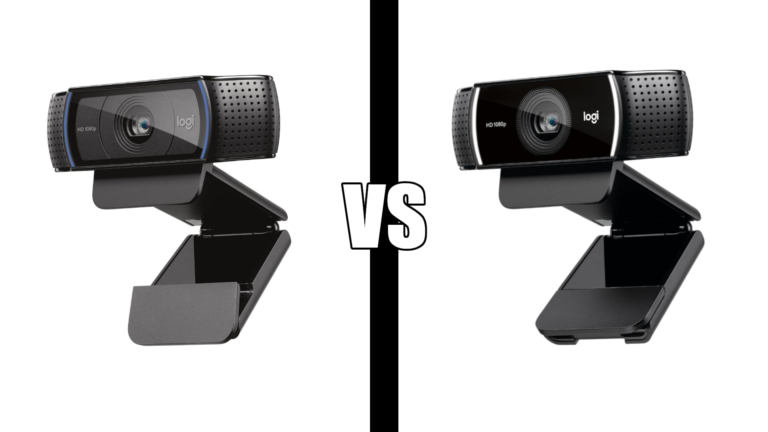
If you are choosing between Logitech’s two most popular webcams see our C920 vs C922 comparison.
Need a keyboard and mouse?
Want to build a full home office setup?
Looking for more ways to stay focused?
Need amazing headphones for your home office?
Frequently asked questions
Do I need a monitor light bar if I have a ceiling light?
Ceiling lights create overhead glare that reflects off your monitor. A monitor light bar angles light downward onto your desk surface specifically — it solves a different problem than general room lighting. If you get headaches or eye fatigue during long screen sessions a monitor light bar is worth trying before buying blue light glasses or making other changes.
Will a docking station work with my laptop?
The Anker Nano 13-in-1 requires a USB-C port on your laptop. Most laptops made after 2018 have at least one USB-C port. Mac users should note that on macOS external monitors mirror rather than extend independently due to Apple’s display limitations — not an issue with the dock itself.
Is wireless charging on a mouse pad slow?
Standard wireless charging through a mouse pad is 5-15W depending on your phone and the adapter used. The TopMade pad supports up to 15W fast charging with a 9V 3A adapter (not included). For most people the speed is fine for keeping your phone topped up during a work day rather than charging from empty.
Does a laptop cooling pad actually make a difference?
Yes — measurably. Laptops run cooler with active airflow underneath which reduces thermal throttling and maintains consistent performance during extended sessions. The difference is most noticeable on thin laptops and during CPU-intensive tasks like video calls with virtual backgrounds, spreadsheet work, or anything that runs the processor hard.
All prices approximate and subject to change. Check current pricing at checkout. Last updated June 2026.