Best Ergonomic Keyboard for Home Office 2026
Category: Tech & Gear | Reading time: 13 min | Last updated: July 2026
Disclosure: This post contains affiliate links. If you buy through our links we may earn a small commission at no extra cost to you.
All 7 picks at a glance
A standard flat keyboard forces both hands toward the center of your body with your wrists slightly rotated inward. For short sessions that’s fine. For six or eight hours a day it shows up as wrist strain, forearm fatigue, and the kind of discomfort that builds so gradually you don’t notice until it’s a problem.
Ergonomic keyboards fix this by positioning your hands at a more natural angle — either through a fixed split design that angles the two halves apart, or a true split that separates into two completely independent pieces. The result is straighter wrists, more relaxed shoulders, and less strain over a full workday.
If you want a simple budget wireless keyboard without ergonomic features our Logitech K270 review covers the most popular option under $24.
An under-desk keyboard tray can be a game changer when it comes to making your hands sit comfortably. See our best under desk keyboard tray guide for five options.
This guide covers six ergonomic keyboards from $54.99 to $319.95 and one wrist rest that works with any keyboard you already own.
Jump to a pick
1. Logitech ERGO K860 — Best overall

The K860 is the most complete ergonomic keyboard package available at this price — split curved design, built-in memory foam wrist rest, and US Ergonomics certification in one product. The curved keyframe keeps both halves connected as a single unit while still angling your wrists into a more natural position. That makes it a much easier transition than a true split keyboard for anyone coming from a standard flat board.
The wrist rest is integrated not detachable — 54% more wrist support and 25% less wrist bending compared to a standard keyboard without a palm rest. The negative tilt legs angle the keyboard downward at three settings, which keeps wrists flatter during typing. Scooped keys match fingertip shape for more precise key contact.
Certified by United States Ergonomics — a third party credential that means it’s been independently validated to improve posture and reduce muscle strain, not just claimed in marketing copy.
“I bought my first of these over 5 years ago and have not looked at another keyboard since. It is the quietest I’ve ever found and great ergonomically. My daughter and son-in-law both use this keyboard and won’t use another. Battery life is amazing — I don’t have even the vaguest recollection of changing the batteries on the one I’m using now. Being able to connect to up to 3 devices is great. No KVM needed. Highly recommend.”
Who it’s for: Anyone making their first move to an ergonomic keyboard who wants a proven design from a brand they know, with a wrist rest included.
Pros:
- US Ergonomics certified
- Built-in memory foam wrist rest
- Curved split design — easier transition than true split
- Bluetooth + USB connectivity
- Scooped keys
- 7,991 reviews at 4.5 stars
- 71% recycled plastic
Cons:
- $129.99 — mid-range price
- Fixed split — can’t separate the two halves independently
- No backlight
| Spec | Detail |
|---|---|
| Price | ~$129.99 |
| Type | Fixed curved split |
| Connectivity | Bluetooth + USB receiver |
| Wrist rest | Built-in memory foam |
| Tilt | 0°, -4°, -7° |
| Certification | US Ergonomics |
2. Logitech Wave Keys — Best compact

The Wave Keys uses a wave-shaped design rather than a true split — the keys follow a curved wave pattern that positions your hands more naturally than a flat board without the visual of a split keyboard. It’s the most approachable ergonomic upgrade here — it looks almost like a standard keyboard and the adjustment period is minimal.
If you pair the Wave Keys with the Logitech Lift vertical mouse — which Logitech specifically recommends — you get a complete ergonomic keyboard and mouse setup from one ecosystem with shared software via Logi Options+. The 3-year battery life makes it genuinely low maintenance. Easy-Switch lets you move between three devices instantly.
“Quiet, soft keys with a nice tactile feel — much gentler on the ears and fingers than standard keyboards. The padded wrist rest actually helps during long typing sessions. Wireless works flawlessly. One honest note: it’s noticeably more compact than older Logitech wave keyboards — keys are closer together and my muscle memory caused frequent typos for the first few days. The arrow keys and number pad area feel especially cramped. That said, the wave shape still provides a comfortable hand position and I’m already adapting. If size isn’t a concern this is an easy recommendation.”
Who it’s for: Anyone who wants ergonomic benefits with the least adjustment period, or who uses multiple devices and wants seamless switching.
Pros:
- Easiest ergonomic transition in this guide
- 3-year battery life
- Easy-Switch between 3 devices
- US Ergonomics certified
- Cushioned palm rest included
- 4 color options
Cons:
- Wave design — less ergonomic benefit than true split
- No backlighting
- Smaller than full-size layout
| Spec | Detail |
|---|---|
| Price | ~$59.99 |
| Type | Wave design |
| Connectivity | Bluetooth + Logi Bolt |
| Battery | Up to 3 years |
| Devices | Up to 3 |
| Colors | Graphite, Off White, Rose, Sand |
3. KINESIS Freestyle2 — Best true split
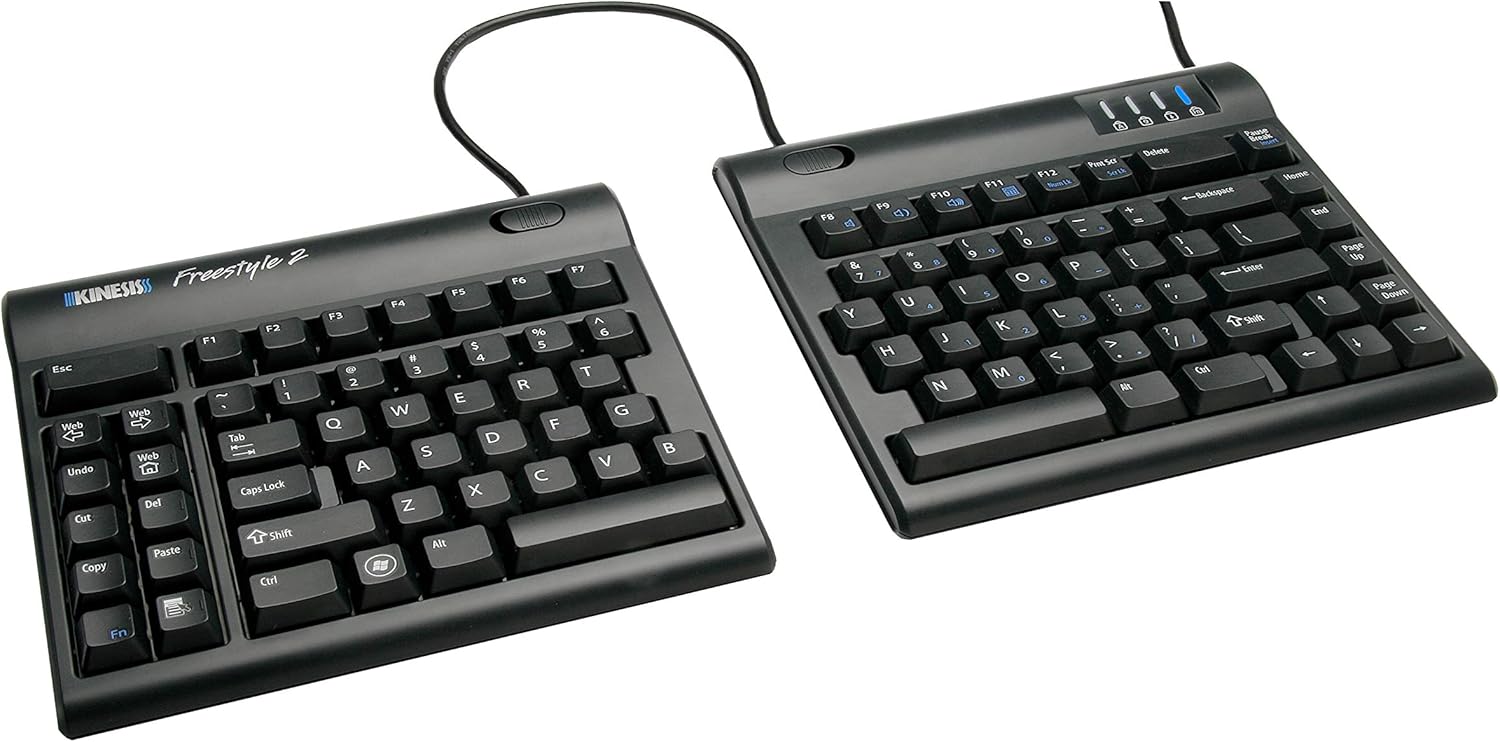
The Freestyle2 is the only true split keyboard in this guide — two completely separate halves connected by a cable that you position independently wherever feels natural for your hands. That separation is what makes it the most ergonomically effective option here. You can position each half at whatever angle, distance, and height works for your specific body rather than being constrained by a fixed form factor.
The adjustment period is real — typing speed drops noticeably for the first week or two as your hands adapt to the new positioning. Most people who commit to it report it becomes natural within two to four weeks, and many say they can’t go back to a standard keyboard after that.
Available in 9″ or 20″ separation — start with 9″ if you’re new to split keyboards and work up from there as your hands adjust.
“Almost 2 years of heavy daily use and it has held strong without issue. I went with the 20-inch split — so worth it. I use it split at shoulder width which allows me to sit up straight, shoulders back, arms resting on the armrests instead of supporting my weight on the desk. Because of that posture change it has cured my tension headaches, shoulder pain, and wrist pain caused by 20 years of working at a computer 8 hours a day. If it breaks I will immediately order a new one.”
Who it’s for: Anyone who wants maximum ergonomic benefit and is willing to go through an adjustment period to get there.
Pros:
- True split — maximum ergonomic positioning freedom
- 9″ or 20″ separation options
- Low-force tactile switches reduce finger fatigue
- Plug-and-play — no software or drivers needed
- Standard Windows layout with embedded numpad
Cons:
- Adjustment period of 1-2 weeks
- Wired only
- No backlight
- Windows 7-10 primarily — check Mac compatibility
| Spec | Detail |
|---|---|
| Price | ~$95 |
| Type | True split — two separate halves |
| Separation | 9″ or 20″ |
| Connectivity | USB wired |
| Switches | Low-force tactile membrane |
| Software | Plug-and-play, none required |
4. Microsoft Ergonomic Keyboard — Best premium business

At $319.95 this is the most expensive keyboard in this guide and the hardest to justify on specs alone. But real-world endorsements tell a different story — this is the keyboard people buy multiple backups of. A family member who works from home full-time keeps three of these on hand because they don’t want to be without one.
That kind of repeat purchase behavior is a stronger endorsement than any spec sheet. The Microsoft Ergonomic line has been refined over decades of development — the natural arc of the split design, the cushion firmness, the key feel, and the wrist angle have all been iterated based on long-term use feedback. The dedicated Office 365 shortcut keys and built-in numpad make it genuinely efficient for heavy office work beyond just the ergonomics.
Low review count at 166 is worth noting — this is a business-focused SKU rather than the consumer version which has far more reviews.
“Love the softness of the keys and the angle of the keyboard. My job requires a lot of computer work plus physical manipulation with my hands and arms so I bought this to help alleviate stress on my wrists. So far so good — been using it for almost a year and really like the way it feels and looks. I also like having a talking point with my coworkers.”
Who it’s for: Heavy office users who prioritize long-term reliability and are willing to pay a premium for a keyboard that keeps people buying backups.
Pros:
- Microsoft’s most refined ergonomic design
- Premium fabric palm rest
- Dedicated Office 365 shortcut keys
- Integrated numpad
- Wired — no battery to manage
- The keyboard people buy multiple backups of
Cons:
- $319.95 — most expensive keyboard in this guide
- Only 166 reviews
- Wired only
- Windows primary — limited Mac functionality
| Spec | Detail |
|---|---|
| Price | ~$319.95 |
| Type | Fixed split |
| Connectivity | USB-A wired |
| Palm rest | Premium fabric cushion |
| Special keys | Office 365, emoji, media |
| Numpad | Integrated |
5. Arteck Split Ergonomic — Best budget

The Arteck gets you a split ergonomic design with a wrist rest at $54.99 — less than half the price of the Logitech K860. It’s not as refined as the Logitech or Microsoft options but it covers the core ergonomic benefit: the split keyframe positions your wrists in a more natural angle compared to a flat board.
The 6-month battery life on a single charge is genuinely impressive — most wireless keyboards need charging every few weeks. USB-C charging keeps it on modern standards. The 2.4G wireless connection is more reliable than Bluetooth for people who have interference issues. Comes with a 24-month warranty.
“I was getting a lot of wrist pain and cramping from standard flat keyboards so I tried the split angled design. The price was within budget, it’s wireless and very responsive. I use it daily for gaming and work and I no longer have any wrist discomfort after long work days and gaming sessions.”
Who it’s for: Anyone who wants to try a split ergonomic keyboard without committing to a $130+ investment.
Pros:
- Most affordable split ergonomic option
- 6-month battery on single charge
- USB-C rechargeable
- Wrist rest included
- 2.4G wireless
- 24-month warranty
Cons:
- Less refined build than Logitech or Microsoft
- No Bluetooth — USB receiver only
- No backlight
| Spec | Detail |
|---|---|
| Price | ~$54.99 |
| Type | Fixed split |
| Connectivity | 2.4G USB wireless |
| Battery | 6 months per charge |
| Charging | USB-C |
| Warranty | 24 months |
6. Keychron Q13 Ultra — Best mechanical

Keychron has built a strong reputation in the mechanical keyboard community for delivering premium build quality at reasonable prices. The Q13 Ultra uses an Alice-style ergonomic layout — a split-style design where the two halves angle outward on a single connected board, similar to the Logitech K860 concept but with full mechanical switches and aluminum construction.
The specs are genuinely impressive: full aluminum body, hot-swappable switches so you can change switch type without soldering, 660 hours of battery life with backlight off, and an 8K polling rate that makes it one of the most responsive wireless keyboards available. ZMK firmware means full key remapping through a web interface.
Worth being transparent: only 1 review on Amazon. Keychron keyboards typically have a strong reputation through their own site and enthusiast communities rather than Amazon specifically — but the lack of Amazon review history means less independent validation than everything else in this guide.
“The keycaps feel great and I love the colors — this is going to be my workhorse keyboard at the office for the foreseeable future. Super happy with it. The acoustic foam kit makes for a very marbley sound and I’m converted to split spacebars from here on out — so much easier to tune than standard sized space bars.”
Who it’s for: Mechanical keyboard enthusiasts who want an ergonomic Alice layout with premium build quality and don’t mind the limited Amazon review history.
Pros:
- Full aluminum construction
- Hot-swappable switches
- 660 hour battery (backlight off)
- 8K wireless polling rate
- RGB backlight
- ZMK web customization
- Keychron’s strong community reputation
Cons:
- Only 1 Amazon review — least validated pick
- $249.99 — premium price
- Alice layout has adjustment period
- No wrist rest included
| Spec | Detail |
|---|---|
| Price | ~$249.99 |
| Type | Alice ergonomic layout |
| Construction | Full aluminum |
| Switches | Hot-swappable Silk POM |
| Battery | Up to 660 hours |
| Connectivity | Bluetooth 5.3, 2.4GHz, USB-C |
7. Gimars Memory Foam Wrist Rest — Best wrist rest

If you’re not ready to replace your keyboard, a wrist rest is the most accessible ergonomic upgrade available. The Gimars set adds wrist support to whatever keyboard and mouse you already own — 40,109 reviews makes it the most validated product in this guide by a significant margin.
The 1.2″ memory foam is thick enough to meaningfully cushion wrist pressure without being so high that it forces your wrists into an upward angled position. The breathable spandex fabric top is waterproof and wipes clean easily. The rubber base doesn’t move around during use. The set includes both a keyboard rest and a mouse rest which together address the two main pressure points during a long typing session.
Under $14 makes it the easiest recommendation in this guide regardless of what keyboard you’re using.
“The soft fabric cover works really well — it avoids the issue where memory foam surrounds and absorbs your wrist to the point of making the contact point sweaty. If you like memory foam’s softness you will probably like this product. Comfortable and does the job.”
Who it’s for: Anyone who wants immediate wrist relief without buying a new keyboard, or anyone who wants to add wrist support to an ergonomic keyboard that doesn’t have one built in.
Pros:
- 40,109 reviews — most validated in this guide
- Works with any keyboard
- Under $14
- Includes keyboard and mouse wrist rest
- Memory foam with slow rebound
- Waterproof and stain resistant
- Non-slip rubber base
Cons:
- Memory foam compresses over time
- Not a substitute for proper keyboard positioning
| Spec | Detail |
|---|---|
| Price | ~$13.90 |
| Material | 1.2″ memory foam |
| Top layer | Breathable spandex fabric |
| Base | Non-slip rubber |
| Set includes | Keyboard rest, mouse rest, coaster |
| Colors | 15+ options |
How to choose
You want the best overall ergonomic keyboard: Logitech ERGO K860. Certified, built-in wrist rest, proven at 7,991 reviews.
You want the easiest transition from a standard keyboard: Logitech Wave Keys. Wave design, minimal adjustment period, 3-year battery.
You want maximum ergonomic positioning freedom: KINESIS Freestyle2. True split, two independent halves, position each wherever works for you.
You use Office 365 heavily and want a proven long-term keyboard: Microsoft Ergonomic Keyboard. The keyboard people buy multiple backups of.
You want to try ergonomic without spending $130+: Arteck Split Ergonomic. Split design, wrist rest, 6-month battery, $54.99.
You want a premium mechanical ergonomic keyboard: Keychron Q13 Ultra. Full aluminum, hot-swappable, 660 hour battery — but only 1 Amazon review.
You want wrist support without buying a new keyboard: Gimars Wrist Rest Set. Under $14, 40,000+ reviews, works with anything.
A good ergonomic keyboard works best alongside a properly positioned monitor and ergonomic mouse. See our best ergonomic mouse guide and ergonomic home office setup guide for the complete picture.
Continue reading
Frequently asked questions
Do ergonomic keyboards actually help with wrist pain?
For most people yes — the primary benefit is reducing the inward wrist rotation that standard flat keyboards force. Whether that translates to meaningful pain reduction depends on how severe the issue is and whether keyboard position is the main contributing factor. A wrist rest alone often helps significantly for minor discomfort. A split or wave keyboard addresses the root positioning issue more completely.
How long does it take to adjust to a split keyboard?
For a fixed split like the K860 or Wave Keys, most people adjust within a few days. For a true split like the KINESIS Freestyle2, expect 1-2 weeks of reduced typing speed before it feels natural. Most people who commit to the adjustment period say it’s worth it.
Is a mechanical or membrane keyboard better for ergonomics?
Ergonomic benefit comes from the keyboard’s physical design — the split, wave, or angled layout — not the switch type. Mechanical switches have a different feel and actuation force than membrane switches, but neither is inherently more ergonomic. Choose based on typing preference and budget.
Can I use an ergonomic keyboard with a laptop?
Yes — any keyboard in this guide connects wirelessly via Bluetooth or USB receiver and works with laptops. Using an external keyboard with your laptop raised on a stand is one of the best ergonomic upgrades you can make since it lets you position screen and keyboard independently.
All prices approximate and subject to change. Check current pricing at checkout. Last updated July 2026.