Best Laptop Cooling Pad 2026
Category: Tech & Gear | Reading time: 7 min | Last updated: July 2026
Disclosure: This post contains affiliate links. If you buy through our links we may earn a small commission at no extra cost to you.
All 7 picks at a glance
A laptop generates heat constantly — the CPU and GPU under heavy workloads push temperatures high enough to trigger thermal throttling, where the processor deliberately slows itself down to avoid damage. That means slower performance exactly when you need it most. A cooling pad addresses this by pushing cooler air against the laptop’s underside, keeping temperatures in a range where the processor runs at full speed.
Beyond performance, running a laptop hot consistently shortens its lifespan. A cooling pad is one of the cheapest ways to protect an expensive piece of hardware.
This guide covers seven cooling pads from $21.59 to $129.99 — a budget pick with 45,000+ reviews, a premium Razer option with smart fan control, a slim portable option, a unique Peltier thermoelectric cooler, an RGB gaming pick, and a German-engineered premium alternative.
Jump to a pick
1. Havit HV-F2056 — Best overall
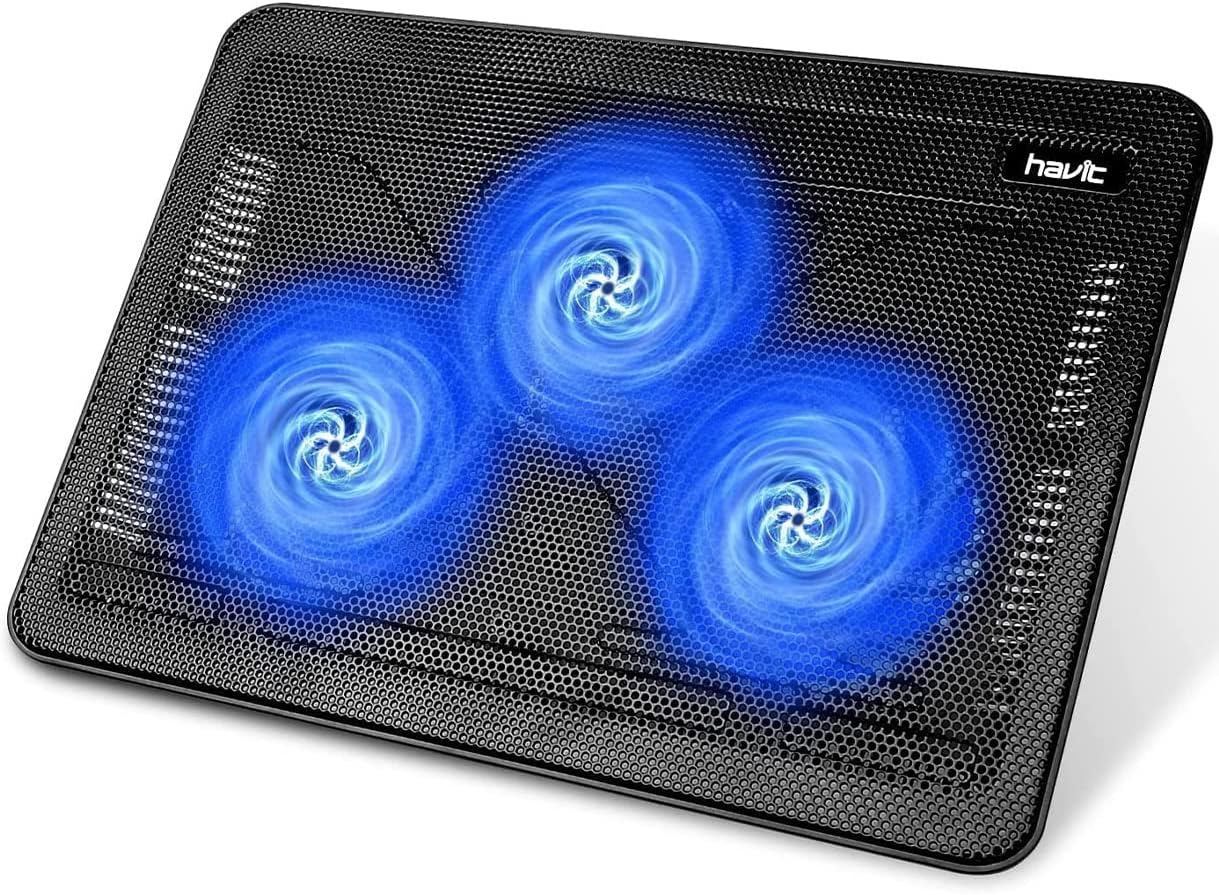
45,132 reviews at 4.5 stars makes the Havit the most validated laptop cooling pad available — by a significant margin over everything else in this guide. At under $27 it covers every core need: three quiet fans, a stable metal mesh surface, two height settings for ergonomic positioning, and an extra USB port so you don’t lose a port by plugging in the cooling pad.
The slim profile makes it genuinely portable — it fits in a laptop bag without adding noticeable bulk. Two height settings double it as a basic ergonomic stand that tilts the keyboard to a better typing angle. The metal mesh surface is more stable than plastic and provides better airflow from below.
8,000+ units bought last month confirms this is the default cooling pad choice for most buyers. If you want something proven that just works without overthinking it, this is it.
“Great cooling pad — used it under both my Dell and MacBook without any issues daily. One thing to note: the USB connection is USB-A to USB-A so you may want a USB-A to USB-C cable for MacBook use. If you work at a desk with an external monitor you can plug the cooling pad into the USB port on the back of your monitor so it isn’t drawing power from your laptop. It definitely keeps my laptop cool when gaming too — I no longer feel like my laptop is gonna explode. Plus no more burnt legs from a hot laptop.”
Who it’s for: Anyone who wants a reliable cooling pad at the lowest price with the most real-world validation behind it.
Pros:
- 45,132 reviews — most validated in this guide
- Under $27
- 3 ultra-quiet fans
- Metal mesh surface
- Extra USB port
- 8,000+ bought last month
Cons:
- Only 2 height settings
- No fan speed control
- Basic design — no RGB or advanced features
| Spec | Detail |
|---|---|
| Price | ~$26.58 |
| Fans | 3 ultra-quiet |
| Height settings | 2 |
| Surface | Metal mesh |
| Fits | 15.6-17″ laptops |
| Extra ports | 1 USB |
2. Razer Adaptive Smart Cooling Pad — Best premium

The Razer is the premium pick in this guide and my personal recommendation if budget isn’t the primary concern — buy nice or buy twice. What separates it from every other cooling pad here is the smart automatic fan control — it adjusts fan speed automatically based on your laptop’s system temperature rather than running at a fixed speed. Under light loads it runs quietly. Under heavy loads it ramps up to handle the heat. You don’t have to think about it.
The airtight pressure chamber with included foam seals prevents cool air from leaking out the sides — all the airflow goes through the laptop rather than around it. Three magnetic frames accommodate laptops from 14 to 18 inches, making it one of the most versatile options for size compatibility.
For Razer Blade laptop owners the Hyperboost feature specifically interfaces with compatible Blades to push thermal performance beyond standard limits — a meaningful advantage if you’re already in the Razer ecosystem. However, it does have non-Razer laptop compatibility.
“I tried probably 10 other laptop coolers before finally arriving at this Razer model — it’s the one. Sleek design with none of the weird unsightly knobs other models have. The buttons are tucked cleanly on the right side and it doesn’t stick out much so my setup looks cleaner. I don’t have a Razer laptop but the additional magnetic frame made it fit my Asus Tuf F15 perfectly. I used to hit framerate drops and bad lag about 40 minutes into heavy gaming due to extreme heat — this pad keeps everything cooler by far, sometimes cutting temps in near half. Yes it’s loud but I’ve never had a fan system that actually works and isn’t loud. This has made what used to be a depressing gaming time into hours of fun.”
Who it’s for: Anyone who wants a premium set-and-forget cooling pad from a brand with a proven reputation, especially Razer laptop owners.
Pros:
- Smart automatic fan control
- Airtight pressure chamber — no air leakage
- 3 magnetic frames for 14-18″ laptops
- Custom fan curves via Razer Synapse
- 140mm brushless fan
- Chroma RGB
- 3 USB ports
- 2-year warranty
- Non-Razer laptop compatibility
Cons:
- $129.99 — most expensive in this guide
- 613 reviews — moderate sample size
- Razer Synapse software required for full features
| Spec | Detail |
|---|---|
| Price | ~$129.99 |
| Fan | 140mm brushless, auto speed |
| Fits | 14-18″ laptops |
| Frames | 3 magnetic |
| Ports | 3 USB Type A |
| Warranty | 2 years |
3. TECKNET Laptop Cooling Pad — Best slim option

The TECKNET is the most portable option in this guide — thin enough to slip into a laptop bag alongside the laptop itself without adding meaningful bulk. At $21.59 it’s the cheapest pick here while still offering adjustable fan speed control that the Havit doesn’t have.
The internal channel design draws air from the sides and bottom and directs it toward the center where CPU heat is highest. USB-A and USB-C powered covers both MacBook and Windows laptop users without needing an adapter. The side-mounted fan speed switch lets you dial between quiet low speed for everyday work and full speed for demanding tasks.
3-year warranty is the longest of any budget option in this guide — meaningful assurance on a product you’ll use daily.
“I like this one so much better than my last cooling pad. The smooth bottom means I can rest it comfortably on my legs instead of dealing with a hard plastic waffle pattern. Quiet and effective — keeps my laptop cool, cord is plenty long, and you can adjust the fan strength. Like a sleek shiny new toy.”
Who it’s for: MacBook users, frequent travelers, or anyone who wants the most portable cooling pad that fits in a bag without thinking about it.
Pros:
- Thinnest option in this guide
- USB-A and USB-C powered — works with MacBook natively
- Adjustable fan speed
- Under $22
- 3-year warranty
- 11,408 reviews
Cons:
- Only fits up to 15.6″ — smaller size range
- Two fans only — less airflow than multi-fan options
- No height adjustment
| Spec | Detail |
|---|---|
| Price | ~$21.59 |
| Fans | Two 110mm adjustable |
| Power | USB-A or USB-C |
| Fits | 12-15.6″ laptops |
| Fan speed | Adjustable via side switch |
| Warranty | 3 years |
4. TopMate C11 — Best with phone holder

The TopMate C11 packs more features into $32.77 than anything else in this guide. Six fans — four smaller and two larger — provide strong airflow across the full laptop base. Five height settings give more ergonomic flexibility than budget alternatives. The built-in phone holder on the left side keeps your phone visible without taking up desk space.
Seven RGB lighting modes add desk aesthetic without the premium price of the gaming-focused options. Two USB ports means you don’t sacrifice connectivity by adding the cooling pad. Capacitor components on each fan reduce operating noise without reducing airflow speed.
“I use an MSI gaming laptop and have had overheating issues — this cooler has made a significant difference in temperature. It draws cool air from the bottom and expels hot air from the back very effectively. The one issue is noise at high settings — not unbearable but noticeable in a quiet environment. Lightweight, portable, easy to set up, well constructed. Good value for the price. One tip: to turn the RGB lights off you need to hold the light button down rather than pressing it — took me forever to figure that out.”
Who it’s for: Anyone who wants the most features for the lowest price and keeps their phone on the desk during work or gaming sessions.
Pros:
- 6 fans — most airflow coverage in this price range
- Built-in phone holder
- 5 height settings
- 7 RGB modes
- 2 USB ports
- Under $33
Cons:
- More plastic construction than premium options
- RGB can’t be turned off entirely
- Bulkier than slim options
| Spec | Detail |
|---|---|
| Price | ~$32.77 |
| Fans | 6 (4 small + 2 large) |
| Height settings | 5 |
| RGB | 7 modes |
| Ports | 2 USB |
| Fits | 15.6-17.3″ laptops |
5. Metfut Peltier Cooling Pad — Most adjustable

The Metfut is the most unique cooling pad in this guide — it uses thermoelectric Peltier technology rather than just fans. A semiconductor panel actively draws heat away from the laptop’s base on contact, working alongside two fans rather than relying on airflow alone. The four spring dampers keep the cooling panel in snug contact with your specific laptop’s underside regardless of shape.
The 360° rotation base and adjustable height and angle give positioning flexibility no other cooling pad here offers. The cooler is detachable — use it as a standard laptop stand when you don’t need active cooling, attach it when you do.
Worth being honest about the review count — 506 reviews is smaller than most picks here and the Peltier technology can generate condensation in high humidity environments. That’s worth knowing before buying.
“The cooling system works exactly as advertised. The 5W mode lowers the semiconductor cooler to 53°F from a room temperature of 72°F — the 20W mode cools it down to 37°F. Game-changer for preventing overheating during intensive tasks. I even tested it by placing my phone on the cooling pad when it got too hot and it worked quickly. The stand is solid and heavy-duty, perfect for daily use at home or in the office. It’s a bit bulky so not ideal for travel but I don’t mind leaving it on my desk permanently. Highly recommended for anyone who primarily uses their laptop at a desk.”
Who it’s for: Anyone who wants genuinely different cooling technology and maximum positioning flexibility in one product.
Pros:
- Peltier thermoelectric cooling — unique technology
- Detachable cooler
- 360° rotation base
- ≤20dB — near silent
- Carbon steel construction
- Adjustable height and angle
Cons:
- 506 reviews — smaller sample
- Can generate condensation in high humidity
- Requires 20W adapter for full power (sold separately)
- Only fits up to 15.6″
| Spec | Detail |
|---|---|
| Price | ~$59.84 |
| Cooling | Peltier thermoelectric + fans |
| Noise | ≤20dB |
| Base | 360° rotation |
| Construction | Carbon steel |
| Fits | Up to 15.6″, 20 lbs |
6. llano V12 — Best RGB gaming

The llano V12 is built for gaming laptops specifically — the 5.5″ turbofan with an airtight pressure chamber pushes air directly into the laptop’s intake vents rather than just blowing cool air below the surface. The claim of reducing temperature by 44°C in 90 seconds is specific enough to be testable — and the airtight seal design is what makes that kind of performance possible.
The removable dust filter is a practical feature no other cooling pad in this guide includes — it captures debris before it gets into the laptop’s own vents, which extends laptop lifespan over years of daily use. 3 USB ports turn the cooling pad into a hub. Fits up to 19-inch laptops which covers the largest gaming laptops on the market.
“This cooling pad has completely changed laptop gaming for me. Temps in RDR2 dropped from an average of 90°C to less than 65°C — that’s crazy. I’m also getting better performance. Set mine to 1200 on the digital display and it’s not loud at all. Cold air comes out the exhaust. According to GeekBench I’m getting 18% better CPU performance using the fan — I would consider that a very substantial increase. Unless you have a seriously poorly designed laptop I think 1200 is more than enough.”
Who it’s for: Gaming laptop owners who want maximum cooling performance and don’t mind paying more for it.
Pros:
- 5.5″ turbofan with airtight pressure chamber
- Removable dust filter — unique in this guide
- 36W power output
- 3 USB ports
- 10 RGB modes
- Fits up to 19″ laptops
- 1,000+ bought last month
Cons:
- $95.98 — premium price
- Requires power adapter included in box
- 70dB at max — louder than quieter picks
- Not for noise-sensitive environments
| Spec | Detail |
|---|---|
| Price | ~$95.98 |
| Fan | 5.5″ turbofan |
| Power output | 36W |
| Ports | 3 USB |
| RGB | 10 modes |
| Fits | 15.6-19″ laptops |
7. KLIM Turbofrost MAX — Best premium alternative

The KLIM Turbofrost MAX is the most engineered option in this guide — German designed, built on an additional year of R&D beyond the original Turbofrost, with a patented TurboFan XL that channels airflow directly beneath the CPU and GPU rather than distributing it broadly. The adaptive sealing foam fits around laptops up to 17.3 inches regardless of shape.
The LCD display showing real-time fan speed is a practical detail that makes a real difference — you can see exactly what the fan is doing rather than guessing. Dual power input lets you use DC adapter at your desk for full steady power or USB-C from your laptop when there’s no outlet available. The 5-year warranty is the longest in this guide by a significant margin.
“I’m running an RTX 5080 which tends to run hot during demanding gaming sessions. I tried a cheaper KLIM version first and it didn’t work for me — returned it and purchased this one and I’m very happy I did. On average I see 10°C lower and sometimes as much as 15°C which is insane. I would have kept it for even 5°C lower. The DC cable provides maximum 3000rpm — I find 2000-2500rpm perfect. The laptop doesn’t move on the foam sealing pad at all which I love. Based on my experience with cheaper coolers and other brands I would say this is the best on the market and the best thing I’ve bought for my laptop.”
Who it’s for: Anyone who wants premium German engineering, the longest warranty in this guide, and dual power flexibility.
Pros:
- German engineered — patented TurboFan XL
- LCD fan speed display
- Dual USB-C/DC power
- Adaptive sealing foam
- Aluminum construction
- 5-year warranty — longest in this guide
- 3 USB-A ports
Cons:
- $94.95 — premium price
- Only 265 reviews
- Heavier than budget options at 1.72kg
| Spec | Detail |
|---|---|
| Price | ~$94.95 |
| Construction | Aluminum |
| Power | USB-C or DC adapter |
| Display | LCD fan speed |
| Ports | 3 USB-A |
| Warranty | 5 years |
How to choose
You want the most proven option at the lowest price: Havit HV-F2056. 45,000+ reviews, under $27, does the job reliably.
You want the best cooling pad available: Razer Adaptive Smart. Smart auto fan control, airtight chamber, fits 14-18″, set-and-forget performance.
You travel frequently or use a MacBook: TECKNET. Thinnest option, USB-C native, adjustable fan speed, 3-year warranty.
You want the most features for the money: TopMate C11. 6 fans, phone holder, 5 heights, RGB, 2 USB ports, under $33.
You want different cooling technology: Metfut Peltier. Thermoelectric cooling plus fans, 360° rotation, near-silent operation.
You have a large gaming laptop: llano V12. Fits up to 19″, 36W turbofan, dust filter, 44°C reduction in 90 seconds.
You want the longest warranty and German engineering: KLIM Turbofrost MAX. 5-year warranty, LCD display, dual power, patented design.
A cooling pad works best alongside a proper laptop stand that gets your screen to eye level. See our best laptop stands guide and best USB hubs guide for the rest of your laptop setup.
Continue reading
Frequently asked questions
Do laptop cooling pads actually work?
Yes — the evidence is consistent that cooling pads reduce laptop surface and internal temperatures by 5-20°C depending on the laptop, the cooling pad, and the workload. The more important practical benefit is preventing thermal throttling — when a laptop gets too hot it reduces CPU and GPU clock speeds to protect itself. A cooling pad keeps temperatures in a range where the processor runs at full speed consistently.
How do I know if my laptop needs a cooling pad?
The clearest signs are the laptop getting hot to the touch on the underside, fans running at full speed for extended periods, performance dropping during demanding tasks, or the laptop shutting down unexpectedly under load. Any of these indicate thermal management is struggling and a cooling pad would help.
Will a cooling pad work with my MacBook?
MacBooks have different thermal management than Windows laptops and Apple’s thermal throttling behavior is more aggressive. A cooling pad helps by reducing the temperature at which throttling kicks in. The TECKNET is specifically worth considering for MacBook users since it’s USB-C native and one of the thinner options that fits MacBook aesthetics better than gaming-focused pads.
Does a cooling pad make noise?
All fan-based cooling pads make some noise — the question is how much. The Havit and TECKNET are specifically designed for quiet operation. The llano V12 at maximum speed reaches 70dB which is audible. If noise is a concern look at the Metfut’s Peltier design which operates at ≤20dB.
All prices approximate and subject to change. Check current pricing at checkout. Last updated July 2026.