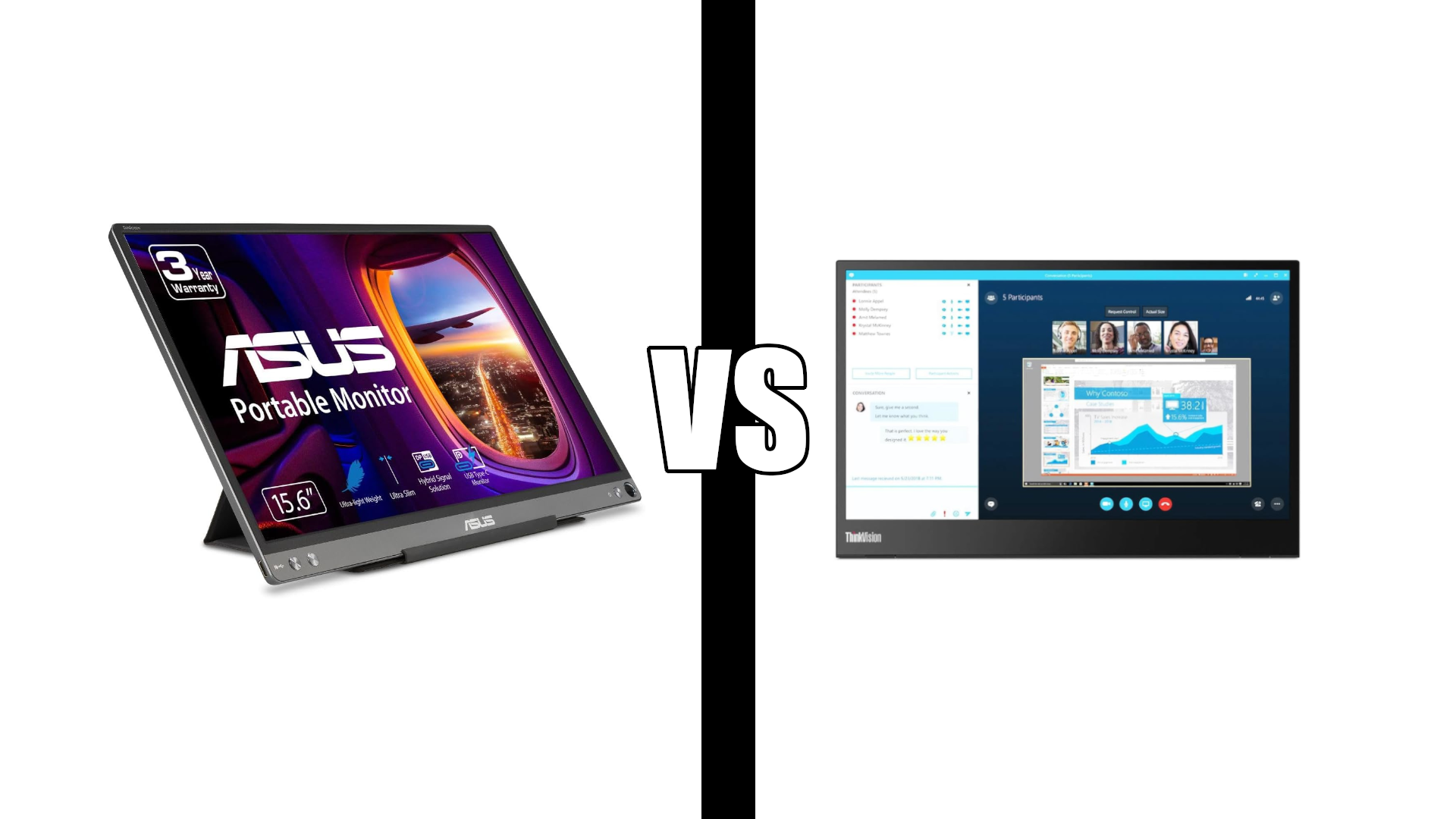
ASUS ZenScreen vs Lenovo ThinkVision M14: Bigger or Better
Category: Tech & Gear | Reading time: 12 min | Last updated: October 2026
Disclosure: This post contains affiliate links. If you buy through our links we may earn a small commission at no extra cost to you.
ASUS ZenScreen vs Lenovo ThinkVision M14. The Lenovo ThinkVision M14 costs about 69% more than the ASUS ZenScreen MB16ACE and gives you a screen 1.6 inches smaller. On paper that makes no sense at all.
Two things justify it, and neither is on a spec sheet: color accuracy and the stand. Whether those are worth the premium depends entirely on what you do with a second screen, so this post is mostly about working out which of those two people you are.
Both are 1080p IPS panels. Both weigh almost nothing. Both have been on sale for years with over 1,300 reviews each, which makes them two of the most validated portable monitors you can buy.
Jump to a section
- The short answer
- ASUS ZenScreen MB16ACE in detail
- Lenovo ThinkVision M14 in detail
- Specs side by side
- Color, where the money goes
- The stand matters more than you think
- USB-C only, or HDMI too
- How they hold up on the road
- Which ZenScreen you are actually buying
- What about the cheap brands
- Which one to buy
- FAQ
The short answer
Buy the ASUS ZenScreen MB16ACE if a second screen is for documents, spreadsheets, email and calls. It is 1.6 inches bigger, costs far less, auto-rotates between portrait and landscape, carries a 3-year warranty, and comes in a variant with Mini HDMI if your machine is not all USB-C. The colors are mediocre and the case-as-stand is floppy. For most remote work neither matters.
Buy the Lenovo ThinkVision M14 if you look at design work, photos, or anything where color has to be right, or if you set up and tear down often enough that a rigid stand earns its keep. Its color accuracy is the single biggest gap between these two, and its fold-out base is better engineered than anything ASUS ships.
One hard requirement decides it before anything else: the M14 is USB-C only. No HDMI, no adapter workaround that reliably works. If your laptop, Chromebook or tablet cannot do DisplayPort over USB-C, the M14 is not an option at any price.
ASUS ZenScreen MB16ACE in detail

At 4.6 stars from 1,501 reviews this is the most validated portable monitor ASUS sells, and it holds Amazon’s Choice in the category. The pitch is simple: more screen for less money, with the compromises in places most people working on documents will never notice.
Two features earn more than their billing. Auto-rotation senses the orientation and switches between landscape and portrait on its own, which turns out to be the thing people use most, because a portrait second screen is excellent for long documents, code and chat windows. And the hybrid-signal connection means it works off USB Type-A as well as USB-C, so an older work laptop is not a dead end.
“This portable monitor is exactly what I was looking for. It’s a nice size at almost 16″ so easy to work off of. I specifically wanted a portable monitor that plugged directly into my laptop so that I wouldn’t have to deal with Bluetooth disconnection glitches. This has a USB-C plug on both ends so easily connects to my MacBook. The picture quality is great and doesn’t hurt or bother my eyes. I’ve read some reviews that complained that this monitor doesn’t hold a charge. This is true. This monitor is not built with a battery of any kind to hold a charge, but must be plugged into your computer in order for it to work. Again, this is exactly what I was searching for as I didn’t want to deal with yet another device to keep charged.”
Worth repeating that point about the battery, since it trips people up on both of these monitors. Neither has one. They draw power from the machine they are plugged into, which is why a laptop on battery will drain noticeably faster with one attached.
The honest limitation is color, and a long-term owner puts it plainly.
“I work from home, and this is great for when I am away from my desktop and monitor, but still want to have the functionality of working with a second screen. It is super light, portable, and easy to carry through an airport and just toss in your backpack. I have had this for a few years now without any problems. Setting it up is easy. My one complaint is the resolution and display quality. Colors do not reflect at all the way that they do on my Macs retina display or my LCD on my gaming laptop. The colors appear to be very washed, so I would not recommend this for any kind of gaming, photo editing, etc.”
Note what that reviewer still does: keeps it for years, carries it everywhere, recommends it for work. The washed colors are a real flaw and a narrow one. They rule out photo editing and they do not affect a spreadsheet.
One more report worth knowing, from the older reviews.
“It’s light, compact, a bit bigger than my laptop screen but in general, makes work from home pretty comfortable. BUT! But the screen is pretty weak: the picture is shaking whenever, especially on video calls and while watching a youtube videos.”
Picture instability over a single USB-C connection usually traces back to the host port rather than the panel, since the monitor is drawing power and video down one cable. If you see it, try a different port or a powered hub. Our USB hub guide covers the powered options.
Lenovo ThinkVision M14 in detail

It carries Amazon’s Overall Pick badge and 1,352 reviews at 4.4 stars. It is also the more expensive monitor with the smaller screen, so the case for it has to be made on quality rather than numbers.
The most useful review on either product comes from someone who bought several portable monitors, returned them, and wrote down why.
“I recently tried several options for a portable monitor to use with my 14 Inch MacBook Pro. My requirements when I started were: light weight, single USB C/Thunderbolt (eg no separate power needed), and for it to be approximately the same size as the MacBook at least height-wise. With my first purchase (and return) I quickly found out that despite the many options all touting the same specs, I had to add a few requirements. Shape (needed it to be 14 wide), built-in ability to stand on its own vs a floppy cover solution, and most importantly, reasonably accurate color. This monitor met all the requirements above. The color is very accurate. A side-by-side comparison to the other portables was instantly clear. Another really nice feature is the way they implemented the kickstand. It’s not really a kickstand but more of a fold-out base. The connections are built in to that which offset them from the edge of the screen unlike all the others, which means you can stand it up right against the Mac even with cables plugged into both sides.”
That is the whole argument for the M14, written by someone who did the comparison with his own money. The three things he landed on, matched height to the laptop, a stand that is not a folded cover, and color that is right out of the box, are exactly the three things the ASUS does not do.
He also addresses the price directly: “The one trade-off that is real is the price. Make no mistake, this monitor is worth that and more if you are planning to use it often at all.”
Now the part that disqualifies it for some people entirely.
“The monitor itself is wonderful if you have thunderbolt / USB-C to USB-C powered devices. I only had my iPad. I needed it for my chromebook. I thought I could make it work if I bought an adapter but that didn’t happen. It also doesn’t support some video? When I had connected it to my iPad Pro, and opened ProCreate, it worked until I started drawing on it and it spazzed. I connected my Switch, the monitor powered on but turned back off, perhaps it is not compatible. The monitor is lightweight, comes with a sleeve case and it has its own stand. The quality of it is great and the brightness is wonderful. This product is best for business, meaning: spreadsheets, PowerPoints, docs, etc. Not for gaming or other entertainment. I had to return it because it didn’t work for my needs and the limited connectivity of USB-C only devices.”
Four stars and a return. He liked the monitor and could not use it. Chromebook, Switch and iPad Pro drawing all failed, and an adapter did not rescue it. Check what your machine actually outputs before you order this one. Our Thunderbolt guide explains DisplayPort Alt Mode and how to tell whether your port has it.
Specs side by side
| ASUS MB16ACE | Lenovo M14 | |
|---|---|---|
| Rating | 4.6 / 1,501 | 4.4 / 1,352 |
| Screen size | 15.6 in | 14 in |
| Resolution | 1920 x 1080 | 1920 x 1080 |
| Panel | IPS, anti-glare | IPS, matte |
| Brightness | Not specified | 300 nits |
| Response time | Not specified | 6 ms |
| Connection | USB-C or USB Type-A | 2x USB-C only |
| Power pass-through | No | Yes, PD 2.0 |
| Stand | Folding case | Fold-out base, tilt adjustable |
| Auto-rotate | Yes | No |
| Weight | Not specified | 1.26 lb |
| Security slot | No | Kensington |
| Eye care | TÜV flicker-free, low blue light | Low blue light |
| Warranty | 3 years | Not stated on listing |
| In the box | Lite smart case | Felt sleeve |
Color, where the money goes
Neither listing publishes a color gamut figure, which is normal for portable monitors and unhelpful. So the evidence has to come from owners, and here it converges from both directions.
The ASUS owner above, three years in and otherwise positive, says the colors “appear to be very washed” against a MacBook display and would not use it for photo editing. The Lenovo owner above, who tested several portables side by side, made accurate color a hard requirement and found the M14 “very accurate” with the difference “instantly clear.”
Two independent reports, opposite products, same conclusion. That is about as good as this category gets for color evidence, and it means the premium is buying something real rather than a badge.
Whether you should care comes down to one question: does anything you look at on the second screen need to be the right color? Spreadsheets, email, Slack, code and PDFs do not. Design comps, product photos, video review and anything client-facing do. If you fall in the first group, the color gap is the easiest money you will ever save.
The stand matters more than you think
This sounds like a detail and it is the thing you will touch every single time you use the monitor.
The ASUS ships a folding “lite smart case” that creases into a triangle to prop the screen up, in portrait or landscape. It works, it weighs nothing, and it is a folded sleeve holding up a screen. Knock the desk and it moves.
The Lenovo has a rigid fold-out base that is part of the monitor, with tilt adjustment. The detail that owner noticed is the clever part: the ports are built into the base, set back from the screen edge. That means you can stand the M14 flush against a laptop with cables plugged into both sides and nothing fouls. Every folding-case design puts the ports on the screen edge, where a cable immediately pushes the panel off its angle.
If you set up once and leave it, the case is fine. If you pack and unpack daily, the base is worth real money.
Either way, both of these sit lower than your main screen, which puts your neck at an angle for half your day. A laptop stand for the main machine evens that out, and our ergonomic setup guide covers the heights.
USB-C only, or HDMI too
This is the hard gate, and it eliminates one of these monitors for a lot of people before any other consideration.
The M14 has two USB-C ports and nothing else. Both carry DisplayPort 1.2 Alt Mode and Power Delivery 2.0, which is genuinely good when it works: one cable from the laptop carries video, and a charger into the monitor’s second port passes power back through to the laptop. One cable, both jobs.
When it does not work, there is no fallback. A USB-C port that does not do DisplayPort Alt Mode will not drive it, adapters generally do not fix it, and the reviewer above found that out across a Chromebook, a Switch and an iPad Pro.
The ASUS takes the opposite approach. Its hybrid-signal connection handles USB-C and plain USB Type-A, so an older laptop with no video-capable USB-C still works. And ASUS sells a Dual USB-C plus Mini HDMI variant on the same listing, which turns a games console or any HDMI source into a valid input.
If you have any doubt about what your machine outputs, that flexibility is worth more than color accuracy.
How they hold up on the road
Both are built thin and light, and thin and light has a cost.
“I bought the Lenovo M14 to replace an AOC monitor that refused to work with any of my Dell Latitudes or my new ThinkPad. Set up is easy; my laptop consistently figures out what monitor configuration it’s seeing. So it works great and looks great. The light and thin part is nice for packing light. Not so nice for surviving on the road, it seems extremely fragile. It moves on the table with the slightest nudge or pull from a connected cable. Second time I used it, the case cracked when I was attaching the Kensington lock, from a modest flex of the cable. I lock my gear when I work on the road, usually sitting in a coffee shop or restaurant for extended hours; Kensington lock is essential.”
Worth taking seriously if you actually work in public. The M14 is the only one of the two with a Kensington slot, which is exactly why someone who needs to lock their gear bought it, and the housing cracked at that slot under cable flex.
The ASUS has no lock slot at all, so it is not an option if locking matters. Its folding case does double as scratch protection in a bag, and the M14 ships a felt sleeve for the same job.
Which ZenScreen you are actually buying
ASUS sells five portable ZenScreens with nearly identical names, and three of them share a single Amazon listing as style options. It is genuinely easy to buy the wrong one.
On the MB16ACE listing you will see three choices:
- USB-C, which is the MB16ACE reviewed here and the one with the 1,501 reviews behind it
- Dual USB-C Mini HDMI, a cheaper model with the extra HDMI input and fewer reviews
- 16:10 2.5K 1600P 155Hz, a much more expensive high-refresh panel with very few reviews so far
They are not the same monitor and the reviews shown do not all belong to the option you have selected. Check the style selector before you check out.
Two more worth knowing about. If you searched for the MB16AC, that is the original and it has been superseded; the MB16ACE is its direct descendant and the one to buy. And ASUS also puts the ZenScreen name on 27 and 32 inch desktop smart monitors, which are not portable monitors at all despite sharing the brand.
What about the cheap brands
Being straight about this, because anyone who has searched for a portable monitor has seen them.
Amazon-native brands like ARZOPA, cocopar and VisionOwl dominate this category on volume. Several of them hold higher star ratings and several times the review counts of either monitor here, at roughly half to a third of the price, and some offer specs neither ASUS nor Lenovo match at any price, including 16 inch panels and 144Hz refresh rates.
That is not a reason to dismiss them. For a second screen holding a spreadsheet, a cheap panel genuinely is enough, and it is what most buyers are choosing.
What you give up is less visible: warranty support that answers, color that is consistent unit to unit, firmware that handles odd resolutions, and a company that will still be selling monitors in three years if yours fails. ASUS publishes a three year warranty on the MB16ACE. That matters more on a device you throw in a bag twice a week than on one that sits on a desk.
The Lenovo reviewer who tested several portables named ARZOPA as his runner-up and chose the ThinkVision anyway, on color and the stand. That is the trade in one sentence.
Which one to buy
| If you | Buy |
|---|---|
| Use it for documents, email and calls | ASUS MB16ACE |
| Need color to be accurate | Lenovo M14 |
| Have a laptop without video over USB-C | ASUS MB16ACE |
| Want to plug in a console | ASUS, the Mini HDMI variant |
| Pack and unpack it every day | Lenovo M14, for the rigid base |
| Want the bigger screen | ASUS MB16ACE |
| Need to lock it to a table in public | Lenovo M14, the only one with a slot |
| Want a portrait second screen | ASUS, for auto-rotation |
| Want one cable doing video and power | Lenovo M14 |
| Want a stated long warranty | ASUS, three years |
| Are not sure | ASUS MB16ACE |
The ASUS is the honest default. It is the bigger screen for much less money, it connects to more things, it is the only one of the two publishing a three year warranty, and the one real compromise only bites people doing color work. The Lenovo is the better monitor and it is priced like it, which makes it the right answer for a narrower group: color-critical work, all-USB-C kit, and enough setting up and tearing down that the stand earns its premium.
Not sure a portable is the right category at all? Our portable monitor vs desktop monitor comparison covers when a desk monitor is simply the better buy.
If this is replacing a second desk monitor rather than traveling with you, neither is the right tool. Our budget monitor guide covers full-size screens that cost less than both of these, and our dual monitor guide covers the setup.
Frequently asked questions
Do portable monitors have a battery?
Neither of these does. They draw power from whatever they are plugged into, which means your laptop battery drains faster with one attached. The M14’s power pass-through helps, since you can run a charger into the monitor and have it feed the laptop back through the same cable.
Will a portable monitor work with my laptop?
For the M14, only if your USB-C port supports DisplayPort Alt Mode. A USB-C port that only does data and charging will not drive it, and adapters usually do not solve it. The ASUS is more forgiving, since it works over USB Type-A as well, and the Mini HDMI variant takes any HDMI source.
Is the Lenovo M14 worth nearly double the ASUS?
For color-critical work and daily setup, yes. For documents and calls, no. You are paying more for a screen that is 1.6 inches smaller, and the return is color accuracy and a better stand rather than more screen.
Can I use a portable monitor in portrait mode?
Both can stand on end. The ASUS auto-rotates the image when you do, which the Lenovo does not, so on the M14 you rotate the display manually in your operating system settings.
Are cheap portable monitors any good?
For a second screen holding documents, often yes, and they outsell the name brands heavily. What you give up is warranty support, unit-to-unit consistency and someone to call in two years. If the monitor lives in a bag, that is worth paying for.
Is a portable monitor better than using an iPad as a second screen?
Different trade. A portable monitor is plug-and-play with no lag and no app, and it is cheaper than a tablet. An iPad you already own costs nothing extra and does other jobs, but Sidecar and equivalents add latency and depend on software that breaks between updates.
Continue reading
Specifications are taken from the current manufacturer listings and verified buyer reviews. Prices change often, so check at checkout. Last updated October 2026.