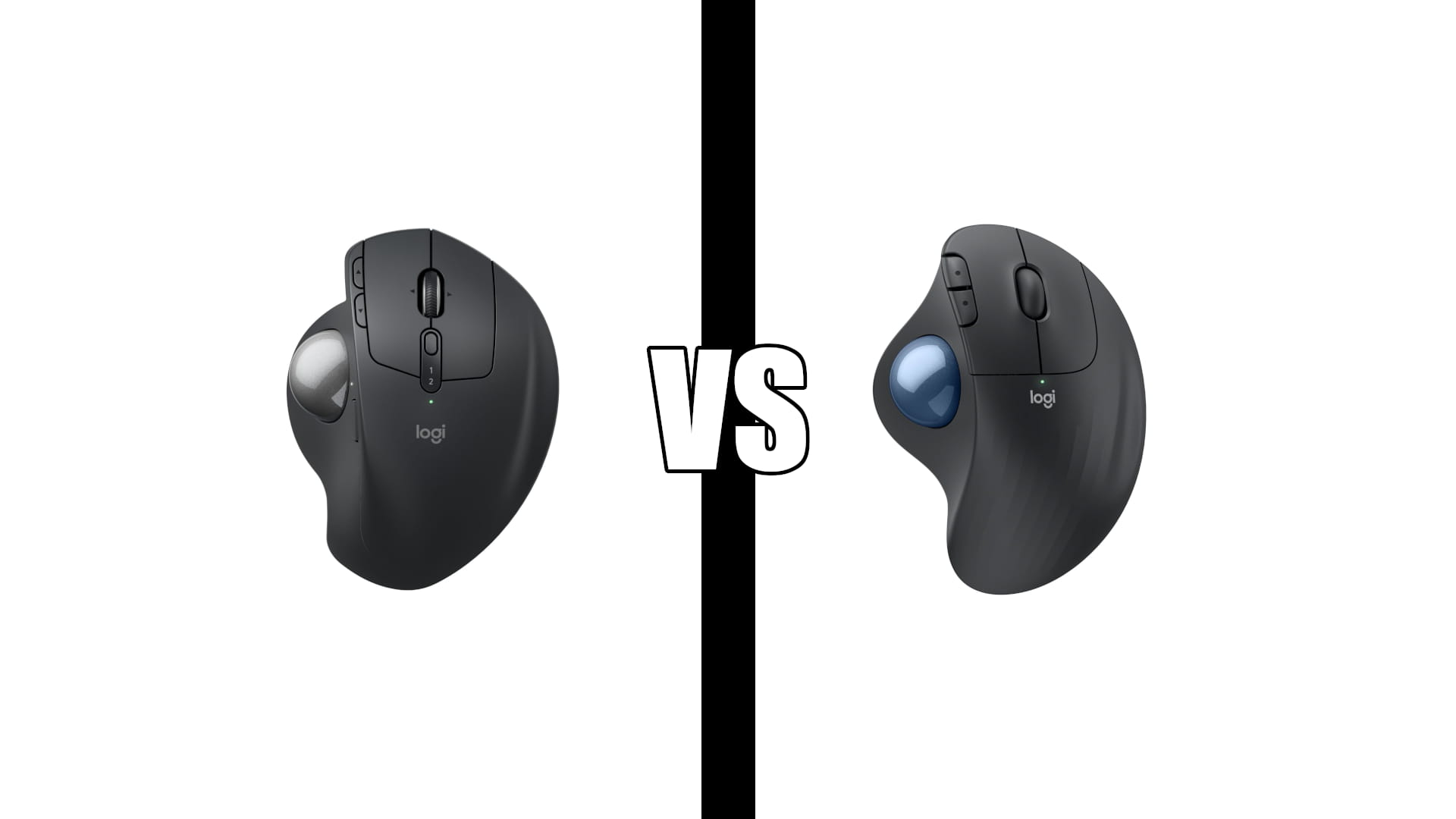
Logitech MX Ergo S vs M575S: Is Triple the Price Worth It?
Category: Tech & Gear | Reading time: 9 min | Last updated: November 2026
Disclosure: This post contains affiliate links. If you buy through our links we may earn a small commission at no extra cost to you.
Logitech MX Ergo S vs M575S. The MX Ergo S costs roughly three times what the ERGO M575S does. Logitech’s own figures say it reduces forearm strain by 27%, and the M575S by 25%.
Two percentage points. For triple the money.
So the extra is not buying you a healthier wrist. It is buying an adjustable tilt angle, three more programmable buttons and a rechargeable battery. Whether those are worth it comes down to your hands and your desk, and for a surprising number of people the cheaper trackball is the better one.
A note on model names. If you searched for the MX Ergo or the M575, those are the previous generation. Logitech replaced both in September 2024 with the MX Ergo S and the ERGO M575S, and those are the two compared here. The older pair still turns up on shelves and in older reviews, so check the S before you order.
Jump to a section
The short answer
Buy the ERGO M575S. It fits more hand sizes, it runs about 18 months on one AA battery, it has a higher rating from more than three times the reviews, and Logitech’s own strain figure is within two points of the expensive one. For most people this is the right trackball and the money saved is real.
Buy the MX Ergo S for three specific reasons: you want to adjust the tilt angle, you have medium to large hands, or you want six programmable buttons and a precision mode toggle rather than three buttons.
Both are right-handed only, both are thumb-operated, and neither is a treatment for carpal tunnel syndrome. If you are shopping because of diagnosed nerve pain, read the section near the bottom before you spend anything.
MX Ergo S in detail

At 4.4 stars from 861 reviews and over 2,000 sold a month, this is the trackball people buy when they have decided the category is worth paying for. The reports from people switching off a conventional mouse are consistent and fairly dramatic.
“This Logitech MX Ergo S trackball is ergonomically designed with an adjustable angle and I am not going to lie, it eliminated my wrist pain within days of switching. No more moving my whole arm around to use the mouse. Just thumb control of the trackball while my hand stays in a natural position. The adjustable tilt lets you customize the angle from flat to 20 degrees. I use it at the higher angle which keeps my wrist in a neutral position. The difference in comfort compared to a traditional mouse is dramatic. My forearm is no longer pronated all day long.”
Two things worth pulling out. He uses it at the full 20 degrees, which is the setting the M575S cannot reach. And the mechanism he describes, the forearm no longer rotating palm-down all day, is the same thing a vertical mouse does. If that is the problem you are solving, our Lift vs MX Vertical comparison covers the vertical route, which keeps a normal cursor movement instead of asking you to learn a ball.
Two complaints recur, and one of them matters.
“Was a great mouse. Smooth trackball quick response and love the adjustable ergonomic plate. However it sadly did not last. Almost made it 2 years and the right mouse button fails to respond. Another slight aggravation is there is no place to store the dongle on the unit. I’m not sure if the lifecycle of trackballs but I’ve never had the button fails, usually it’s the ball sensors. A quick YouTube search suggest this button issue is a reoccurring problem.”
A right button failing at around two years on a trackball at this price is worth knowing about, and the reviewer is not the only one to mention it. The dongle complaint is smaller but comes up repeatedly: there is nowhere on the body to store the Logi Bolt receiver, which is an odd omission on a device sold partly on portability.
ERGO M575S in detail
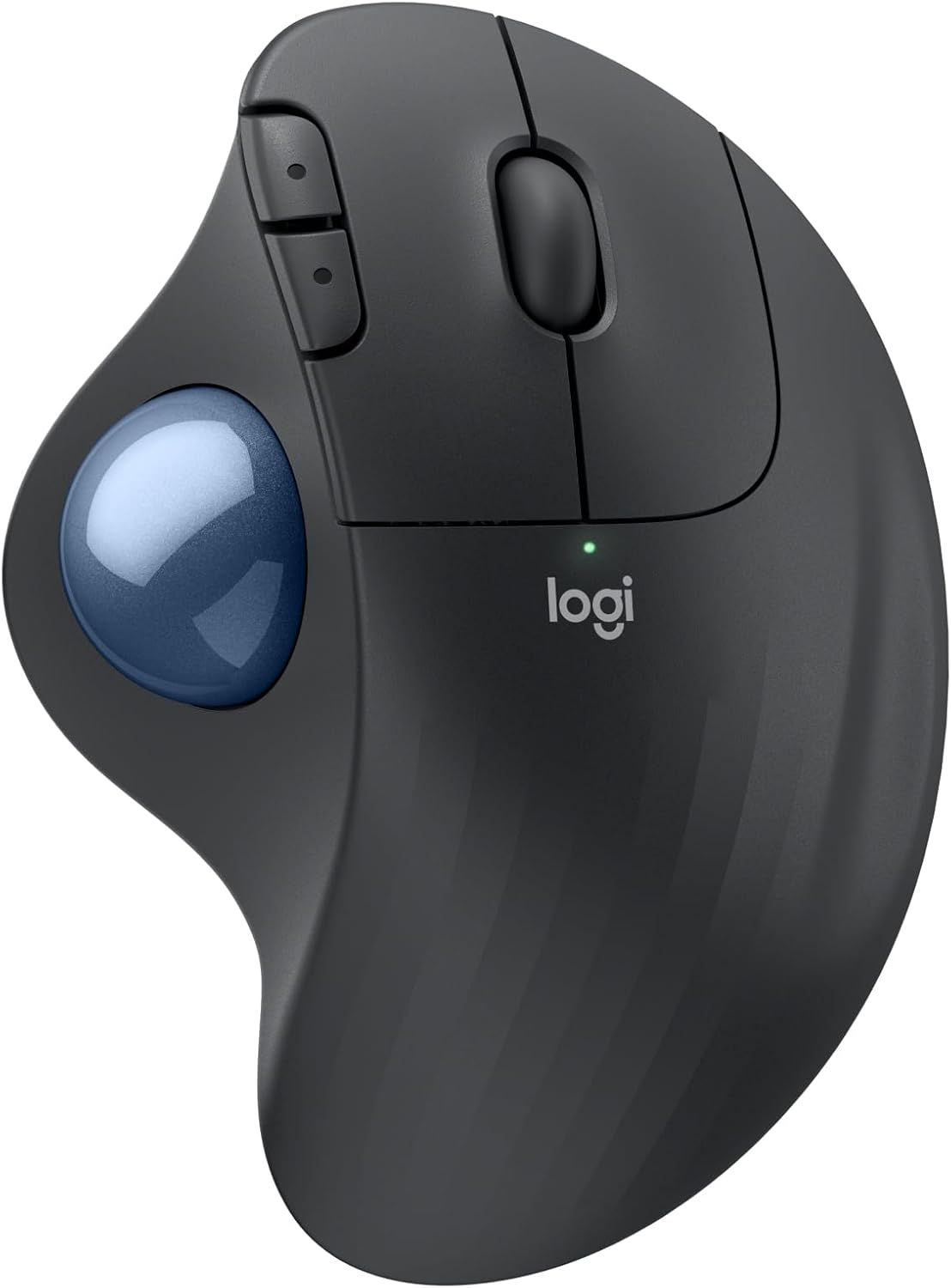
4.5 stars from 2,797 reviews with over 6,000 sold a month. It is both the better reviewed and the far more popular of the two, and it is the one Amazon flags as its choice in the category.
The most useful review comes from someone who has bought several Logitech trackballs over the years, which makes the criticisms land harder than the praise.
“I have purchased different Logitech trackball mouse items over the years. I gave 4 stars rather than 5 due to the connection difficulty (USB dongle and Bluetooth both had issues with connectivity where in the past the connection was instant no matter which was used) and the smoothness of the roller ball (seems to stick a little at first but that evens out with use). The scrolling speed is good and the click sound is exceptionally quiet. This is my preferred mouse because if you have limited desk space or are working on the go, you do not need additional space to maneuver the mouse. Typically, I have found that the battery lasts for at least a year. The fit to me is great, whether I am using this or my husband is, there is no issue. The fact that the mouse is ergonomic is a bonus as well, at least for someone who is right-handed. If you are left-handed, you may have issues with this particular design.”
Three things in there you will not find in the listing. Pairing is slower than earlier Logitech trackballs on both Bluetooth and the dongle. The ball sticks slightly when new and loosens with use. And it fits two different adults in the same household comfortably, which is the hand-size point below.
The adjustment period is real but short. Owners describe a few days of feeling clumsy followed by not wanting to go back.
“The ergonomic design is comfortable, and the thumb-operated trackball makes navigating effortless without constantly moving the mouse around my desk. It’s especially convenient when working for extended periods or in areas with limited desk space. There is a slight adjustment period if you’re accustomed to a traditional mouse, but once you get comfortable with the trackball, it’s hard to imagine going back.”
Specs side by side
| MX Ergo S | ERGO M575S | |
|---|---|---|
| Rating | 4.4 / 861 reviews | 4.5 / 2,797 reviews |
| Sold per month | 2,000+ | 6,000+ |
| Tilt angle | Adjustable, flat or 20 degrees | Fixed |
| Strain reduction claimed | 27% | 25% |
| Hand size | Medium to large | Most hand sizes |
| Programmable buttons | 6 | 3 |
| Precision mode toggle | Yes | No |
| Battery | Rechargeable, up to 120 days | AA, up to 18 months |
| Charging | USB-C, 24h from 1 min | Not applicable |
| Connection | Bluetooth or Logi Bolt | Bluetooth or Logi Bolt |
| Colors | One | Five |
| Dongle storage | No | No |
| Handedness | Right only | Right only |
The tilt, and what it actually buys
The adjustable plate is the headline feature and the main justification for the price, so it is worth being precise about what it does.
Both trackballs tilt your hand away from flat, which is the point. A conventional mouse forces your forearm into pronation, palm rotated down, and holds it there all day. Angling the device unwinds some of that rotation.
The M575S has one angle, chosen by Logitech. The MX Ergo S lets you pick flat or 20 degrees by moving a magnetic plate.
Here is the part that should set your expectations. Logitech publishes 27% less forearm muscle strain for the MX Ergo S and 25% for the M575S. Those are the manufacturer’s own numbers, measured in their own lab, and they are two points apart. Whatever the adjustable tilt is worth, Logitech is not claiming it delivers meaningfully more relief than the fixed one.
So the tilt is a fit feature, not a health feature. It is valuable if the M575S’s fixed angle happens to be wrong for your arm, or if you want to change it between sitting and standing. It is not valuable because 20 degrees is inherently better than whatever the M575S uses.
Monitor and desk height change your arm angle more than either trackball does. Our ergonomic setup guide covers getting those right first, because a well-angled trackball at a badly set desk is solving the smaller problem.
Hand size decides more than price
This is the sentence most reviews skip, and it is in both listings.
Logitech describes the MX Ergo S as “for medium- to large-sized hands.” It describes the M575S as “a good fit for most hand sizes.”
The cheaper trackball fits more people. If your hands are on the smaller side, the expensive one is not the upgrade, it is the wrong size, and no amount of tilt adjustment fixes a shell your thumb cannot comfortably reach across.
That is worth taking seriously because it is the same pattern as Logitech’s vertical mice, where the Lift is built for small to medium hands and the MX Vertical for large ones, and where buying the premium model regardless of hand size is the most common mistake. The M575S owner above mentions she and her husband both use the same unit without issue, which is what “most hand sizes” looks like in practice.
Measure before you spend. If your hand is under about seven inches from wrist crease to the tip of your middle finger, start with the M575S regardless of budget.
Battery, where the cheap one wins
Logitech MX Ergo S vs M575S. A straight inversion of what you would expect from the prices.
The MX Ergo S is rechargeable over USB-C, rated up to 120 days per charge, with a one minute top-up giving a day of use. That fast charge is genuinely useful and the cable is not included.
The M575S runs on one AA for up to 18 months, and Logitech puts the battery in the box. One owner reports at least a year of real use and switches to lithium cells for longer.
So the cheaper trackball asks for your attention roughly four and a half times less often. Which you prefer is a genuine split: rechargeable means never buying batteries, replaceable means never being tethered to a cable at the wrong moment. Neither is the premium answer, whatever the price suggests.
Is a trackball right for you at all
Worth answering before the Max versus budget question, because most people reading this have never used one.
A trackball stays still. You move the cursor by rolling a ball with your thumb while your hand and arm stay put. That is the whole proposition, and it has three consequences.
It needs almost no desk space, which makes it genuinely good on a small desk, a shared table or a train. Owners of both models raise this unprompted.
Your arm stops reaching. If your shoulder or elbow aches rather than your wrist, eliminating the reach is the relevant fix, and a trackball does it more completely than any mouse shape.
There is a learning curve of a few days, and your speed drops before it recovers. Fine detail work is where people notice it most. If you do pixel-level design work, expect to want the MX Ergo S’s precision mode.
If the reach is not your problem and your wrist is, a vertical mouse solves the same pronation issue with no retraining at all. Our Lift vs MX Vertical comparison covers that path, and our ergonomic mouse guide covers the wider field.
What neither one will fix
Both listings lean on ergonomist certification and strain percentages, and it is worth being clear about the limits of that.
“The functionality and quality of this trackball mouse is outstanding and exactly what I have come to expect from Logitech. The reason I gave them only three stars is due to the claims made in terms of eliminating the symptoms caused by repetitive use and the presence of carpal tunnel syndrome. I have severe carpal tunnel syndrome that affects both hands. I can only use a mouse for a few minutes before my hand becomes numb, forcing me to take a break. I thought the Ergo trackball mouse was the answer to my issues however, in practice, my hand still went numb after only a few minutes. The bottom line is I didn’t notice any improvement so I returned it.”
A reduction in average forearm muscle strain across a test group is not the same thing as relief from a diagnosed nerve compression. People switching off a conventional mouse with general aches report real improvement, and that shows up repeatedly in both products’ reviews. Someone with severe carpal tunnel may get nothing.
If you have been diagnosed with anything, treat a trackball as one input alongside advice from whoever is treating you, not as the fix. And buy it somewhere you can return it, which is what that reviewer did.
Which to buy
| If you | Buy |
|---|---|
| Are trying a trackball for the first time | ERGO M575S |
| Have smaller hands | ERGO M575S |
| Have medium to large hands | Either, MX Ergo S fits better |
| Want to adjust the tilt angle | MX Ergo S |
| Switch between sitting and standing | MX Ergo S, for the angle |
| Do pixel-level detail work | MX Ergo S, for precision mode |
| Want to think about batteries least | ERGO M575S, 18 months per AA |
| Hate buying batteries | MX Ergo S, rechargeable |
| Need more than three programmable buttons | MX Ergo S |
| Are left-handed | Neither, both are right-hand only |
| Are not sure | ERGO M575S |
The M575S is the honest default and it is not a compromise pick. Higher rating, more than three times the reviews, three times the monthly sales, fits more hands, far longer between batteries, and a strain figure two points off the expensive one by Logitech’s own measurement.
The MX Ergo S earns its price for a narrower group: larger hands, a desire to set the angle yourself, or a workflow that wants six buttons and a precision toggle. Those are real reasons. They are just not most people’s reasons.
Frequently asked questions
Is the MX Ergo S worth three times the M575S?
For most people, no. Logitech claims 27% less forearm strain for the MX Ergo S and 25% for the M575S, so the extra is buying an adjustable tilt, three more buttons and a rechargeable battery rather than better ergonomics. If you have larger hands or want to set the angle yourself, it is worth it.
Is a trackball better than a vertical mouse?
They fix different things. A trackball removes the reaching, which helps shoulder and elbow strain and saves desk space, at the cost of a few days relearning. A vertical mouse unwinds forearm rotation while keeping normal cursor movement, so there is nothing to relearn.
How long does it take to get used to a trackball?
Owners consistently describe a few days of feeling clumsy, then preferring it. Fine detail work takes longest to recover.
Will a trackball help carpal tunnel syndrome?
Maybe not. Logitech’s figures describe average muscle strain across a test group, not relief from diagnosed nerve compression, and at least one buyer with severe carpal tunnel reported no improvement and returned it. Worth trying with an easy return, worth discussing with whoever is treating you, not worth treating as a cure.
Are these left-handed friendly?
No. Both are sculpted for right-handed use with a thumb-operated ball. Left-handed users need a symmetrical or finger-operated trackball from another brand.
Do they come with the USB receiver?
Both include a Logi Bolt receiver and both also work over Bluetooth. Neither has anywhere on the body to store the receiver, which several owners find irritating on a device you might travel with.
Sources and references
- Logitech MX Ergo S review: is it worth choosing a trackball over a mouse, ITC
- Computer Workstations eTool, OSHA
Continue reading
Strain reduction figures are Logitech’s own published claims. Specifications taken from current manufacturer listings and verified buyer reviews. Prices change often, so check at checkout. Last updated November 2026.