Ergotron LX vs LX Pro: Why “Pro” Holds Less Weight (2026)
Category: Tech & Gear | Reading time: 10 min | Last updated: October 2026
Disclosure: This post contains affiliate links. If you buy through our links we may earn a small commission at no extra cost to you.
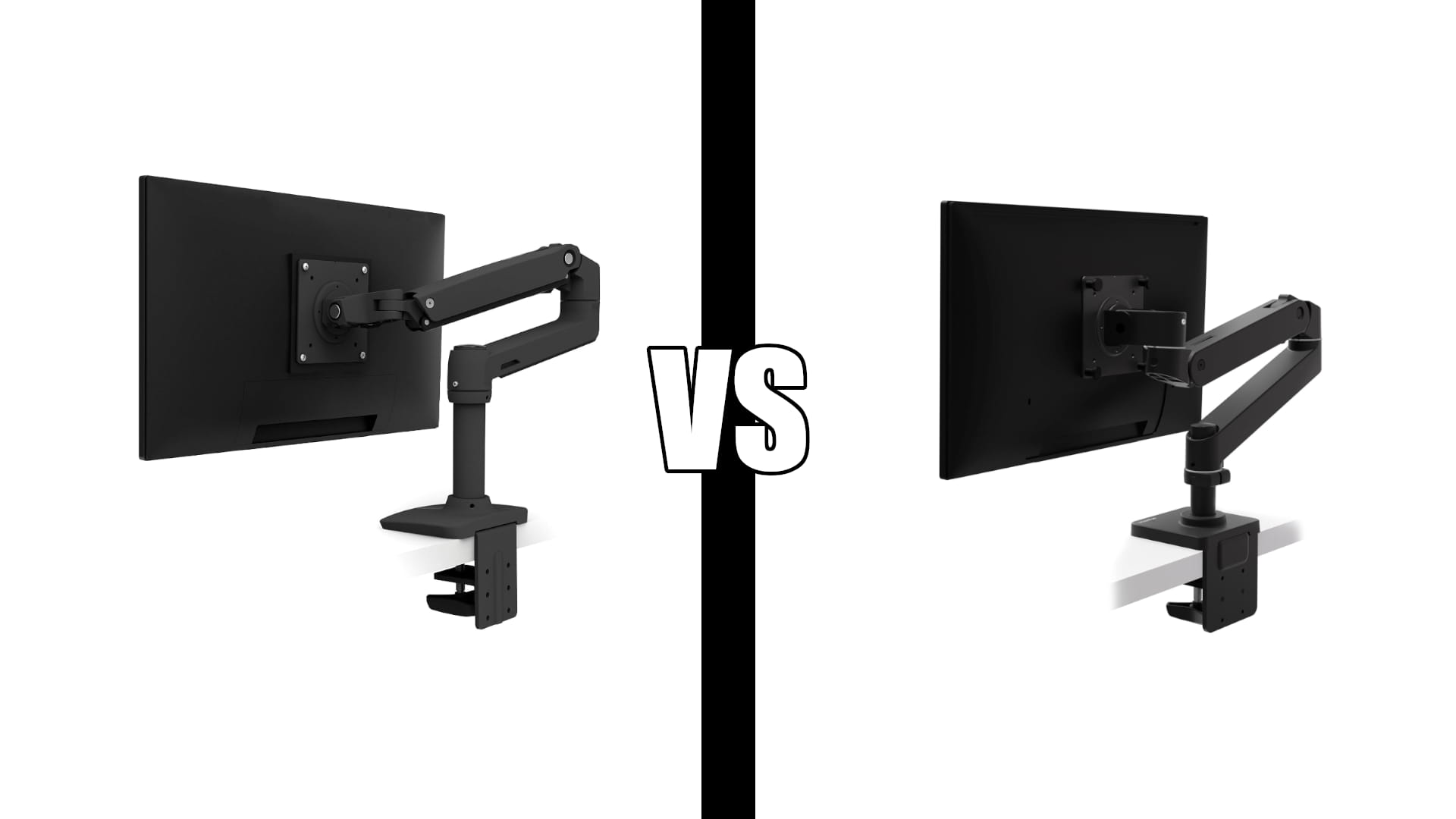
Ergotron LX vs LX Pro. Ergotron sells the LX and the LX Pro from the same Amazon listing, with a style dropdown switching between them. The Pro costs less. Most people assume that means it is the stripped-down version of the same arm.
It is not. It is a different arm with a lower weight limit, and that is the whole story.
The LX holds 7 to 25 pounds. The LX Pro holds 4 to 22. If your monitor is over 22 pounds, which includes a lot of 32 inch panels and most 34 inch ultrawides, the cheaper arm is not an option at all.
There is also a gap between what the Pro is rated for and what owners report it comfortably handles. More on that below, because it is the part that decides this.
Jump to a section
The quick answer
Weigh your monitor without its stand. That single number decides this.
| Monitor weight | Buy |
|---|---|
| Under 7 lb | LX Pro, since the LX needs at least 7 lb to work properly |
| 7 to 20 lb | LX |
| 20 to 25 lb | LX |
| Over 25 lb, or over 34 inches | HX |
For most people the answer is the standard LX. It covers the widest range, it has over ten thousand ratings at 4.6, and it ships with both mounting options in the box.
All three compared
| LX Pro | LX | HX | |
|---|---|---|---|
| Weight capacity | 4 to 22 lb | 7 to 25 lb | 20 to 42 lb |
| Max screen size | 34″ | 34″ | 49″ |
| Max monitor depth | 3.6″ | Not stated | Not stated |
| Lift range | 13″ | 13″ | 11.5″ |
| Height above desk | 18.3″ | 17.3″ | 17.8″ |
| Tilt | 85° | 75° | 75° |
| Rotation | 360° | 360° | 360° |
| VESA | 75×75, 100×100 | 75×75, 100×100 | 75×75, 100×100, 200×100, 200×200 |
| Desk clamp fits | 0.4 to 2.4″ | 0.4 to 2.4″ | 0.4 to 2.6″ |
| Grommet mount | Sold separately | Included | Included |
| Warranty | 10 years | 10 years | 10 years |
| Owner rating | 4.0 | 4.6 | 4.6 |
Three rows matter more than the rest.
Weight capacity is the real difference, and it runs opposite to the naming.
The grommet mount is the one nobody mentions. The LX includes both a desk clamp and a grommet mount in the box. The LX Pro includes only the clamp, with the grommet mount as a separate accessory. If your desk has a cable hole you were planning to mount through, that is an extra purchase that eats the saving.
The Pro is not strictly worse. It reaches an inch higher and tilts ten degrees further. That is a genuine trade, just not the trade most buyers think they are making.
Why the Pro costs less
Because it is built for lighter screens. That is the entire explanation.
The naming is the problem. In almost every product category, “Pro” means more capable. Here it means a different load range: a lower ceiling at 22 pounds and a lower floor at 4.
The lower floor is worth understanding, because it is the one case where the Pro is clearly the right arm. The standard LX needs at least 7 pounds of monitor to hold position. Hang something lighter on it and the gas spring pushes the arm up, because there is not enough weight to balance against. If you have a genuinely light 24 inch panel, the Pro is built for you and the LX is not.
Everyone else is choosing a lower ceiling to save a small amount of money.
The rating and the reality
Here is where the spec sheet and owner experience part company.
The LX Pro is rated to 22 pounds. One detailed owner account describes running a 32 inch monitor weighing 14.2 pounds, with the lift assist adjusted to its maximum setting, and still finding it very difficult to raise. Their 27 inch monitor on the same arm worked fine at about 75 percent of maximum assist.
That is a monitor at roughly two thirds of the rated capacity already needing two hands.
A separate reviewer who used three different Ergotron arms reported the LX Pro sagging under its own load with a 27 inch Dell, and described it as feeling “light in a bad way.” Their standard LX held a heavier monitor with no wobble.
Neither is a controlled test, and both are individual experiences. But they point the same direction, and the rating pattern backs them up: the Pro sits at 4.0 while the LX and HX both sit at 4.6.
The practical read. Treat the Pro’s 22 pound rating as the point where it physically holds, not the point where it comfortably adjusts. If you move your monitor up and down regularly, stay well under it.
Ergotron LX

The one to buy unless you have a specific reason not to. It covers the widest weight range of the two 34 inch arms, it comes with both mounting methods, and it has the review volume to back it: nearly eleven thousand ratings at 4.6.
It is also the only one of the three available in polished aluminium as well as matte black, if the finish matters to you.
The limitation is the 7 pound minimum. A very light monitor will not hold position on it, which is the one scenario where you want the Pro instead.
“I owned a cheap monitor arm for several years and always hated it. It was cheap and felt cheap. I decided to finally replace it when I recently bought a new desk. This Ergotron is like a work of art. It is incredibly well designed, simple to use and does a great job doing what it’s designed to do. No annoying plastic. It is very stable and easily adjusted, it manages cables well. All I can tell you is I don’t regret the purchase one bit.”
Who it’s for: Almost anyone with a monitor between 7 and 25 pounds.
Pros:
- Widest practical weight range of the two standard arms
- Desk clamp and grommet mount both included
- Nearly eleven thousand ratings at 4.6
- Polished aluminium finish available
Cons:
- Needs at least 7 pounds to hold position
- Reaches an inch lower than the Pro
- 34 inch screen limit
Ergotron LX Pro

Buy this one for a light monitor, or for the extra inch of height, and not because the name sounds better.
Where it genuinely wins: the 4 pound minimum means it works with light panels the LX cannot hold, it reaches 18.3 inches above the desk against the LX’s 17.3, and it tilts 85 degrees against 75. On a standing desk where you need the screen high, that extra inch is real.
Where it does not: a 22 pound ceiling, no grommet mount in the box, matte black and dark grey only, and a 3.6 inch monitor depth limit that the LX listing does not state at all.
The owner feedback is also the weakest of the three, and specific enough to be useful rather than vague.
“The monitor arm is made from an attractive powder-coated aluminum but as others have noted it is very light weight for an arm in the price range. There is an adjustment for the amount of assist in the lifting mechanism. The adjustment for the 27 inch went fine, I increased the lift to about 75% of max and it works great. However, with the 32 inch monitor, I adjusted the assist to the maximum setting, and it was still very difficult to raise. The monitor only weighs 14.2lbs. This may be a deal killer for someone who needs the ability to easily raise and lower the arm with a larger heavy monitor.”
The same reviewer flagged the cable routing as a bigger problem than the lift. The channels are concealed by two removable plastic panels, but the upper one is difficult to remove without feeling like it will break, and the pathway does not continue through the arm joint, so cables have to exit the bottom section and re-enter the top. The cable exit on the upper arm also sits high enough that a thick HDMI or DisplayPort cable has to bend sharply back on itself, and they described a power cable as impossible to route that way. They ended up zip tying cables to the outside of the arm.
If internal cable routing is the reason you are buying an arm, that is worth knowing. Our standing desk cable management guide covers how to handle it externally if you end up in the same position.
Plenty of owners are happy with it, and it is the right arm for a light screen.
“This monitor arm feels like a real quality upgrade. It is sturdy, smooth to adjust, and does a great job holding the monitor securely without feeling cheap or wobbly. Once installed, it makes the whole desk look cleaner and gives much more flexibility for positioning the screen exactly where you want it. The movement is smooth, the build quality is excellent, and it helps free up desk space in a big way.”
Who it’s for: Light monitors under about 15 pounds, or anyone who needs the extra inch of height.
Pros:
- Works with screens as light as 4 pounds
- Reaches an inch higher than the LX
- Ten degrees more tilt
- Same 10 year warranty
Cons:
- 22 pound ceiling, and owners report difficulty well below it
- Grommet mount not included
- Cable routing is awkward by owner accounts
- 4.0 rating against 4.6 for both siblings
Ergotron HX

The answer when neither 34 inch arm will do. Its 20 pound minimum means it is genuinely a different class rather than an upgrade, so a light monitor will float on it exactly as it would on an oversized LX.
The VESA support is the other real difference. The LX and LX Pro stop at 100x100mm. The HX adds 200x100mm and 200x200mm, which is what large panels actually use, and there is a separate adaptor kit for patterns beyond that.
The trade is lift range. You get 11.5 inches against the LX’s 13, because holding 42 pounds steady and giving a long travel range work against each other.
“I went through a couple of cheaper heavy-duty mounts that claimed they could hold a massive curved monitor, but they always ended up sagging or feeling unstable. The Ergotron HX is in a completely different league. The build quality is phenomenal. The best part is the movement, it is buttery smooth. Even with a massive, heavy screen attached, you can adjust the height and angle with just one hand and it stays perfectly locked in place without any drooping.”
Who it’s for: Anything over 25 pounds or wider than 34 inches.
Pros:
- Handles up to 42 pounds and 49 inches
- VESA to 200x200mm
- Holds position one-handed with heavy screens
- 4.6 rating across more than two thousand reviews
Cons:
- 20 pound minimum rules out normal monitors
- Less lift range than the LX
- Needs a sturdy desk
If you have an ultrawide
This is where people buy the wrong arm, so check two numbers before ordering.
Weight, without the stand. Manufacturer listings quote weight with the stand attached, which can be several pounds more than what the arm actually carries. Find the panel-only figure. A 34 inch ultrawide often lands between 15 and 22 pounds, which puts it near the top of the LX’s range and past comfortable territory for the Pro.
VESA pattern. Large panels frequently use 200x100mm, which neither 34 inch arm supports. That alone forces the HX.
One specific gotcha. If you have a Samsung 49 inch Odyssey G9, the standard HX will not work on its own. Ergotron states you need the separate HX Heavy Duty Tilt Pivot, accessory 98-540-216, or a bundle that includes the HD Pivot in the box. Buying the plain HX for a G9 means a second order.
Our ultrawide vs dual monitors comparison covers whether an ultrawide suits your work in the first place, and it includes the VESA trap we found on one popular panel.
Frequently asked questions
Is the Ergotron LX Pro better than the LX?
No, it is different. The Pro holds 4 to 22 pounds and the LX holds 7 to 25, so the Pro has a lower ceiling. It reaches an inch higher and tilts ten degrees further, which are real advantages, but it costs less because it carries less. For most monitors the standard LX is the better buy.
Why is the LX Pro cheaper than the LX?
Because it is built for lighter screens. The naming suggests an upgrade, but “Pro” here refers to a different load range rather than a higher tier. The Pro also ships without the grommet mount that comes in the box with the LX.
How much weight can an Ergotron LX hold?
7 to 25 pounds, for screens up to 34 inches. The minimum matters as much as the maximum: below 7 pounds the arm will not hold position, because there is not enough weight to balance the gas spring.
Will the LX Pro hold a 32 inch monitor?
Only if it is light, and even then expect stiff adjustment. One owner reported a 14.2 pound 32 inch monitor being very difficult to raise with the lift assist at maximum, well inside the 22 pound rating. If you adjust your monitor height often, go up to the LX or the HX.
Which Ergotron arm do I need for a 34 inch ultrawide?
Usually the LX, but check the panel-only weight first, not the weight with the stand. If it is over 25 pounds or uses a 200x100mm VESA pattern, you need the HX.
Do I need the HX for a 49 inch monitor?
Yes, and possibly an accessory with it. The HX supports up to 49 inches, but for the Samsung Odyssey G9 specifically Ergotron requires the separate HX Heavy Duty Tilt Pivot or a bundle that includes the HD Pivot.
Are Ergotron arms worth it over a cheap one?
They hold position without sagging and they come with a 10 year warranty, which is the gap owners of cheaper arms describe most often. Our best monitor arm guide covers the budget options worth considering, and our monitor stand guide covers risers if you do not need an arm at all.
Sources and references
- Ergotron Monitor Arm Buying Guide: LX vs LX Pro vs HX, Best Office Finds
- Ergotron 45-695-292 LX Pro specifications, Markertek
- Best monitor arms 2026, PCWorld
- Best Monitor Arm for Home Office, Home Office Nomad
Continue reading
Prices change often. Check current pricing at checkout. Last updated October 2026.