Best Monitor Arm for Home Office 2026
Category: Desk Setups | Reading time: 13 min | Last updated: July 2026
Disclosure: This post contains affiliate links. If you buy through our links we may earn a small commission at no extra cost to you.
All 7 picks at a glance
A monitor arm lifts your screen off the desk, frees up the surface underneath, and lets you position your monitor at exactly the right height and angle for your posture. Most monitors come with stands that only adjust a few inches in height and don’t tilt or swivel meaningfully — a monitor arm fixes all of that and makes a noticeable difference in how your neck and shoulders feel after a long day.
This guide covers the seven best monitor arms from $19.99 to $432.99 — budget single arms, mid-range options with ergonomic certifications, dual arms for two-monitor setups, a laptop and monitor combo arm, and a heavy-duty option for large ultrawide screens.
Monitor height is one of the most important ergonomic adjustments — our ergonomic home office setup guide covers the complete positioning picture.

Jump to a pick
- 1. ErGear Single Arm — Best overall
- 2. HUANUO FlowLift Pro — Best mid-range single
- 3. HUANUO FlowLift Dual — Best dual arm
- 4. Ergotron LX Single — Best premium single
- 5. Ergotron LX Dual — Best premium dual
- 6. WALI 2-in-1 — Best laptop + monitor combo
- 7. HUANUO TitanLift — Best for ultrawide monitors
1. ErGear Single Monitor Arm — Best overall

At $19.99 the ErGear is the most affordable monitor arm in this guide that doesn’t compromise on the basics. It fits monitors from 13 to 34 inches, handles screens up to 19.8 lbs, and offers 17.5 inches of height adjustment — enough to get most monitors to true eye level regardless of desk or chair height. The 18.1-inch reach lets you push the monitor further back or pull it closer depending on your working distance preference.
The tool-free VESA plate speeds up installation significantly — no searching for screwdrivers mid-setup. Built-in cable clips keep the cable run organized along the arm. Compatible with VESA 75×75 and 100×100 patterns. C-clamp or grommet mounting for desks 0.39 to 2.56 inches thick.
9,000+ units bought last month confirms this is the go-to budget monitor arm for most buyers. Tested through 20,000 adjustment cycles so it should hold its position reliably over years of daily use.
“Very happy with this monitor arm. It looks great on my desk and gives a lot more flexibility than a standard monitor stand — I can move the monitor left or right, tilt it, raise it, lower it, and position it higher when working standing up. Feels sturdy, moves smoothly, and makes it easy to find a comfortable viewing angle throughout the day. Also helps free up desk space and gives the workspace a much cleaner look. One thing to note: avoid installing directly on a glass desk without proper protection underneath — the clamping pressure can be risky for glass surfaces. Overall a solid, well-built arm that performs exactly as expected.”
Who it’s for: Anyone who wants a reliable monitor arm without spending more than $20.
Pros:
- Under $20 — cheapest arm in this guide
- Fits monitors up to 34″ and 19.8 lbs
- Tool-free VESA mount
- 17.5″ height adjustment
- 9,000+ bought last month
- 20,000 cycle tested
Cons:
- No certifications or endorsements
- Alloy steel rather than aluminum
- 3,836 reviews — moderate sample vs Ergotron
| Spec | Detail |
|---|---|
| Price | ~$19.99 |
| Fits | 13-34″, up to 19.8 lbs |
| Height adjustment | Up to 17.5″ |
| Reach | Up to 18.1″ |
| Mount | C-clamp or grommet |
| VESA | 75×75, 100×100 |
2. HUANUO FlowLift Pro — Best mid-range single

The HUANUO FlowLift Pro is the most certified arm in this guide — TÜV Rheinland safety certification and an endorsement from the American Chiropractic Association for ergonomic positioning. For anyone who wants third-party validation that the arm actually does what it claims for posture and neck health, those credentials matter.
The MechaSpring tension system keeps the arm holding position smoothly — tested through 20,000 cycles and rated at 3x its load capacity. The PrecisionView tension window is a useful practical feature: a visible yellow indicator shows you when the tension is correctly calibrated for your monitor weight, removing the guesswork that comes with most arms.
Low review count at 365 is worth noting — this is a newer arm and the #1 New Release badge reflects recent market arrival rather than long-term validation. The credentials are real but the sample size is smaller than the ErGear or Ergotron options.
“Really good — sturdy and stable. Can move it to different positions and really easy to adjust. Took me 5 minutes to install. For the price the quality is really good value.”
Who it’s for: Anyone who wants ergonomic certifications and a quality build at a mid-range price point.
Pros:
- TÜV Rheinland certified
- American Chiropractic Association endorsed
- MechaSpring for smooth consistent support
- 90% metal construction
- PrecisionView tension indicator
- Quick installation
Cons:
- Only 365 reviews — newest arm in this guide
- Wooden desks only, 0.59″-3.54″ thick
- No cross beams under desk
| Spec | Detail |
|---|---|
| Price | ~$25.64 |
| Fits | 13-32″, 4.4-19.8 lbs |
| Certifications | TÜV Rheinland, ACA endorsed |
| Construction | 90% metal |
| Mount | C-clamp or grommet |
| VESA | 75×75, 100×100 |
3. HUANUO FlowLift Dual — Best dual arm

The HUANUO dual arm is the #1 Best Seller in monitor arms on Amazon with 34,404 reviews and 4.6 stars — the most validated dual arm available at any price. If you’re running two monitors and want to free up both stands’ footprint from your desk, this is the default recommendation.
Full motion on each arm independently: +85°/-50° tilt, ±90° swivel, 360° rotation, and height adjustment up to 15.75″. Each arm handles monitors from 13 to 32 inches and up to 19.8 lbs. Built-in cable management routes cables along both arms keeping the setup clean. Dual C-clamp base or grommet mounting.
Choosing between a dual arm and a single wide screen? Our ultrawide vs dual monitors comparison covers VESA patterns and weight ratings for both setups.
If you’re building a dual monitor setup, we cover the full setup including monitors, connectivity, and desk mat in our best dual monitor setup guide.
“I wasn’t expecting to like this as much as I do — this monitor stand completely upgraded my desk setup. Setup was extremely fast and easy, feels very sturdy and secure with no wobbling even when adjusting. Supports both screens easily and holds position well thanks to the spring arms. The biggest win is the range of motion — height, tilt, swivel, and rotation make it easy to find a comfortable position whether working or gaming. It also cleared up a ton of desk space which I didn’t realize I needed until I had it. A couple things to note: tension takes a bit of effort to adjust perfectly at first, and I’d recommend a wider desk so the monitors aren’t too close to your face. Overall one of those upgrades that actually makes a difference day to day.”
Who it’s for: Anyone running two monitors who wants the most proven dual arm available.
Pros:
- #1 Best Seller in monitor arms
- 34,404 reviews — most validated arm in this guide
- Full motion on each arm independently
- 10,000+ bought last month
- Dual C-clamp or grommet
Cons:
- Wooden desks only, 0.59″-3.54″ thick
- No cross beams under desk allowed
- Not for monitors over 32″ or 19.8 lbs
| Spec | Detail |
|---|---|
| Price | ~$59.99 |
| Fits | Two 13-32″ monitors, up to 19.8 lbs each |
| Height | Up to 15.75″ |
| Movement | Tilt, swivel, rotate |
| Mount | Dual C-clamp or grommet |
| VESA | 75×75, 100×100 |
4. Ergotron LX Single — Best premium single

Ergotron is the benchmark that every other monitor arm gets compared to, and the LX is their most popular model. At 4.7 stars across 10,944 reviews it’s the highest rated arm in this guide. The 10-year warranty is industry-leading — no other arm in this guide comes close to that coverage period.
Fits monitors up to 34 inches and 25 lbs — a higher weight capacity than the budget options, which matters for larger or heavier displays. 17.3 inches of height adjustment gives more range than most budget arms. The articulating arm extends, retracts, and folds cleanly, and the build quality is noticeably more solid than anything under $100.
The $209.99 price is a real investment. It’s worth it if you have an expensive monitor you want to treat well, if you need the 10-year warranty assurance, or if you want an arm that moves smoothly and holds position perfectly for years. It’s not worth it if a $20 ErGear will do the same job for your setup.
“I owned a cheap monitor arm for several years and always hated it — cheap and felt cheap. This Ergotron is like a work of art. It literally brings me a small piece of joy just looking at it. Incredibly well designed, simple to use, very stable and easily adjusted, manages cables well. No annoying plastic. Is it necessary? Probably not — all I can tell you is I don’t regret the purchase one bit. If you’re not happy with yours, get it.”
Who it’s for: Anyone who wants the best-built single monitor arm available and is willing to pay for it.
Pros:
- 4.7 stars — highest rated arm in this guide
- 10-year warranty — industry leading
- Fits up to 34″ and 25 lbs
- 17.3″ height adjustment
- Premium build quality
- 10,944 reviews — well validated
Cons:
- $209.99 — most expensive single arm here
- Desk clamp only fits desks 0.4-2.4″ thick
- Overkill for budget monitor setups
| Spec | Detail |
|---|---|
| Price | ~$209.99 |
| Fits | Up to 34″, 7-25 lbs |
| Height adjustment | 17.3″ |
| Warranty | 10 years |
| Mount | C-clamp or grommet |
| VESA | 75×75, 100×100 |
5. Ergotron LX Dual — Best premium dual

The Ergotron LX Dual is the premium option for two-monitor setups — same build quality and 10-year warranty as the single arm, with two fully articulating arms on a shared pole. Each arm handles monitors up to 27 inches and 20 lbs independently.
At $432.99 this is significantly more expensive than the HUANUO dual arm at $59.99. The Ergotron earns that premium through smoother movement, longer warranty, and better long-term reliability — but for most home office setups the HUANUO covers the practical need at a fraction of the cost. The Ergotron dual makes sense if you have expensive monitors, want the 10-year warranty, or simply want the best.
“The absolute best monitor arm I’ve ever used. The stability, strength, and construction are astounding. The maximum rating is 27 inches and 20 lbs per arm but I have a curved 32-inch MSI on one arm and it feels rock solid without modifying the tension. Ergotron thought of everything — my desk has a lip that hangs off the edge and the clamp wouldn’t fit. But the box included parts to convert to a grommet bolt-through mount, which saved me from having to modify my desk or return it. Made the whole process a breeze even with that hurdle.”
Who it’s for: Professionals who want the best dual monitor arm available and already own high-end monitors worth protecting.
Pros:
- 10-year warranty
- Premium articulating build quality
- 360° rotation per arm
- Both C-clamp and grommet included
- Ergotron’s reputation and support
Cons:
- $432.99 — most expensive arm in this guide
- Fits monitors up to 27″ only — not for larger displays
- 447 reviews — smaller sample
| Spec | Detail |
|---|---|
| Price | ~$432.99 |
| Fits | Two monitors up to 27″, 7-20 lbs each |
| Lift | 13″ |
| Warranty | 10 years |
| Mount | C-clamp and grommet |
| VESA | 75×75, 100×100 |
6. WALI 2-in-1 Laptop + Monitor Arm — Best laptop and monitor combo

Most people using a laptop with an external monitor end up with the laptop taking up desk space next to the monitor. The WALI solves that — it holds both your laptop and your external monitor on separate arms from a single desk mount, getting both screens off the surface entirely.
The laptop tray fits notebooks up to 17 inches and has ventilation holes for airflow to prevent overheating. The monitor arm handles screens up to 32 inches and 26.4 lbs independently on its own arm. Both arms offer full motion adjustment so you can position laptop and monitor at different heights and angles — useful for clamshell mode where the laptop is positioned vertically or to the side.
For laptop stand options that don’t require a monitor arm, see our best laptop stands guide.
If your laptop runs hot while docked our best laptop cooling pad guide covers seven options from $21.59 to keep temperatures in check.
“Great laptop arm — the best one I could find to accommodate my larger gaming laptop. Feels secure and the clips hold it well. My only complaint is the way the VESA mount is screwed onto the plate causes the laptop to wobble slightly when you bump the desk or type on it. Not a deal breaker and pretty much all laptop arms seem to have this setup anyway.”
Who it’s for: Laptop users who want both their laptop and external monitor off the desk surface on a single mount.
Pros:
- Holds laptop and monitor simultaneously
- Ventilated laptop tray for airflow
- Fits laptops up to 17″ and monitors up to 32″
- Full motion on both arms
- C-clamp or grommet mounting
Cons:
- More complex setup than single monitor arms
- Takes up more desk clamp space
- Not for desktop PC users
| Spec | Detail |
|---|---|
| Price | ~$37.99 |
| Laptop | Up to 17″, 22 lbs |
| Monitor | Up to 32″, 26.4 lbs |
| Movement | Full motion both arms |
| Mount | C-clamp or grommet |
7. HUANUO TitanLift — Best for ultrawide monitors
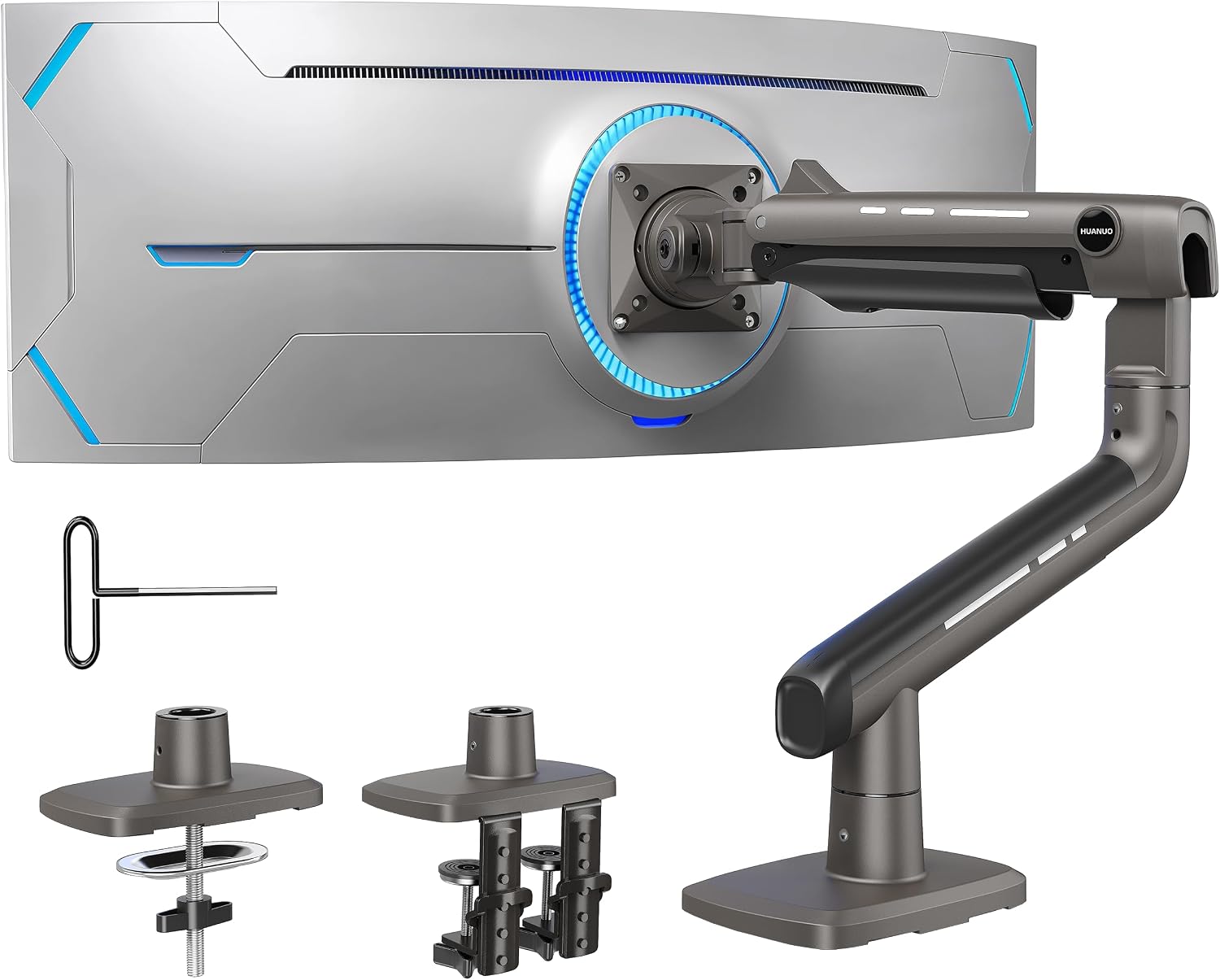
Every other arm in this guide has a maximum weight of 19.8-26 lbs and a maximum size of 34 inches. The HUANUO TitanLift goes to 44 lbs and 49 inches — specifically designed for the 34-49 inch ultrawide monitors that standard arms can’t handle.
High-strength aluminum alloy construction with 20% thicker arms and a 30% wider base than standard HUANUO arms. Tested through 50,000 adjustment cycles at 3x its rated load — the most rigorously tested arm in this guide. 19.6 inches of height adjustment and 22.5 inch reach give you more positioning range than any other arm here.
If you’re running a 34-49 inch ultrawide and every other arm in this guide is literally too small or too weak for your screen, this is your option.
“I use Ergotron monitor arms at work every day and the difference in quality between this HUANUO and the Ergotrons is negligible for home use. Is the Ergotron better? Yes. Is it $200 better? Not for 99% of people. The range of motion is crazy good — goes up high enough that I can vertically mount my 34-inch ultrawide. Two solid mounting options, rubber-grip hex wrench included for tension adjustments, everything that needs to be metal is aluminum. The value is insane. At full price it would still be worth it. In a professional setting where you’re moving monitors constantly, maybe spend more. For home use this is perfect.”
Who it’s for: Anyone with a large ultrawide monitor between 34-49 inches that standard arms can’t support.
Pros:
- Fits monitors up to 49″ and 44 lbs
- 50,000 cycle tested — most rigorous in this guide
- 3x load rated
- 19.6″ height adjustment
- 22.5″ reach
- High-strength aluminum alloy
Cons:
- $93.98 — premium price for a single arm
- Wooden desks only, 0.8″-3.5″ thick
- 402 reviews — newer product
| Spec | Detail |
|---|---|
| Price | ~$93.98 |
| Fits | 17-49″, 6.6-44 lbs |
| Height adjustment | 19.6″ |
| Reach | 22.5″ |
| Construction | Aluminum alloy |
| Mount | Dual C-clamp |
How to choose
If you want a simpler and more affordable solution see our best monitor stand guide for riser options across every budget.
You want a reliable arm under $20: ErGear. Fits most monitors, tool-free setup, 9,000+ bought last month.
You want ergonomic certifications at a budget price: HUANUO FlowLift Pro. TÜV certified, ACA endorsed, $25.
You have two monitors: HUANUO FlowLift Dual. #1 Best Seller, 34,000+ reviews, $59.
You want the best single arm available: Ergotron LX. 10-year warranty, 4.7 stars, industry standard.
You want the best dual arm available: Ergotron LX Dual. Same quality as the single, 10-year warranty, two arms.
You use a laptop with an external monitor: WALI 2-in-1. Holds both off the desk on a single mount.
You have a large ultrawide monitor: HUANUO TitanLift. Fits up to 49 inches and 44 lbs.
Continue reading
Frequently asked questions
Do monitor arms fit all monitors?
Most monitors have VESA mounting holes on the back in either a 75x75mm or 100x100mm pattern — every arm in this guide supports both. Check your monitor’s spec sheet or look at the back of the monitor before purchasing. Some budget monitors and all-in-ones don’t include VESA holes and aren’t compatible with monitor arms.
Will a monitor arm fit my desk?
All arms in this guide use either C-clamp or grommet mounting. C-clamps attach to the edge of your desk and require a specific thickness range — check each arm’s specs against your desk thickness. Grommet mounts go through a hole in the desk surface. Most wooden desks are compatible. Glass and plastic desks are generally not.
Is a monitor arm worth it for a home office?
For most people yes. The combination of freeing up desk surface space, getting your monitor to the correct eye-level height, and being able to adjust the angle throughout the day makes a real difference in both how your desk looks and how your neck and shoulders feel. The ErGear at $19.99 makes the upgrade accessible at essentially any budget.
What’s the difference between a single and dual monitor arm?
A single arm holds one monitor. A dual arm holds two monitors on independent arms from a single desk mount — it replaces both monitor stands and frees up the footprint of both screens. If you’re running two monitors, see our best dual monitor setup guide for the complete setup.
All prices approximate and subject to change. Check current pricing at checkout. Last updated July 2026.