Best Ergonomic Mouse for Home Office 2026
Category: Tech & Gear | Reading time: 13 min | Last updated: July 2026
Disclosure: This post contains affiliate links. If you buy through our links we may earn a small commission at no extra cost to you.
All 7 picks at a glance
A standard mouse keeps your wrist in a pronated position — palm facing down — for hours at a time. That’s an unnatural position that puts sustained pressure on your forearm tendons and wrist, which is why so many remote workers develop wrist pain and discomfort after months of daily computer use. An ergonomic mouse changes that by orienting your hand in a more natural position, reducing the strain that accumulates over a long workday.
This guide covers seven ergonomic mice across every major category: vertical mice at budget and premium price points, a trackball for people who want to eliminate hand movement entirely, options specifically sized for small and large hands, and a silent option for shared workspaces. Prices run from $14.99 to $71.24.
If you’re also looking for an ergonomic keyboard to pair with your mouse, see our best wireless keyboards and mice guide for combo options.
Mouse position is one part of a full ergonomic setup — our ergonomic home office guide covers every element from chair to lighting in one place.
Jump to a mouse
1. Anker 2.4G Vertical Mouse — Best overall

With 53,226 reviews the Anker vertical mouse has more real-world validation than any other ergonomic mouse in this guide by a significant margin. At $20.48 it’s also one of the most affordable vertical mice available, which means most people trying a vertical mouse for the first time will start here.
The neutral handshake position keeps your wrist in a natural orientation rather than the pronated palm-down position of a standard mouse. Three DPI settings (800/1200/1600) cover everyday office tasks through faster navigation. The power-saving mode kicks in after 8 minutes of inactivity and wakes instantly with a button press — practical for a workday full of brief breaks.
Worth noting: this uses a 2.4G USB receiver rather than Bluetooth, so it occupies one USB port. If your laptop is already short on ports, pair it with a USB hub or consider the ProtoArc or Logitech Lift options below which offer Bluetooth connectivity.
“This Anker vertical mouse completely changed how my hand feels after a long day. Super comfortable, no more wrist strain, and the grip feels natural right away. Plug-and-play was instant, no hassle. Tracking is smooth and responsive. Only minor thing — it’s a bit too smooth and I wish it had more of a textured grip. Still much better than a more expensive one I tried. For the price this is a no-brainer upgrade.”
Who it’s for: Anyone trying a vertical ergonomic mouse for the first time who wants the most proven option at the lowest price.
Pros:
- 53,226 reviews — most validated ergonomic mouse available
- Budget price point for a vertical mouse
- Neutral handshake position reduces wrist strain
- 18-month Anker warranty
- Power saving mode extends battery life
Cons:
- 2.4G USB receiver only — no Bluetooth
- 2 AAA batteries not included
- 4.2 star average — lower than some picks here
| Spec | Detail |
|---|---|
| Price | ~$20.48 |
| Connectivity | 2.4G USB receiver |
| DPI | 800 / 1200 / 1600 |
| Buttons | 5 |
| Battery | 2x AAA (not included) |
2. ProtoArc EM11 — Best color options

The ProtoArc EM11 stands out from the Anker top pick in two meaningful ways: Bluetooth connectivity and nine color options. If you’re already short on USB ports or simply prefer wireless without a dongle, the EM11 connects via Bluetooth or a 2.4G USB-A receiver and switches between up to three devices with a button press. The built-in rechargeable 500mAh battery eliminates the need for disposable batteries.
Nine color options — Black, Blue, Gray, Pink, White, White Gold, Wine Red, Black Gold, and Green — make this the most customizable ergonomic mouse in the guide. For anyone who cares about how their desk looks as much as how it performs, that color variety matters.
Designed specifically for small to medium hands (under 7.5 inches). ProtoArc specifically recommends a 1-2 week adjustment period when switching to a vertical mouse for the first time — a realistic and honest expectation worth setting before buying.
“The most comfortable mouse I have ever used — beats everything I have tried from Logitech including the MX Master, MX Ergo, and Trackball. I have pretty bad carpal tunnel syndrome and this mouse is a gamechanger for me. It glides smoothly, the buttons have a quality feel, and the support it offers at the base is a unique touch. Bluetooth connection has been very stable and quick on Windows 11. Only things to note: if they added a side scroll wheel it would be perfect, and I do worry the soft-touch rubbery surface may not wear well long term — similar surfaces can become sticky over time. Right now though it feels great.”
Who it’s for: Anyone who wants Bluetooth connectivity or a specific color that the Anker doesn’t offer, at a similar budget price.
Pros:
- Bluetooth + 2.4G dual connectivity
- 3-device switching
- Rechargeable — no disposable batteries
- 9 color options — most in this guide
- Quiet clicks
- 4.4 stars across 5,413 reviews
Cons:
- Designed for small to medium hands only
- Adjustment period of 1-2 weeks recommended
- Forward/back buttons not compatible with Mac OS
| Spec | Detail |
|---|---|
| Price | ~$20.88 |
| Connectivity | Bluetooth + 2.4G USB-A |
| Devices | Up to 3 |
| DPI | 1000 / 1600 / 2400 |
| Battery | Rechargeable 500mAh |
| Colors | 9 options |
3. Logitech Ergo M575S — Best trackball
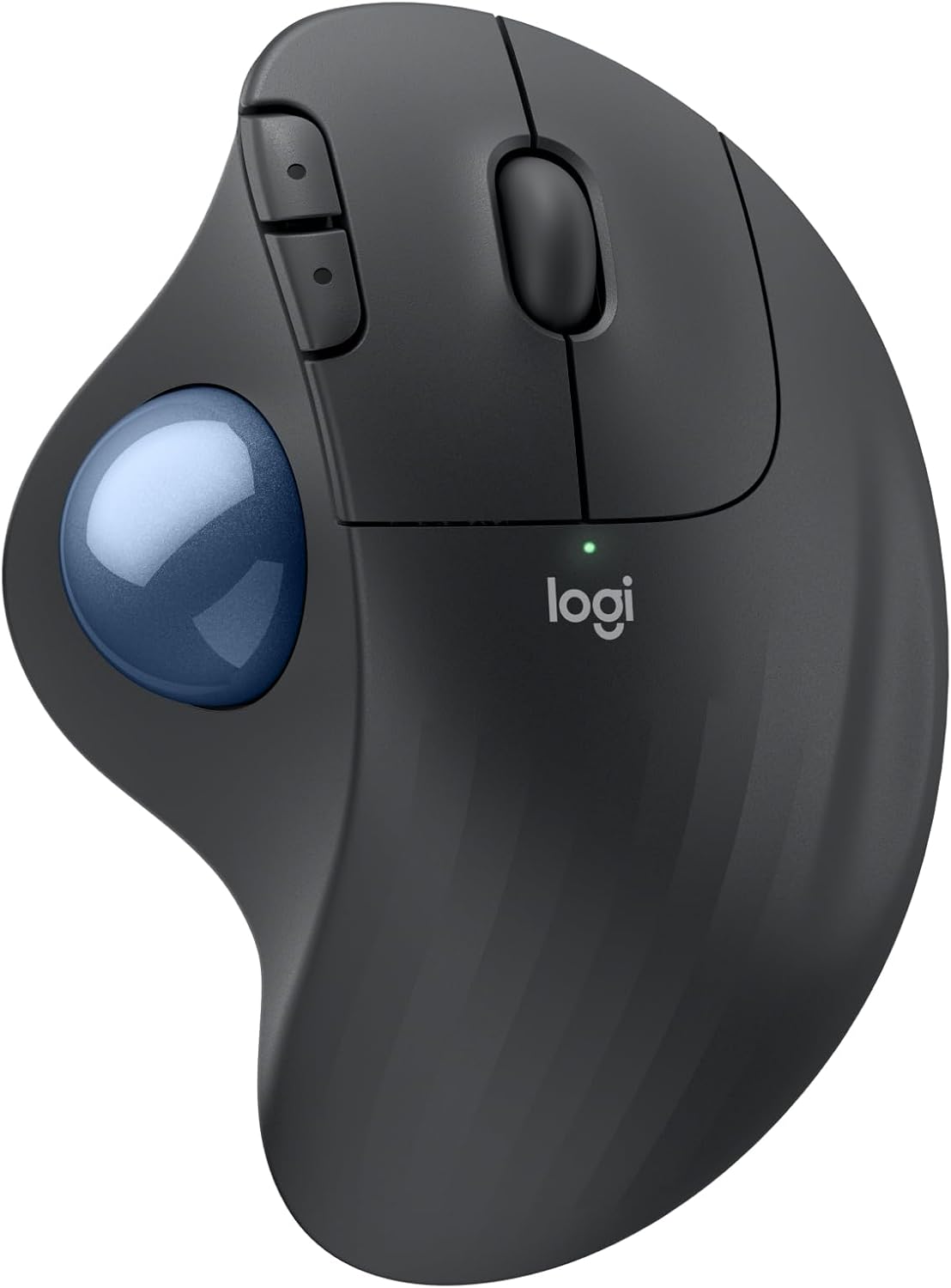
Every other mouse in this guide still requires you to move your hand across the desk to move the cursor. The M575S eliminates that entirely — you roll a trackball with your thumb while your hand stays completely stationary. For people with shoulder pain, limited desk space, or repetitive strain injuries that affect arm movement, this is a fundamentally different solution to the ergonomic problem.
Logitech developed this mouse with their Logi Ergo Lab and had it certified by ergonomists — it delivers 25% less muscle strain in the forearm compared to standard mice according to their testing. The 18-month battery life on a single AA battery is the longest in this guide, and quiet clicks keep the workspace peaceful during calls or in shared spaces.
Worth being honest: there’s a learning curve with trackball mice. Your thumb takes over cursor control and it feels unfamiliar for the first few days. Most users adapt within a week and find the reduced arm and shoulder movement genuinely beneficial for long work sessions.
“After returning a couple of knockoffs I truly understand why this one is twice the price — it’s a good product, reliable, and the ball rolls smoothly and quietly. The USB receiver stores neatly inside the bottom without rattling around. Takes time to get used to if you do digital artwork, but I would definitely recommend this to everyone. Worth every penny over cheap alternatives.”
Who it’s for: Remote workers with shoulder pain, limited desk space, or who want to completely eliminate hand movement from their cursor control.
Pros:
- Highest rated mouse in this guide (4.6 stars)
- Eliminates hand movement — stationary cursor control
- 25% less forearm muscle strain per Logitech testing
- 18-month battery life — longest in this guide
- Bluetooth + Logi Bolt USB
- Ergonomist certified
- Made with recycled plastic
Cons:
- Learning curve — takes days to adapt
- More expensive than budget vertical options
- Thumb trackball not for everyone
| Spec | Detail |
|---|---|
| Price | ~$49.99 |
| Type | Trackball (thumb control) |
| Connectivity | Bluetooth + Logi Bolt USB |
| Battery | 18 months (AA included) |
| Buttons | 3 customizable |
| Colors | 4 options |
4. Logitech Lift Vertical Mouse — Best for small hands

Most ergonomic mice are designed around average to large hand sizes. The Logitech Lift is specifically built for small to medium right hands — a meaningful distinction if you’ve tried other vertical mice and found them too large to grip comfortably. Logitech designed, tested, and had this mouse approved by leading ergonomists specifically for this hand size category.
The 57° vertical angle reduces forearm pressure and promotes a natural wrist position throughout the day. Quiet clicks and a SmartWheel for smooth scrolling make it comfortable for all-day use. The 2-year battery life is second only to the M575S trackball in this guide — and given it ships with the battery included, there’s nothing extra to buy.
Worth noting: this is a right-hand-only design. Left-handed users should look at the Anker top pick which is ambidextrous, or the ProtoArc EM11.
“Great mouse if you have wrist or arm pain. Easy to install using the USB dongle, comfortable grip, and buttons on both the top and side of the unit. Only negative is the custom button software does not work on Linux or Windows 7. Didn’t even know vertical mice existed ten days ago — glad I found this one.”
Who it’s for: Remote workers with small to medium hands who want a Logitech-quality ergonomic mouse specifically sized for their grip.
Pros:
- Specifically designed for small to medium right hands
- Ergonomist certified
- 2-year battery life
- Quiet clicks
- Bluetooth + Logi Bolt USB
- 70% recycled plastic construction
Cons:
- Right-hand only
- More expensive than budget options
- Not for large hands
| Spec | Detail |
|---|---|
| Price | ~$66.07 |
| Hand size | Small to medium right hand |
| Connectivity | Bluetooth + Logi Bolt USB |
| Battery | 2 years |
| Angle | 57° vertical |
| Buttons | 6 |
5. SABLUTE MAM3 — Best budget small hands option

The SABLUTE MAM3 gives you a small-hands-specific ergonomic mouse with Bluetooth connectivity and a rechargeable battery at a budget price — filling the gap between the $20 Anker (no Bluetooth, not sized for small hands) and the $66 Logitech Lift. At $19.78 it’s actually the cheapest mouse in this guide.
The 57° vertical angle matches the Logitech Lift’s angle at a fraction of the price. The 300-day standby battery life is the longest of any rechargeable option in this guide. Clicks are 90% quieter than standard mice — useful in shared spaces or during calls.
Worth flagging honestly: 123 reviews is the smallest sample in this guide. At 4.4 stars that average is encouraging, but there’s simply less long-term validation than the Anker or Logitech options. SABLUTE offers a 24-month warranty and lifetime US-based support which partially offsets the lower review count.
“Really like the design compared to other ergonomic mice and comfortable to use all day. I like the Bluetooth feature so I can use it with both my laptops. One thing to note though — the Bluetooth does not automatically reconnect most mornings and I have to go into settings and remove and re-add it each time. Still a good mouse overall despite that inconvenience.”
Who it’s for: Anyone with small to medium hands who wants Bluetooth connectivity and rechargeable battery at a budget price, and is comfortable being an early adopter of a less-reviewed product.
Pros:
- Cheapest mouse in this guide
- Bluetooth + USB dual connectivity
- Rechargeable — 300-day standby battery
- 90% quieter clicks
- 57° vertical angle
- 24-month warranty
Cons:
- Only 123 reviews — least validated pick here
- Small to medium hands only
- 3-5 day adjustment period recommended
- Possible Bluetooth connectivity headaches
| Spec | Detail |
|---|---|
| Price | ~$19.78 |
| Connectivity | Bluetooth + USB |
| DPI | 800 / 1200 / 1600 / 2400 |
| Battery | Rechargeable, 300-day standby |
| Angle | 57° |
| Colors | Black, Beige, Pink, Purple |
6. Logitech MX Vertical — Best premium

The MX Vertical is Logitech’s flagship ergonomic mouse — designed for larger hands and built with the highest spec sensor in this guide. The 4000 DPI high-precision optical sensor delivers 4x less hand movement compared to a standard 1000 DPI mouse, which translates to meaningfully less physical effort over a full workday. The cursor speed switch lets you change DPI instantly without software.
Logitech’s research shows the MX Vertical reduces muscular activity by 10% compared to a standard mouse — a real, measurable reduction in the physical load your hand and forearm carry during daily computer work. The 57° vertical angle and textured rubber grip are comfortable for larger hands throughout the day.
If you already use Logitech’s MX ecosystem — MX Keys keyboard, MX Master mouse — the MX Vertical connects via the same Logi Bolt receiver, simplifying your setup. See our wireless keyboards and mice guide for MX keyboard options that pair well with this mouse.
Can’t decide between the two Logitech options? See our Logitech Lift vs MX Vertical comparison for a detailed breakdown of which fits your hand size and workflow.
Deciding between the MX Vertical and MX Master 3S? Our MX Master 3S vs MX Vertical comparison breaks down exactly how they differ at the same price point.
“Definitely reduces fatigue and easy to use. Great response with less space needed for mouse movement. Stays charged for months — you actually forget to charge it. I play video games with it and never have any issues with movement or response time. Since my car accident where I broke my thumb, this is the only mouse that gave me the same abilities as before the accident. Highly recommend. One very broken thumbs up.”
Who it’s for: Remote workers with larger hands who want Logitech’s best ergonomic mouse and the highest-precision sensor in this guide.
Pros:
- 4000 DPI — highest precision in this guide
- 10% less muscular activity than standard mouse
- 14,907 reviews — second most validated pick here
- Ergonomist approved
- Rechargeable
- Compatible with Logi Bolt ecosystem
Cons:
- Most expensive mouse in this guide
- No Bluetooth — USB receiver only
- Designed primarily for larger hands
| Spec | Detail |
|---|---|
| Price | ~$71.24 |
| DPI | 4000 |
| Connectivity | Logi Bolt USB receiver |
| Battery | Rechargeable |
| Angle | 57° |
| Hand size | Medium to large |
7. UGREEN Vertical Mouse — Best budget silent option

At $14.99 the UGREEN is the cheapest mouse in this guide that also has Bluetooth connectivity — making it a strong option for anyone who wants wireless without a dongle at the lowest possible price. Bluetooth 5.4 is the latest standard in this lineup, offering a faster and more stable connection than the older Bluetooth versions on some competing options.
The PTFE glide feet are a detail worth calling out specifically — Teflon glide pads reduce surface friction and make movement noticeably smoother and quieter than standard plastic feet. Combined with quiet-click buttons, this is the most acoustically unobtrusive mouse in the guide — good for open home offices, shared spaces, or anyone on frequent video calls where click noise can be picked up by microphones.
4 DPI settings up to 4000 and 3-device switching via Bluetooth round out a feature set that punches significantly above its price point.
“Someone at work paid $50 for their vertical mouse — same dongle, same button layout. This was $15 and also has a dongle, TWO Bluetooth connections you can switch between, AND grip stickers to set where your hand feels best. Fits my oversized hands, which is my big issue with mice — they get smaller not bigger. Doesn’t feel cheap, doesn’t look embarrassing on a desk. Glides smooth, simple buttons, works great for Slack, coding, email, and writing. Once I got used to it, actually better on my hand. The main point: $15 bucks.”
Who it’s for: Anyone who wants quiet clicks and Bluetooth connectivity at the lowest price available — particularly good for shared or open workspaces.
Pros:
- Cheapest Bluetooth ergonomic mouse in this guide
- Bluetooth 5.4 — latest standard
- PTFE glide feet for smooth quiet movement
- Quiet clicks
- 3-device switching
- 4000 DPI maximum
Cons:
- AA battery not rechargeable
- Black only — no color options
- 1,518 reviews — moderate sample size
| Spec | Detail |
|---|---|
| Price | ~$14.99 |
| Connectivity | Bluetooth 5.4 + 2.4G USB |
| DPI | 1000 / 1600 / 2000 / 4000 |
| Battery | AA (not rechargeable) |
| Glide feet | PTFE (Teflon) |
| Devices | Up to 3 |
How to choose
You want the most proven ergonomic mouse at a budget price:
→ Anker 2.4G Vertical. 53,226 reviews, under $21, neutral handshake position.
You want Bluetooth and color options at a budget price:
→ ProtoArc EM11. 9 color options, rechargeable, 3-device Bluetooth switching.
You want to eliminate hand movement entirely:
→ Logitech Ergo M575S Trackball. Stationary thumb control, 18-month battery, highest rated in this guide.
You have small to medium hands and want a Logitech:
→ Logitech Lift. Specifically sized for smaller hands, ergonomist certified, 2-year battery.
You have small hands and want budget Bluetooth:
→ SABLUTE MAM3. Cheapest small-hands Bluetooth option, rechargeable, 300-day standby.
You have larger hands and want Logitech’s best:
→ Logitech MX Vertical. 4000 DPI, 10% less muscular activity, premium build quality.
You want the quietest mouse at the lowest price:
→ UGREEN Vertical. Bluetooth 5.4, PTFE glide feet, quiet clicks, under $15.
Pair your ergonomic mouse with an ergonomic keyboard — our best ergonomic keyboard guide covers seven options from a $14 wrist rest to a full split mechanical keyboard.
There’s now a newer version too. See our MX Master 4 vs MX Master 3S comparison for whether the haptics and Actions Ring are worth it.
Continue reading
Frequently asked questions
Do ergonomic mice actually help with wrist pain?
For many people yes — but results vary depending on the source of the pain. Vertical mice specifically address the pronation (palm-down position) that standard mice force your wrist into for hours at a time. If your wrist pain comes from sustained pronation, a vertical mouse can provide meaningful relief. If the pain comes from other causes like gripping too tightly or poor desk height, the mouse alone may not be enough. Ergonomic mice work best as part of a broader ergonomic setup including desk height, monitor position, and chair support.
What’s the difference between a vertical mouse and a trackball?
A vertical mouse still requires you to move your hand across the desk to move the cursor — it just keeps your wrist in a more natural position while doing so. A trackball keeps your hand completely stationary — you roll a ball with your thumb or fingers to control cursor movement. Trackballs eliminate arm and shoulder movement entirely, which benefits people with shoulder pain or very limited desk space. Both are ergonomic improvements over standard mice, just addressing different aspects of the problem.
Is there an adjustment period when switching to a vertical mouse?
Yes — most people find the first few days with a vertical mouse feel awkward. Your hand isn’t used to the orientation and precision can feel reduced initially. Most users adapt within 3-7 days and find the adjustment worthwhile. ProtoArc and SABLUTE both honestly recommend 1-2 weeks of adjustment time in their product listings, which is a realistic expectation.
Do ergonomic mice work with Mac?
All mice in this guide are compatible with macOS. One exception worth noting: the ProtoArc EM11’s forward and back buttons are not compatible with Mac OS systems — those buttons simply won’t function on a Mac. Everything else works normally.
What DPI do I need for office work?
For standard office tasks — documents, spreadsheets, email, web browsing — 800-1600 DPI is the practical range most people use. Higher DPI moves the cursor faster with less physical movement, which some people prefer on larger monitors. Every mouse in this guide covers this range, and having multiple DPI settings lets you find the speed that feels right for your monitor size and workflow.
All prices approximate and subject to change. Check current pricing at checkout. Last updated July 2026.