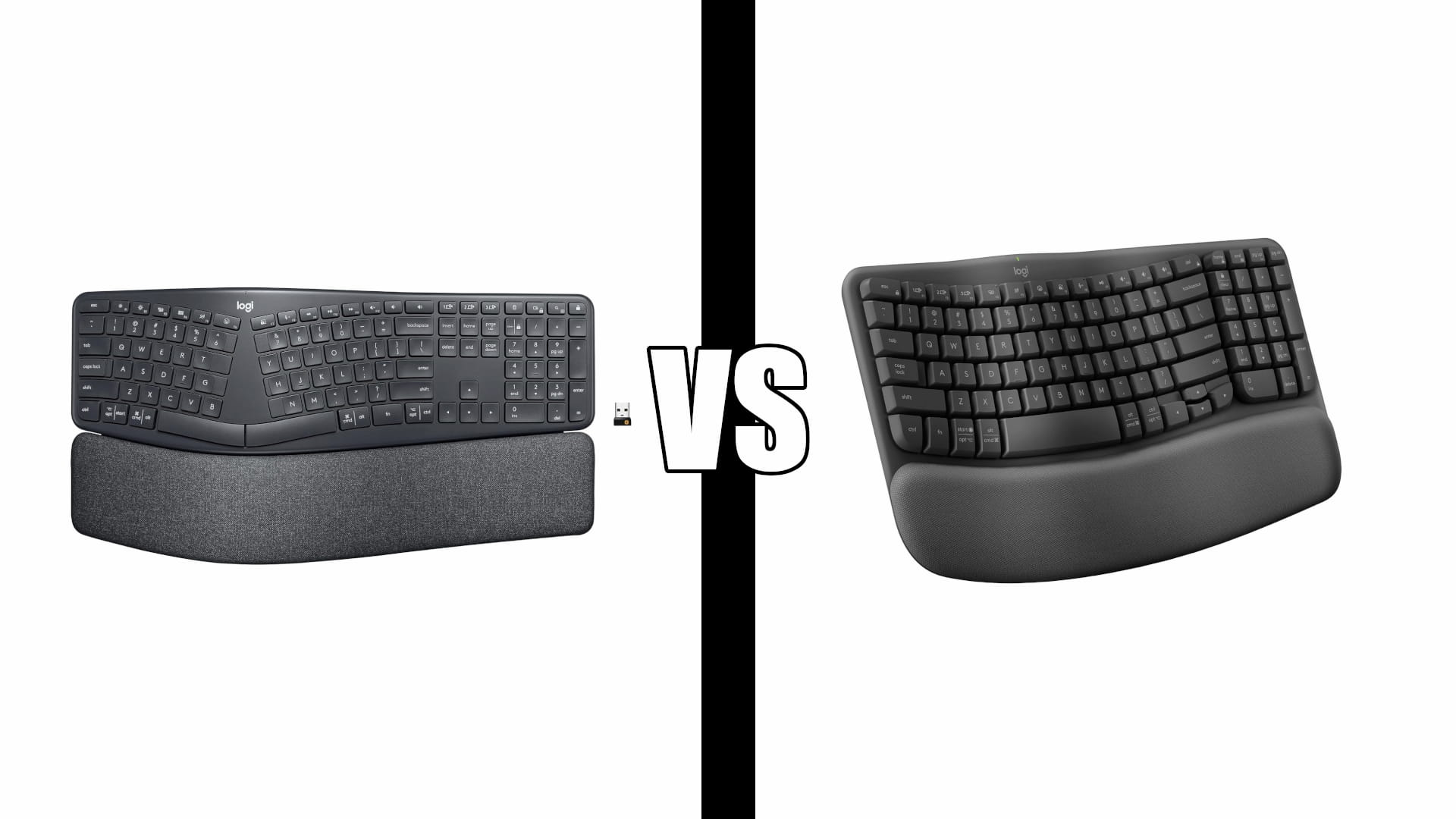
Logitech Ergo K860 vs Wave Keys: Which One Fits You
Category: Tech & Gear | Reading time: 12 min | Last updated: October 2026
Disclosure: This post contains affiliate links. If you buy through our links we may earn a small commission at no extra cost to you.
Logitech sells two ergonomic keyboards that look like they do the same job. They do not.
The ERGO K860 splits the keyboard into two halves with a real gap between them. The Wave Keys keeps every key on one continuous board and bends it into a gentle wave. Both are certified by United States Ergonomics. Both have a memory foam palm rest. Both have a number pad.
The difference that decides this is not comfort. It is how much typing you are willing to relearn, and the honest answer for most people is less than they think.
Jump to a section
The short answer
Buy the Wave Keys if you want ergonomic relief without rebuilding your muscle memory. It takes a few days to adapt, it costs roughly half as much, and it fits a smaller desk. This is the right pick for most remote workers.
Buy the K860 if you already type on a split keyboard, you are coming off a Microsoft Natural or Sculpt, or your wrist pain is bad enough that a gentle wave has not been enough. It corrects more because it asks more.
The trap is buying the K860 because it looks like the more serious ergonomic keyboard, then giving up in week two. That outcome shows up repeatedly in owner reviews, and it is the single most useful thing to know before you choose.
The K860 in detail

For the people it suits, this keyboard is the end of a long search. The group it suits most clearly is anyone replacing a discontinued Microsoft ergonomic board, which is a large and underserved population.
“As a long time user of the now largely discontinued Microsoft Elite-branded keyboards (the Natural and larger models for business) since the 90s, I have not found a suitable ergonomic replacement among several different brands I’ve tried, until now, that is. The K860 is a super solid keyboard. The natural key position, curved, raised keyboard layout, and comfortable palm-rest are as close to ideal as can be imagined. The biggest hurdle for me (if you can call it that) is getting used to the shorter travel chicklet-style keys which work best with a lighter touch than the traditional, longer travel keys.”
Hold that against the three-star review further down, from a typist who had not made that commitment and gave up on the split. Same keyboard, opposite verdicts, and the deciding variable is you rather than the hardware.
One limitation to plan around. The tilt legs only raise the palm rest, which suits standing desks. If you are seated and tall, you may want the opposite angle, and the K860 does not offer it without improvising.
The Wave Keys in detail

This is the keyboard to buy if you want the ergonomic benefit without the project. It is the cheaper board and the switches are the cheaper type, but it delivers the thing people actually buy an ergonomic keyboard for, which is wrists that stop hurting.
Three practical notes. It comes in Graphite, Sand, Off White and Rose, which matters more than it should if your desk is in a bedroom or living room. Easy-Switch across three devices covers a work laptop, a personal machine and a tablet. And a handful of owners report the unit arriving without the Bolt receiver in the box, so check before you set the packaging aside.
Logitech designed it to pair with the Lift vertical mouse, and that combination is a complete ergonomic desk at a reasonable total. Our Lift vs MX Vertical comparison covers which vertical mouse fits your hand size, since that choice has the same body-dependent answer this one does.
Specs side by side
| ERGO K860 | Wave Keys | |
|---|---|---|
| Shape | Split keyframe, curved | Continuous wave, not split |
| Switches | Scissor, scooped keycaps | Rubber dome |
| Number pad | Yes | Yes |
| Width | 17.95 in | 14.80 in |
| Depth | 9.17 in | 8.62 in |
| Height | 1.89 in | 1.20 in |
| Weight | 2.56 lb | 1.65 lb |
| Palm rest | Memory foam, pillowed | Memory foam, cushioned |
| Tilt legs | 0, -4, -7 degrees | Fixed |
| Receiver | USB receiver or Bluetooth | Logi Bolt or Bluetooth |
| Devices | Multi-device pairing | 3 via Easy-Switch |
| Battery | AAA | 2x AAA, up to 36 months |
| Rating | 4.4/5 from 8,076 | 4.2/5 from 3,108 |
| Colors | Graphite | Graphite, Sand, Off White, Rose |
Split vs wave: what the shapes do
Both keyboards are solving the same two problems, and it helps to name them.
Ulnar deviation is the sideways bend in your wrist when your hands angle inward to reach a straight row of keys. Forearm pronation is the rotation that flattens your palms down against the desk. A flat keyboard forces both.
The Wave Keys addresses the first one. The wavy contour raises the middle and drops the edges so your fingers meet the keys where your hands naturally fall, with every key still on one continuous board. Your hand positions move, but the key relationships do not.
The K860 addresses both. The keyframe splits into two clusters with a real gap, so your hands sit further apart and squarer to the board, and the curved tenting rotates your palms inward off the desk. More correction, and a layout that no longer matches the one in your hands.
The K860 also has one thing the Wave Keys lacks: negative tilt legs at 0, -4 and -7 degrees, which drop the front edge away from you. For a standing desk, or anyone whose keyboard sits high, that adjustment is worth more than it sounds. Our ergonomic setup guide covers where your keyboard should sit relative to your elbows.
The learning curve
This is the section that should decide your purchase, so it goes before the specs arguments.
On a split keyboard, every key is assigned to one hand permanently. On a standard board, most touch typists cheat constantly, reaching across the middle with whichever hand is free. The number row is where this bites hardest. A split layout will not let you.
“This is a gorgeous keyboard that types very quietly. My main issue is that the split layout slowed down my work. It is tough for touch typing because of the unusual key positioning. For example, the #6 key sits on the left side, whereas traditional touch typing trains your right hand to reach for it. It takes a lot of practice to get used to this design. If you already use a split keyboard or have the time to completely relearn your hand placement, this would easily be a 5-star product. Unfortunately, I do not have the time to retrain my muscle memory.”
Read that last line again, because it is the whole decision. This is not a complaint about build quality. It is a competent typist discovering that the keyboard demanded a retraining project he did not sign up for.
The Wave Keys asks for far less:
“If you work on a computer and type consistently buy this. I work at a computer and type a lot at my job, and my wrists were starting to feel it. I bought this along with the wave mouse and my wrists havent hurt since. It takes a little bit of getting used to for the shape of it, but if you confidently type on a normal computer (without looking at the keys constantly) you will pick it up quick. Its not too too different from a standard flat keyboard, but just enough different to require maybe a few days to get used to.”
A few days against a retraining project. That gap is the product difference, and the ratings reflect it: the K860 holds a higher average at 4.4 from a much larger sample, which is what you expect from a product that works extremely well for the people who stay with it.
The Wave Keys is not effortless either. It corrects enough to expose bad habits:
“It did take me a little while to get used to though because this keyboard kinda forces you to type like you actually attended computer class. You cant just have your hands roaming around doing side quests wherever they want. The shape kinda forces you to type properly, like actually keeping your fingers around the F and J keys instead of just free styling all over the keyboard. Once I got used to where my hands were supposed to sit tho it became sooo much more comfortable. The wrist rest is soft, the keys feel really nice and my wrists are no longer threatening legal action after a 5 page paper.”
Typing feel
The switches are not the same class of component, and this is where the price difference is most visible.
The K860 uses scissor switches with scooped keycaps, the same mechanism under a good laptop keyboard. Short travel, a defined tactile bump, consistent feel across the board. Owners describe it as heavier and more substantial than they expected.
The Wave Keys uses rubber dome switches, the cheaper and more common mechanism. Quiet, slightly mushier, and a few owners find them stiff.
“I have been using Logitech Wave keyboards for many years. I still have several old K350s tucked away that just need replacement keycaps. I gave the keyboard about two weeks, but I never got used to the layout. I really like the programmable keys and found they saved me a lot of time. I think I could have eventually adjusted to the layout, but the biggest problem was the key feel. The keys required much more force to press than my old K350, and that never became comfortable.”
Key force is subjective and this is one owner against a 4.2 average, but it recurs often enough to be worth knowing. If you are coming off a keyboard with a light touch, the Wave Keys will feel firmer. If you are coming off a mechanical board, both of these will feel shallow.
Desk space
The K860 is 3.15 inches wider than the Wave Keys and almost a pound heavier. Both include an integrated palm rest that cannot be removed, so the depth figures are the real footprint rather than the keyboard alone.
On a 48 inch desk, the K860 plus a mouse leaves you very little room. On a 55 inch desk or wider it is a non-issue. Measure before you order, because the integrated palm rest means you cannot reclaim depth by pushing the board back.
The Wave Keys is also the better travel option at a pound and a half, though neither of these is a keyboard you throw in a bag. If you work from a small space, our home office setup guide covers minimum workable desk dimensions.
Receivers and battery
Both run on AAA batteries rather than an internal rechargeable cell, and both pair over Bluetooth or a bundled USB receiver. Logitech rates the Wave Keys at up to 36 months on its two included AAAs, which matches what long-term owners report.
One wrinkle worth checking if you already own Logitech gear. The Wave Keys listing explicitly names a Logi Bolt receiver, Logitech’s current standard. The consumer K860 listing only says “USB Receiver,” and owners report it ships with the older Unifying receiver, with Bolt reserved for the business variant.
“Somehow even though it’s a relatively new logi product, it doesn’t use logi’s new bolt receiver like my new logi mouse does. So I have two receivers taking up two usb ports. Bluetooth doesn’t work as well, unifying is more stable, has less lag, and uses less battery. The corporate version of this keyboard uses the bolt receiver.”
If you run a Bolt mouse, the K860 may cost you a second USB port. Not a dealbreaker, but check the receiver type on the exact listing before you order, and budget a port. Our USB hub guide covers the fix if you are short.
The same owner flags a second annoyance: the media controls share the F7 to F12 keys behind a toggle, and the toggle key sits directly beside them. Easy to hit by accident, and on some apps F12 does something disruptive.
If neither is right
Worth saying plainly: not everyone needs an ergonomic keyboard.
If you have no wrist pain and you are shopping on principle, a conventional premium keyboard will serve you better than a shape you have to adapt to. The MX Keys S is the usual answer there, and it is the keyboard we recommend by default in our home office setup guide.
If your pain is in your wrist rather than your fingers, fix the mouse first. Mouse posture causes more wrist complaints than keyboard posture, and a vertical mouse is cheaper than either keyboard here.
And if you want a true split with tenting you can adjust yourself, both of these are the wrong category. Our ergonomic keyboard guide covers the fully separable boards, and our wireless keyboard and mouse guide covers conventional picks.
Which one to buy
| If you | Buy |
|---|---|
| Have never used a split keyboard | Wave Keys |
| Are replacing a Microsoft Natural or Sculpt | K860 |
| Have a desk under 50 inches | Wave Keys |
| Type at a standing desk | K860, for the negative tilt |
| Need relief now, with no adjustment period | Wave Keys |
| Have real wrist pain a wave did not fix | K860 |
| Already run Logi Bolt devices | Wave Keys |
| Want a color other than black | Wave Keys |
| Want the better switches | K860 |
| Are not sure | Wave Keys |
That last row is the honest default. The Wave Keys costs about half as much and asks for days rather than weeks, which makes it the lower-risk way to find out whether an ergonomic keyboard helps you at all. If it is not enough correction, you will know within a month, and you will know exactly what to ask of the K860.
Frequently asked questions
Does the Logitech Wave Keys have a number pad?
Yes. Logitech lists it as a compact layout with a number pad. It is narrower than the K860 but it is not a tenkeyless board.
Is the K860 split in two separate halves?
No. It is a single board with a split keyframe, meaning the key clusters separate with a gap between them but the body is one piece. You cannot move the halves independently or adjust tenting.
How long does it take to get used to an ergonomic keyboard?
For the Wave Keys, owners report a few days to a week. For the K860, give it two to four weeks of daily use, and expect your typing speed to drop before it recovers. If you cannot absorb a temporary productivity hit, that is an argument for the Wave Keys.
Will an ergonomic keyboard fix my wrist pain?
It can help, and many owners report exactly that, but keyboard shape is one input among several. Chair height, desk height, monitor position and mouse posture all contribute. Persistent pain is worth raising with a doctor rather than solving by shopping.
Do either work with Mac?
Yes. Both are multi-OS, and the Wave Keys supports Windows, macOS, iPadOS and ChromeOS with Easy-Switch across three devices.
Are these mechanical keyboards?
Neither. The K860 uses scissor switches and the Wave Keys uses rubber dome. If you want mechanical switches in an ergonomic shape, neither of these is your board.
Sources and references
- ERGO K860 vs Wave Keys comparison, RTINGS
- Logitech ERGO K860 review, RTINGS
- ERGO K860 specifications, Logitech
- Wave Keys product page, Logitech
Continue reading
Prices change often. Check current pricing at checkout. Last updated October 2026.