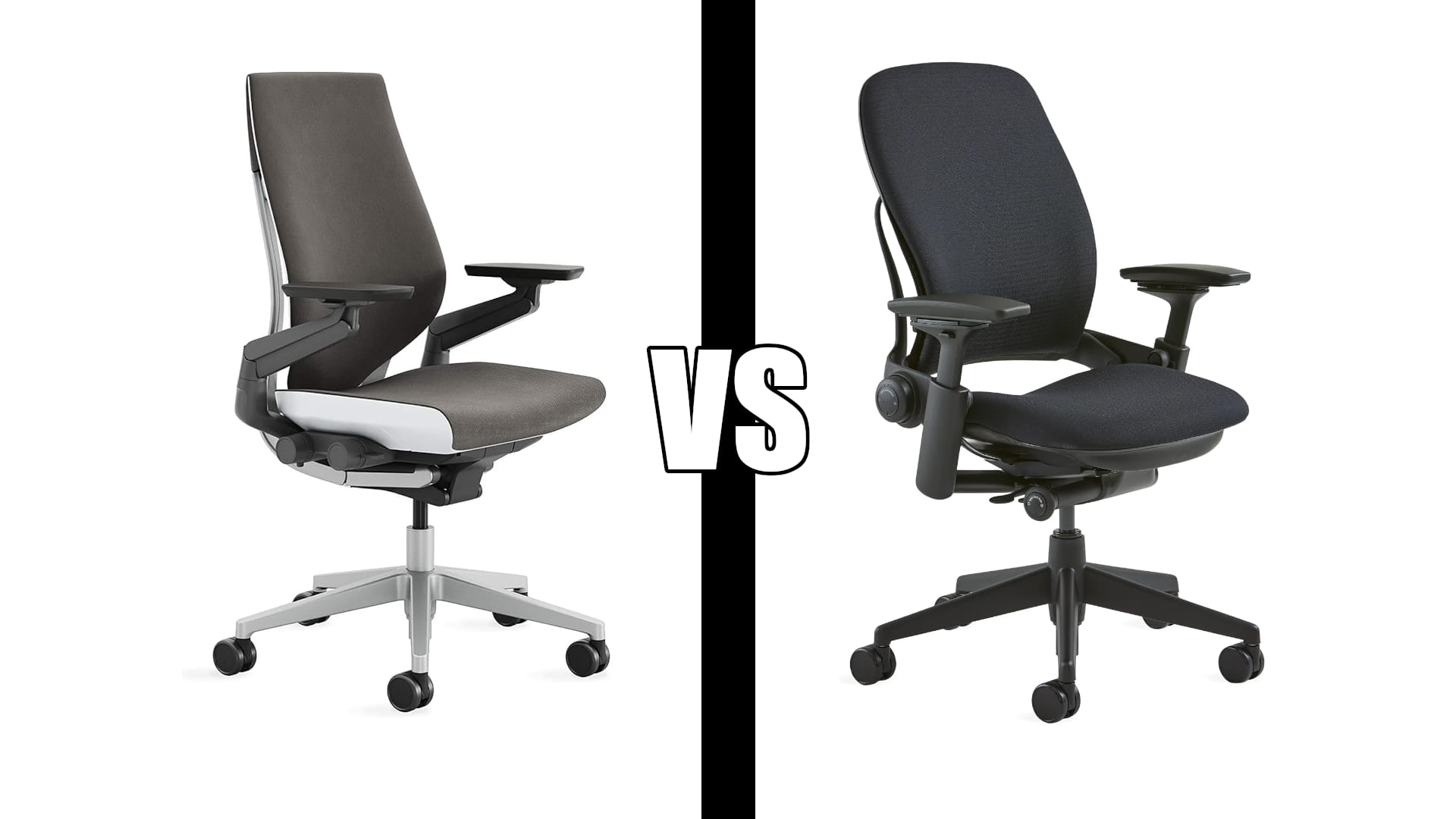
Steelcase Gesture vs Leap: Which One to Buy (2026)
Category: Desk Setups | Reading time: 13 min | Last updated: November 2026
Disclosure: This post contains affiliate links. If you buy through our links we may earn a small commission at no extra cost to you.
Steelcase Gesture vs Leap. Most comparisons of these two treat the Leap as the default Steelcase chair and the Gesture as the one you buy if you like the arms. The buyer data says otherwise. The Gesture rates 4.4 across 1,269 reviews. The Leap rates 4.1 across 671. The better-reviewed chair here is also the one more people are buying right now, and that is not the result the internet has settled on.
The Leap keeps one genuine advantage, and it is narrow and important: a dial that sets how firmly the lower back pushes into you. If your reason for spending this much is specifically lumbar pain, that dial is the feature, and the Gesture has no equivalent.
There is also a finding neither manufacturer will tell you, which shows up in both sets of reviews. Owners of a chair at this price are opening the box, finding no instructions, and concluding the chair is uncomfortable when what they actually have is a chair they have not adjusted. One Gesture buyer rated it three stars for exactly that. Everything below is built around those three things.
Jump to a section
The short answer
Buy the Gesture. It rates higher, on nearly twice the reviews, and it is the one selling in volume today. Its arms move in ways no other chair’s do, which matters more than it sounds if you alternate between a keyboard, a phone and a tablet through the day. It is also the more expensive of the two, and I want to be plain that the ratings are why it wins here rather than the margin.
Buy the Leap if your lower back is the reason you are shopping. It has a firmness dial for the lumbar region and a seat that glides forward as you recline, so you stay close to the desk instead of drifting away from it. Those two things are aimed squarely at back pain, and no amount of arm articulation substitutes for them.
Neither if you want a headrest. Neither listing includes one, and a four-star Leap owner specifically wished for neck support. If you want to recline and rest your head, you are looking at the wrong two chairs.
Steelcase Gesture

1,269 ratings at 4.4 with 50 or more sold in the past month is the strongest buyer signal either chair has. Steelcase pitches it as a chair that adjusts to your body and your posture rather than asking you to adopt one, and the arms are how it delivers that.
The best evidence on this chair is not a new owner’s first impression. It is someone who has sat in it for years.
“I have had this chair for 4.5 years and I still love it just as much as I did the first day. I was using a cheap office chair before and had developed horrible tailbone pain. I thought I would never spend a grand on a chair but it has been worth it. If anything happens to it I will buy another one without hesitation. I wasn’t sure about how I would like the sliding arms but they are great and I like that they move easily but do hold their position. I don’t know how to properly describe it but it was one feature I wasn’t sure if I would like.”
Four and a half years, tailbone pain resolved, and would buy again. Note what he says about the arms, because it is the common arc with this chair: buyers are unsure about them, then find they move easily and hold position. Moving easily and holding position are usually a tradeoff, and getting both is what the mechanism is for.
The honest complaints are the seat and the arm range. A four-star owner a few weeks in called it well made but not the most comfortable, found the seat pretty stiff though possibly softening, and wanted the arms to swing further out of the way when he did not want to rest on them. That last one is a fair criticism of a chair whose selling point is its arms.
Who it’s for. Anyone who switches between devices and postures through the day, anyone who wants the better-rated of these two chairs, and anyone who has developed pain from a cheap chair and wants it gone.
Pros:
- Highest rating of the two at 4.4, on 1,269 reviews
- The only chair here with arms rotating through 360 degrees
- Arms move easily and still hold their position, by a long-term owner’s account
- Three recline settings plus an upright back lock
- All adjustments grouped on the right side within reach
- Still loved at four and a half years by the owner who reported longest
- Eight fabric colors, including several that are not corporate grey
Cons:
- The more expensive of the two
- No lumbar firmness dial, which the Leap has
- Seat is stiff when new, by two separate owners’ accounts
- Arms do not swing far enough out of the way for everyone
- Shipped with no user guide to one buyer, who could not work out the back adjustment
- No headrest offered on this listing
Steelcase Leap

Steelcase calls the Leap its most classic chair, and the long tenure shows in the review base: 671 ratings at 4.1, lower than the Gesture on both counts. Some of that gap is age, because a chair sold for many years accumulates reviews from several production eras at once.
One thing the listing does not tell you, and a buyer does. The Amazon page says only “Steelcase Leap Office Chair” with no generation marked, and the Leap has been sold in two. A five-star owner settles it by naming the version he received.
“Went from an Aeron B to the leap V2 and couldn’t be happier. If you’re 6’1 and don’t want to pay extra for an aeron size c then this is the chair to get imo. I’m 6’1 215 for reference.”
So the listing ships the v2, the current generation, which matters because the earlier v1 circulates widely as remanufactured stock at much lower prices. His other point is worth holding on to if you are tall: the Leap fits a six-foot-one frame without a size upgrade, where the competing Herman Miller sizes up and charges for it.
The support is where this chair earns its keep. A four-star owner took one day to adapt to the seat and adjustments and then called the back support very good and the seat cushion very solid, with the warning that anyone sitting all day should not even consider a cheap office-supply chair. His single complaint was the absence of neck or head support.
Who it’s for. People whose lower back is the problem they are paying to solve, anyone tall enough that chair sizing has become an expense, and anyone who wants to stay close to the desk while reclining rather than sliding away from it.
Pros:
- Lower back firmness dial, with no equivalent on the Gesture
- Natural Glide System keeps you near the desk as you recline
- 3D LiveBack reshapes to your spine as you move
- The less expensive of the two
- Fits a six-foot-one frame without paying for a larger size
- Twelve-year warranty, and an owner confirms a part was replaced under it
- Eight colors, and chosen over a Herman Miller Aeron by one owner who had both
Cons:
- Rates 4.1 against the Gesture’s 4.4, on fewer reviews
- One owner’s gas cylinder stopped holding height within a few years
- Warranty service took that owner repeated attempts to reach
- Seat padding described as a little light by the same owner
- Arms do not rotate the way the Gesture’s do
- Listing does not state which generation you are buying
- No headrest offered on this listing
Specs side by side – Steelcase Gesture vs Leap
| Gesture | Leap | |
|---|---|---|
| Rating | 4.4 | 4.1 |
| Reviews | 1,269 | 671 |
| Bought last month | 50+ | Not stated |
| Arms | 360 degree rotation | Adjustable, no rotation stated |
| Lumbar firmness dial | No | Yes |
| Seat glides forward on recline | No | Yes, Natural Glide System |
| Back conforms to spine | Yes, contoured back | Yes, 3D LiveBack |
| Recline settings | Three, plus upright lock | Not stated |
| Control placement | Right side, within reach | Not stated |
| Casters | Carpet | Carpet |
| Headrest | No | No |
| Colors | Eight fabrics | Eight |
| Warranty | Not stated on listing | Twelve years, per an owner |
| Generation shown | Not applicable | v2, per an owner |
The “not stated” entries are the point of reading this table. Steelcase publishes less about the Leap on Amazon than about the Gesture, including the thing most buyers want to know, which is the generation. That is a documentation gap rather than a chair problem, but it is the kind of gap that leads people to buy a remanufactured v1 by accident.
Neither chair tells you how to use it
This is the most useful finding across both review sets, and it is the one that would cost you the most if you did not know it.
“The package contained no User Guide or Installation Instructions. For a chair this expensive, I expect adequate instructions in English about using it, especially since it has so many adjustments available. I shouldn’t have to hunt around online to get this information. The chair back is extremely stiff and I have no instructions about how to adjust it. The chair as it arrived is uncomfortable.”
Read that against the Gesture listing, which promises intuitive adjustments all located on the right side within arm’s reach. A buyer found the back extremely stiff, had no way to learn how to change it, and rated the chair three stars for being uncomfortable as delivered. The chair was almost certainly fine. He had an unadjusted chair and no manual.
The same pattern shows faintly on the Leap, where the four-star owner mentions it took him a day to get used to the seat style and the adjustments before it became great. He got through it. Not everyone does, and some of the one and two-star reviews on expensive chairs are almost certainly this.
So do this before you judge either chair. OSHA’s guidance on workstation chairs gives the criteria to set up against, and they are specific enough to work through in ten minutes:
- Set the height so the whole sole of your foot rests on the floor, with the back of the knee slightly higher than the seat. If it will not go low enough, you need a footrest rather than a different chair.
- Set the seat depth so most of your thigh is supported without the front edge pressing behind your knee.
- Adjust the lumbar support to sit in the curve of your lower back. On the Leap this is the firmness dial. On the Gesture it is the back tension and recline.
- Check the back reclines at least fifteen degrees from vertical and that you can lock or tension it. The Gesture’s three settings and upright lock cover this directly.
- Set the arms so your lower arms are supported with shoulders relaxed and elbows close to your body. OSHA treats armrests as optional, so if they fight you, lower them out of the way.
If you want the longer version of this, we worked through the whole desk setup in how to set up an ergonomic home office.
What happens after four years
Almost every review of an expensive chair is written in the first month, which is the least useful moment to write one. Two owners here reported over years instead, and they reached opposite conclusions.
The Gesture owner quoted earlier is at four and a half years and would buy another without hesitation. The Leap owner below started at four stars in 2022 and revised the same review downward twice.
“This is a good chair. It arrives fully assembled in a large box. It seems like it will last and the 12 year warranty is very good (assuming it’s easy to get warranty service). However, the chair didn’t ‘rock my world’ from my previous less expensive chair. The chair’s bottom padding seems a little light. UPDATE: Chair is holding up but I just don’t find it all that comfortable, so I’m downrating it. UPDATE: It’s only a few years old and chair already can not hold the height adjustment. Will be trying to solve this via the 12 year warranty. And minus another star because their website never sends a password reset link like it says it does. UPDATE: I did finally get a response from them and they sent me a new gas cylinder.”
Worth being careful about what this does and does not show. It is one owner, and one gas cylinder failing is not a pattern. The review began in 2022 and was last updated in May 2026, so it is current despite the original date, which is unusual and makes it more valuable rather than less.
The useful part is the warranty, and it cuts both ways. The twelve-year cover is real and it did produce a free replacement gas cylinder on a chair several years old, which is the outcome you are paying a premium for. Getting there took him repeated attempts, including a password reset that never arrived. So budget for the cover being honored and for the process being slow.
Note also what he says at the start, because it is the most honest line in either review set: the chair did not transform his working day compared with a much cheaper chair that had lasted years. That is worth sitting with before spending this much. If your current chair is comfortable and intact, the upgrade may disappoint you. If it is causing you pain, the Gesture owner’s tailbone story is the other side of it.
Both ship with carpet casters
Both listings specify wheels for carpet, and neither makes much of it. OSHA’s chair guidance asks for a five-leg base with casters suited to the floor type, which is the polite way of saying the wrong casters will fight you all day.
Carpet casters are typically harder and narrower, because they need to bite into pile. On a hard floor that same hardness makes them roll too freely, so the chair wanders while you sit, and on softer floors it can mark them. If you are on hardwood, laminate, tile or vinyl, plan on either swapping to soft casters or putting something under the chair.
Both chairs arrive fully assembled in a large box, per the Leap owner above, so this is a thing to settle before delivery rather than a later project. We went through the surface options in the best office chair mats, which is the cheaper of the two fixes.
Which one to buy
| If you | Buy |
|---|---|
| Are not sure | Gesture |
| Have lower back pain specifically | Leap, for the firmness dial |
| Switch between keyboard, phone and tablet all day | Gesture, for the arms |
| Want the better-reviewed chair | Gesture, 4.4 against 4.1 |
| Want to spend less of the two | Leap |
| Are around six foot one | Leap, which fits without a size upgrade |
| Lean back often but need to stay at the desk | Leap, for the glide system |
| Want a headrest | Neither, look elsewhere |
| Already have a comfortable chair that works | Neither, read the four-year review first |
| Sit on a hard floor | Either, with soft casters or a mat |
The Gesture is the chair to buy. It rates higher on nearly twice the reviews, it is the one selling in volume, its arms do something genuinely unavailable elsewhere, and the longest-tenured owner in either review set is still happy with it after four and a half years. It costs more, and I would rather say plainly that the ratings decided this than pretend the price did not favor it.
The Leap is not a lesser chair, it is a narrower one. Buy it for the lumbar dial and the glide system, which are aimed at a specific problem the Gesture does not address. If that is your problem, the Leap is the better purchase regardless of what the aggregate ratings say.
And whichever you choose, spend the first ten minutes adjusting it against the checklist above. The three-star review that called a Gesture uncomfortable on arrival is the best argument on this page for doing that.
Frequently asked questions
Is the Steelcase Gesture or Leap better?
The Gesture, on the buyer evidence. It rates 4.4 across 1,269 reviews against the Leap’s 4.1 across 671, and it is the one selling in volume today. The Leap wins in one specific case: it has a lower back firmness dial and a seat that glides forward as you recline, so if lumbar support is the reason you are buying, choose it instead.
Which generation of the Leap does Amazon sell?
The listing does not say, which is a real gap on a chair sold in two generations. A five-star owner who received his in 2026 identifies it as the v2, the current one. This matters because the older v1 circulates widely as remanufactured stock at much lower prices, so a listing that looks like a bargain may not be the same chair.
Does either chair come with a headrest?
Neither listing includes one. A four-star Leap owner who otherwise praised the back support said neck or head support would be a welcome addition. If reclining with your head supported matters to you, neither of these is the right chair.
Are these chairs worth it over a cheaper one?
It depends entirely on whether your current chair hurts you. One Gesture owner had developed severe tailbone pain in a cheap chair, spent the money reluctantly, and calls it worth it four and a half years on. A Leap owner coming from a less expensive chair that had lasted years said it did not transform anything and downrated it twice. Pain is the thing that justifies this spend; dissatisfaction on its own may not be.
Do they work on hardwood floors?
Both ship with casters specified for carpet. On hardwood, laminate, tile or vinyl you will want to swap to soft casters or use a mat, because carpet casters are harder and will roll too freely and can mark a soft floor.
Continue reading
The Leap generation sold on Amazon is identified by an owner rather than by the listing, which states no version. The twelve-year warranty, the gas cylinder replacement and the recline and control details not published for the Leap all come from owner reports and are labeled as such above. The gas cylinder failure is a single report, not a pattern. Setup criteria are from OSHA’s workstation chair guidance. Specifications taken from current manufacturer listings and verified buyer reviews. Prices change often, so check at checkout. Last updated November 2026.