Logitech MX Master 3S vs MX Vertical: Which Mouse Should You Buy?
Category: Tech & Gear | Reading time: 8 min | Last updated: September 2026
Disclosure: This post contains affiliate links. If you buy through our links we may earn a small commission at no extra cost to you.
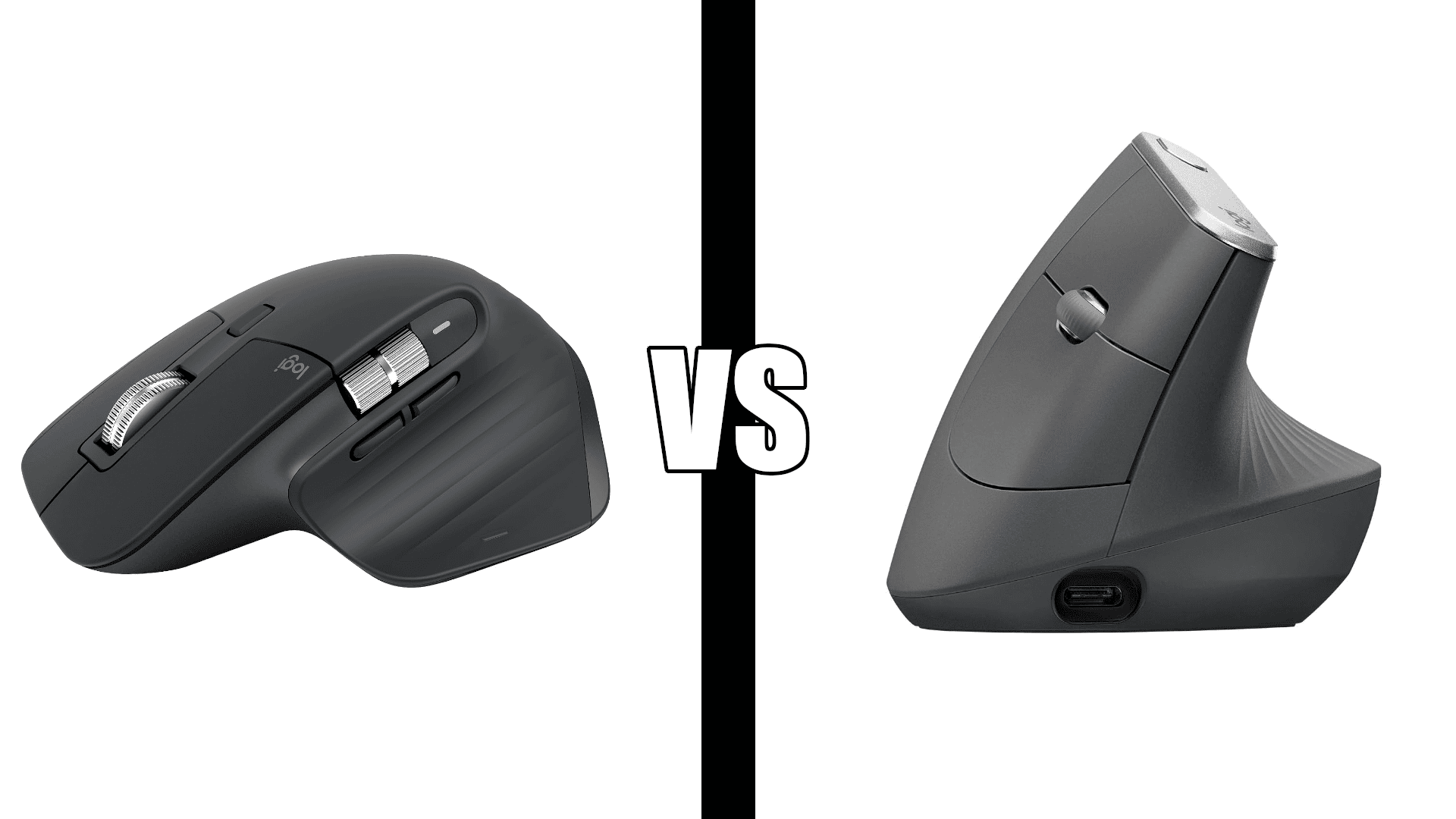
The short answer: Get the MX Vertical if you have wrist pain, forearm strain, or want to prevent it. Its 57 degree angle puts your hand in a handshake position that no standard mouse can match. Get the MX Master 3S if your wrists are fine and you want the most capable productivity mouse Logitech makes, with MagSpeed scrolling, 8K DPI tracking on any surface, and quiet clicks.
The Logitech MX Master 3S vs MX Vertical decision comes down to why you’re buying. Both are premium Logitech mice, both connect over Bluetooth, both pair with up to three devices, and both support button customization in Logi Options+. One is built for wrist health, the other for features.
Pairing a keyboard with it? Our MX Keys vs MX Keys S comparison covers the keyboard side of the same decision.
In this comparison
Key differences
Hand position. This is the real decision. The MX Vertical holds your hand at a 57 degree angle, the same position as a handshake, which keeps your forearm from twisting. The MX Master 3S is shaped to support your hand and is comfortable for long days, but it’s still a horizontal mouse, so your forearm rotates palm down like it does on any standard mouse.
Scrolling. The MX Master 3S has Logitech’s MagSpeed electromagnetic wheel, which switches between precise click-by-click scrolling and a free spin that moves through long documents in seconds. It also adds a thumb wheel for horizontal scrolling. The MX Vertical has a standard scroll wheel.
Tracking. The MX Master 3S tracks at up to 8,000 DPI on nearly any surface, including glass. The MX Vertical tops out at 4,000 DPI, with a cursor speed switch on top to change sensitivity on the fly.
Buttons. The MX Master 3S has 7 buttons plus a gesture button. The MX Vertical has 4 customizable buttons. Both support app-specific button profiles in Logi Options+.
Clicks. The MX Master 3S has quiet clicks. The MX Vertical has standard clicks.
Connection. Both connect over Bluetooth. The MX Vertical also includes a Unifying USB receiver and can run wired through its USB-C cable. The MX Master 3S includes a Logi Bolt receiver.
Logitech MX Vertical: Best for wrist health

The MX Vertical is built around one goal: reducing wrist and forearm strain. Logitech developed the 57 degree angle with ergonomists and says the handshake position reduces muscular strain by 10 percent compared to a standard mouse. If you’re shopping for an ergonomic mouse because something already hurts, this is the one that changes your posture.
The thumb rest keeps your thumb from dragging on the desk, and the textured rubber grip stays secure through long sessions. The 4000 DPI sensor means less hand movement to cross the screen, and the cursor speed switch changes sensitivity without opening any software. The battery lasts up to four months per charge, and one minute of charging gives about three hours of use.
Expect a short adjustment period. The vertical grip feels unfamiliar for the first few days, and fine cursor control takes a little practice. Most people adapt within a week or two.
“I tried the MX Master 3S first. Incredible mouse, but the angle is only about 20 degrees and by the end of long days I could feel tension building in my forearm. So after a week I returned it and bought the MX Vertical. Most importantly it keeps my hand in the neutral position. The button clicks are crisp and it still feels firm and solid.”
Who it’s for: Anyone with wrist pain, forearm strain, or RSI, and anyone at a computer 6 or more hours a day who wants to prevent it.
Pros:
- 57 degree angle keeps your forearm neutral
- 15,039 reviews, the most in this comparison
- Bluetooth, Unifying receiver, or wired USB-C
- 4 customizable buttons with Logi Options+
- Cursor speed switch on the mouse
- Up to 4 months per charge
- Lighter at 135 g
Cons:
- Adjustment period of a week or two
- Standard scroll wheel, no MagSpeed
- Standard clicks, not quiet
- Right-handed only
| Spec | Detail |
|---|---|
| Angle | 57 degrees vertical |
| DPI | Up to 4,000 |
| Buttons | 4 customizable |
| Connectivity | Bluetooth, Unifying USB, wired USB-C |
| Battery | Rechargeable, up to 4 months |
| Weight | 135 g |
Have smaller hands? Our Logitech Lift vs MX Vertical comparison covers Logitech’s smaller vertical mouse, which also comes in a left-handed version.
Logitech MX Master 3S: Best for features

The MX Master 3S is Logitech’s most capable productivity mouse. The MagSpeed scroll wheel is the standout: Logitech rates it 90 percent faster and 87 percent more precise than a standard wheel, and it shifts between precise clicks and a near-frictionless spin on its own. The thumb wheel handles horizontal scrolling, which is useful for spreadsheets, timelines, and wide design files.
The 8000 DPI sensor tracks on nearly any surface, including glass, and the clicks are 90 percent quieter than the MX Master 3, which matters on video calls and in shared spaces. With 7 buttons plus a gesture button and app-specific profiles, you can set up one layout for Excel, another for Photoshop, and another for browsing.
“Tracks on almost anything, super smooth, and the multiple channels make it perfect for bouncing between workstations. The scroll wheel is top tier, fast when you want it, controlled when you don’t. Ergonomics are great, fits my hand well and stays comfortable for long stretches. If you’re juggling multiple computers this mouse makes it feel way less annoying.”
Who it’s for: Anyone without wrist pain who wants the most capable mouse for spreadsheets, design, coding, or switching between computers.
Pros:
- MagSpeed scroll wheel plus thumb wheel
- 8000 DPI tracking, works on glass
- Quiet clicks
- 7 buttons plus gesture button
- App-specific profiles in Logi Options+
- 4.5 stars, highest rated in this comparison
Cons:
- Horizontal mouse, not built for wrist pain
- 563 reviews on this listing, far fewer than the MX Vertical
- Heavier at 141 g
| Spec | Detail |
|---|---|
| Angle | Standard horizontal |
| DPI | Up to 8,000 |
| Buttons | 7 plus gesture button |
| Connectivity | Bluetooth, Logi Bolt compatible |
| Battery | Rechargeable, up to 70 days |
| Weight | 141 g |
Specs comparison
| Feature | MX Vertical | MX Master 3S |
|---|---|---|
| Best for | Wrist health | Features |
| Hand position | 57 degree vertical | Horizontal |
| Max DPI | 4,000 | 8,000 |
| Tracks on glass | No | Yes |
| Scroll wheel | Standard | MagSpeed plus thumb wheel |
| Quiet clicks | No | Yes |
| Buttons | 4 customizable | 7 plus gesture |
| Logi Options+ profiles | Yes | Yes |
| Connectivity | Bluetooth, Unifying, wired USB-C | Bluetooth, Logi Bolt receiver |
| Multi-device | Up to 3 | Up to 3 |
| Battery | Up to 4 months | Up to 70 days |
| Weight | 135 g | 141 g |
| Reviews | 15,039 | 563 |
Who should buy which
Buy the MX Vertical if:
- You have wrist pain, forearm strain, or RSI
- You’re at a computer 6 or more hours a day and want to prevent strain
- You want a USB receiver or wired connection in the box
- You want the longest battery life
Buy the MX Master 3S if:
- Your wrists are fine and you want maximum features
- MagSpeed scrolling and horizontal scrolling matter for your work
- You work on glass or other tricky surfaces
- You want quiet clicks for calls or shared spaces
The bottom line: wrist health first, features second. If an ergonomic mouse is on your list because something hurts, the MX Vertical is the answer. If you’re upgrading from a basic mouse and want Logitech’s best productivity tool, the MX Master 3S wins.
For more options, see our best ergonomic mouse guide and our best wireless keyboards and mice guide. Pairing either mouse with an MX keyboard? Our MX Keys vs MX Keys S comparison covers which one to get.
Frequently asked questions
Is the MX Vertical better than the MX Master 3S?
For wrist health, yes. The 57 degree angle keeps your forearm from twisting in a way the MX Master 3S can’t. For features, no. The MX Master 3S has faster scrolling, higher DPI, tracking on glass, quiet clicks, and more buttons. The right choice depends on why you’re buying.
Does the MX Vertical have Bluetooth?
Yes. The MX Vertical connects over Bluetooth, through its included Unifying USB receiver, or wired with its USB-C cable. It pairs with up to three devices and switches between them with a button.
Does the MX Master 3S come with a USB receiver?
Yes. The standard MX Master 3S includes a Logi Bolt receiver, and it also connects over Bluetooth. It doesn’t work with older Unifying receivers.
Is there a learning curve with the MX Vertical?
Yes, usually a week or two. The vertical grip feels unfamiliar at first and fine cursor control takes practice. Most people adjust and don’t want to go back.
Can you customize the buttons on the MX Vertical?
Yes. The MX Vertical has 4 customizable buttons, and Logi Options+ supports app-specific settings, the same software the MX Master 3S uses.
Which Logitech mouse is best for long work sessions?
For long daily sessions, the MX Vertical is the stronger choice because the vertical angle keeps your forearm in a neutral position over hours of use. The MX Master 3S is comfortable, but it’s still a horizontal mouse.
Is the MX Master 4 worth considering?
The MX Master 4 is the newer version of the MX Master 3S, with haptic feedback and an Actions Ring overlay. Like the 3S, it’s a horizontal mouse, so the same trade-off against the MX Vertical applies. Our MX Master 4 vs MX Master 3S comparison covers whether the upgrade is worth it.
Continue reading
Prices change often. Check current pricing at checkout. Last updated September 2026.