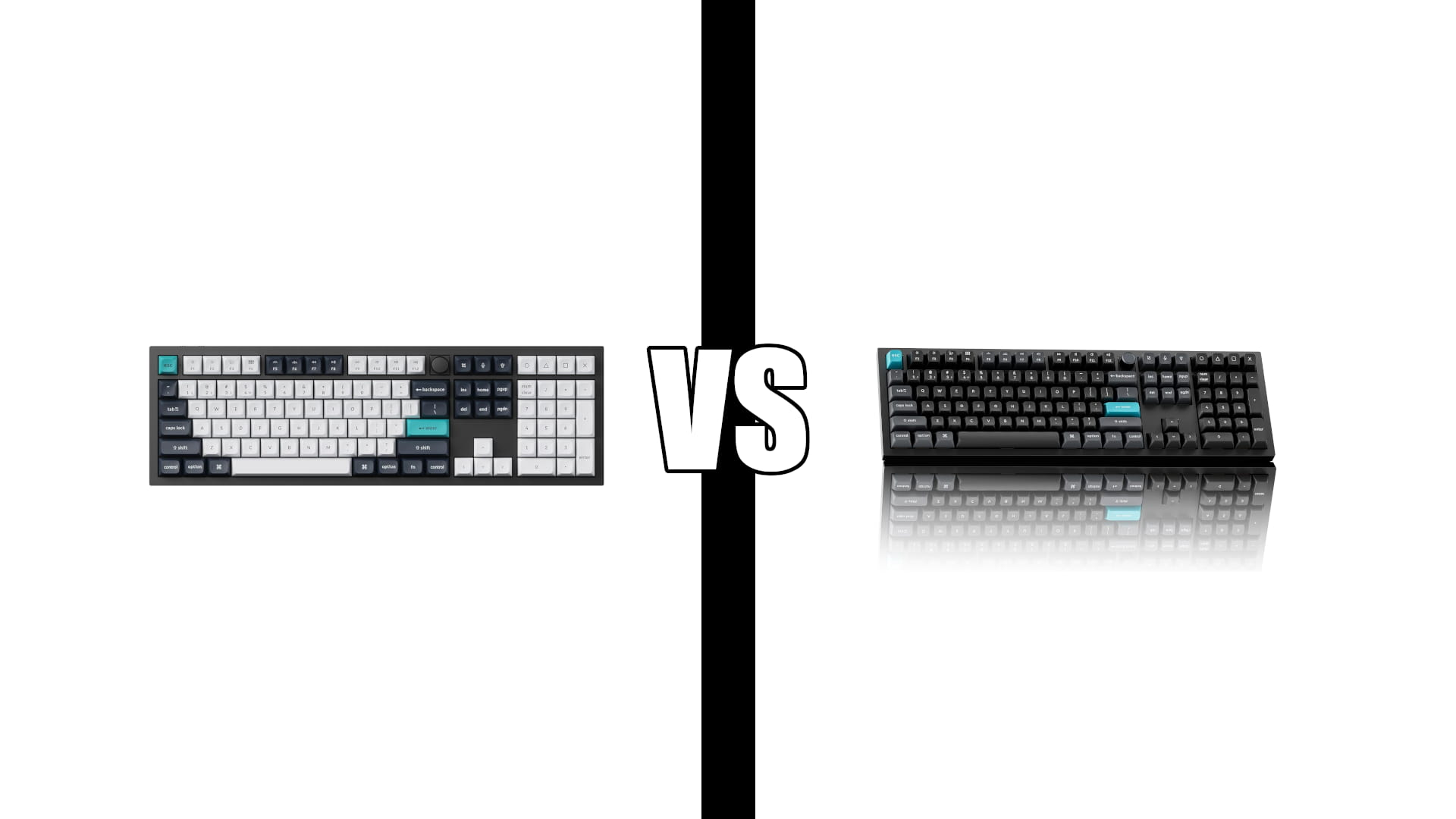
Keychron Q6 Max vs Q6 Ultra 8K: Buy the Older One
Category: Tech & Gear | Reading time: 10 min | Last updated: November 2026
Disclosure: This post contains affiliate links. If you buy through our links we may earn a small commission at no extra cost to you.
Keychron Q6 Max vs Q6 Ultra. These two keyboards cost exactly the same. The Q6 Ultra 8K is the newer one, with a faster polling rate, a longer battery and per-key RGB the Q6 Max does not have.
It is also the one you probably should not buy, and the reason comes from a reviewer who owns eleven Keychron keyboards including two Q6 Maxes. He bought the Ultra, found the typing feel worse, and sent it back.
There is a bigger issue underneath both of them, and it is the thing to read this post for. We will get to it.
Jump to a section
The short answer
The Q6 Max is the better buy of the two, at the same price. It has twice the review history, it runs QMK and VIA rather than the newer ZMK, and the owners best placed to compare them prefer how it types.
Choose the Q6 Ultra 8K only for specific reasons: you want per-key RGB, which the Max does not offer, you want the much longer quoted battery life, or you prefer a softer and quieter board.
And buy either one somewhere with an easy return process. Both sit at 4.0 stars, and both have an unusually high share of one-star reviews describing keys that stop working. That is the single most important thing on this page.
The 8K polling rate in the Ultra’s name is not a reason to pick it. Its own owners cannot feel it.
Q6 Max in detail

When it works, it is the kind of keyboard that makes people replace everything else on their desk.
“This is my second Keychron board. The aluminum case is heavy and solid. Compared to the Logitech MX Mechanical, this keyboard (and the K10 Max) are entirely superior and create a next level, premium typing and excel experience. Honestly, I was hesitant to buy such an expensive keyboard, but now I wish I’d bought it much sooner. If you’re on the fence, just buy it.”
Worth noting the comparison he reaches for. If you are coming from a Logitech MX Mechanical or an MX Keys, this is a different class of object: a solid aluminum block that does not move when you type, with foam and gasket layers tuned to kill the hollow sound cheaper boards make.
One gap that matters at this price. The Max does not offer true per-key RGB. You get backlighting, but not independent control of every key, which owners reasonably point out is odd on a board this expensive when much cheaper keyboards manage it. The Ultra fixes this.
Six switch options is the other quiet advantage: Brown, Red and Banana, each also available in a silent version. If you share a room or take calls, the silent variants matter more than any spec on the box. Our ergonomic keyboard guide covers quieter options if noise is the main concern.
Q6 Ultra 8K in detail

On paper it is the upgrade. It is selling faster than the Max, and the people who like it are emphatic: one long review calls it the best keyboard they have ever used and a work of art, praises the even lighting and the programmable knob, and confirms the battery claims hold up at roughly three to four months with the lights off.
That same owner flags two things the listing does not. The key legends are not lit by the LEDs, so you are buying side-lit keycaps separately if you want visible characters in the dark. And the board is tall enough that a wrist rest stops being optional.
Then there is the headline feature.
“I am coming from a Corsair K70 and noticed the noticeable quality improvements. The keyboard itself has heft, easily doubling the weight of my Corsair. This alone adds a premium feel right out of the box. The 8k part though, does feel like a gimmick as I can barely perceive the difference between 1k and 8k polling. My biggest gripe is with the included switches. They feel pretty good but they are too loud. There is such a thing as too much clack and thock. After a week of enduring my own typing, I ended up spending even more money on Gateron Jades to get the quiet sound I needed.”
An owner saying the feature in the product’s name is imperceptible is about as clear as buying advice gets. More on that below.
Specs side by side
| Q6 Max | Q6 Ultra 8K | |
|---|---|---|
| Rating | 4.0 / 83 reviews | 4.0 / 38 reviews |
| Price | Identical | Identical |
| Layout | 100% full size | 100% full size |
| Case | 6063 CNC aluminum | CNC aluminum |
| Polling rate | 1000 Hz | 8000 Hz |
| Bluetooth | 5.1, three devices | 5.3, three devices |
| Firmware | QMK and VIA | ZMK, Keychron Launcher |
| Per-key RGB | No | Yes |
| Battery quoted | Not stated | Up to 660 hours |
| Default switches | Gateron Brown | Silk POM |
| Switch options | Six, three silent | Three, none silent |
| Hot-swappable | Yes, 3 and 5 pin MX | Yes, 3 and 5 pin MX |
| Knob | Yes | Yes, programmable |
| One-star share | 15% | 13% |
Note the switch options row, because it is easy to miss. The Max comes in six switch types including three silent ones. The Ultra comes in three, none silent. If quiet typing matters, that difference outweighs everything else in the table.
Does 8K polling matter
Polling rate is how often the keyboard reports to your computer. At 1000Hz that is once per millisecond. At 8000Hz it is eight times per millisecond, so input latency drops by a fraction of a millisecond.
For office work it is meaningless. Typing a document, writing code, filling a spreadsheet, none of it is bottlenecked by a sub-millisecond reporting interval. For competitive gaming the theoretical case exists, and the practical case is thin enough that the Ultra’s own owner, coming from a gaming keyboard, called it a gimmick he could barely perceive.
There is also a cost. Running 8000Hz is what the 660-hour battery figure is measured against with the backlight off, and the same owner reports ten to fifteen days with the lights on full. High polling rates draw power.
So the feature in the name is not the reason to buy this keyboard. Per-key RGB and the battery are.
Typing feel and the case redesign
This is the review that should decide it for anyone upgrading from a Q6 Max, and it comes from the most qualified owner in either product’s review history.
“I am the proud owner of 11 different Keychron keyboards, including two Q6 Max, a Q6 Pro, Q6 HE, Q8 Pro, Q13 Max. When I saw the Q Ultra 8K line release, it seemed like the next logical upgrade. I was more interested in the case and gasket upgrades than the battery life and wireless upgrades. Compared to my Q6s, this Q6 Ultra feel was a total disappointment. The action was less clicky, more soft and, I don’t know, unpleasant. No thwokiness. I tried switching out the silk POM banana switch with gateron Jupiter bananas, but it wasn’t much of a difference. I guess the case and gasket design is making this keyboard simply less fun to type on, at least for me. So I sent it back. If you’re into a softer, quieter typing experience, maybe this will be your thing. But if you already appreciate something like a Q max with banana switches, I wouldn’t bother.”
Several things make this unusually credible. He owns eleven Keychrons including two of the exact keyboard the Ultra replaces. He bought the Ultra specifically for the case and gasket changes rather than the marketing features. He swapped the switches to rule them out, and the feel did not change, which points at the case rather than the switches. And he returned it.
Read his conclusion as a sorting rule rather than a verdict. The Ultra’s case is softer and quieter. If that is what you want, it is a feature. If you came to a metal keyboard for a firm, resonant typing sound, the newer board moves away from you.
Read this before you buy either
Both keyboards average 4.0 stars, which sounds middling and is actually hiding something. The Max’s ratings split 64% five-star and 15% one-star. The Ultra’s split 58% and 13%. That is not a mediocre product, it is a divided one: most people love it and a meaningful minority had theirs fail.
The pattern in those one-star reviews is consistent, and it is keys.
“This is my second Q6 Max. On the first one, the F2 key stopped working (actually, it acted as though it was being pressed continuously), and it was within warranty, so I figured I just got a lemon, and returned it for a replacement. Same thing happened with my second Q6 Max, but this time, it was the F1 key, and it had the same problem within a week or two. A month or two after that, the S and A keys became problematic. I have to press both of those keys much harder than normal to get them to be recognized, and often, a single hard press of the S key results in ‘ss’. I emailed customer support to see if they could do anything to help me out. Crickets.”
A separate Max buyer received a unit with the space bar stuck down, returned it, and found the replacement’s space bar glitchy too. He also described Keychron’s website as difficult to use and no help.
The Ultra’s record is shorter and worse.
“Randomly the keyboard would fail to connect for up to a minute to either device, along with significant input delays while wireless, leading me to keep it plugged in to one PC and charging 24/7. I was plagued by several keys having consistent double-input or dropped inputs entirely, which I had hoped would fade as I got used to the new switches, but this didn’t change up to the point where after almost exactly one month and one week of ownership, the keyboard’s RGB became entirely disabled, custom keys randomized, and was not responsive to resets, factory resets, or firmware re-flash, until finally not taking any input whatsoever.”
What to do with this. Not “avoid Keychron,” because most buyers are genuinely delighted and the five-star reviews are not padding. But at this price, with this failure pattern and two separate reports of support not responding, where you buy matters as much as what you buy.
- Buy from a retailer with a no-argument return window rather than direct
- Test every key, including the full F-row, within the first week
- Keep the packaging until the return window closes
- Hot-swappable sockets mean a dead switch is a cheap fix, but a dead key that persists after swapping the switch is a board problem
If that sounds like more risk than you want on a keyboard, the honest answer is that a Logitech MX Keys S costs a fraction of this and has thousands of reviews behind it. You give up the aluminum case, the hot-swap sockets and the typing sound. You also give up the failure rate.
QMK versus ZMK
Easy to skim past and it is a real difference.
The Max runs QMK with VIA, the long-established open source keyboard firmware. Years of documentation, a large community, and a graphical remapping tool most people find straightforward.
The Ultra runs ZMK, configured through Keychron’s own Launcher web app. ZMK is the newer firmware, built with wireless and power efficiency in mind, which is part of how the Ultra reaches its battery figure. It has a smaller community and less accumulated documentation.
Both let you remap keys, build macros and program the knob. The practical difference is what happens when you want to do something unusual: with QMK someone has written it up, and with ZMK you may be working it out yourself. If you already have QMK layouts you like, moving to the Ultra means rebuilding them.
Which to buy
| If you | Buy |
|---|---|
| Want a firm, resonant typing sound | Q6 Max |
| Want a softer, quieter board | Q6 Ultra 8K |
| Need silent switches | Q6 Max, three silent options |
| Want per-key RGB | Q6 Ultra 8K |
| Already use QMK layouts | Q6 Max |
| Will run it wireless for weeks | Q6 Ultra 8K |
| Are upgrading from a Q6 Max | Stay where you are |
| Want the longer review history | Q6 Max |
| Play competitively and want 8000Hz | Q6 Ultra, but expect not to feel it |
| Want a keyboard that just works | Neither, see below |
The Max is the pick. Same price, twice the review history, the mature firmware, more switch options including silent ones, and the typing feel that the people who own both prefer. The Ultra’s advantages are real but narrow: per-key RGB, battery life, and a softer sound some people will specifically want.
That last row is not a joke. If you want a premium keyboard without a one-in-seven chance of a key failing, this is the wrong category, and our wireless keyboard guide covers boards with thousands of reviews behind them.
Frequently asked questions
Is the Q6 Ultra 8K worth it over the Q6 Max?
They cost the same, so it is not about value. The Ultra adds per-key RGB, a much longer quoted battery and Bluetooth 5.3. It gives up QMK firmware, three silent switch options and, according to owners who have used both, the firmer typing feel. For most people the Max is the better board.
Can you feel the difference between 1000Hz and 8000Hz polling?
For office work, no. One Ultra owner coming from a gaming keyboard described it as a gimmick he could barely perceive. It also costs battery life.
Are Keychron keyboards reliable?
Mixed, and worth knowing before you spend this much. Both boards carry an unusually high share of one-star reviews, and the recurring complaint is keys that stop registering or register twice. Most buyers have no problems. Buy where returns are easy and test every key in the first week.
Do I need to know anything technical to use these?
No. Both work out of the box on Mac and Windows. The firmware matters only if you want to remap keys or build macros, and both offer a browser-based tool for that.
Are the key legends backlit?
Not on the Ultra. The RGB lights the board, not the characters, so typing in a dark room means touch typing or buying side-lit keycaps separately. Worth checking before you order if you work at night.
Will a wrist rest be necessary?
Probably. Both are tall aluminum boards, and owners recommend one. Keychron sells a matching silicone rest, and any flat rest of similar height works.
Sources and references
- Q6 Max specifications, Keychron
- Q6 Ultra 8K review, Pulse
Continue reading
Specifications taken from current manufacturer listings and verified buyer reviews. Prices change often, so check at checkout. Last updated November 2026.