Logitech Lift vs MX Vertical: Which Ergonomic Mouse Should You Buy?
Category: Tech & Gear | Reading time: 8 min | Last updated: September 2026
Disclosure: This post contains affiliate links. If you buy through our links we may earn a small commission at no extra cost to you.
The short answer: Get the Logitech Lift if you have small to medium hands, want quiet clicks, or are left-handed. Get the MX Vertical if you have medium to large hands and prefer a rechargeable mouse. Hand size is the deciding factor, not features.
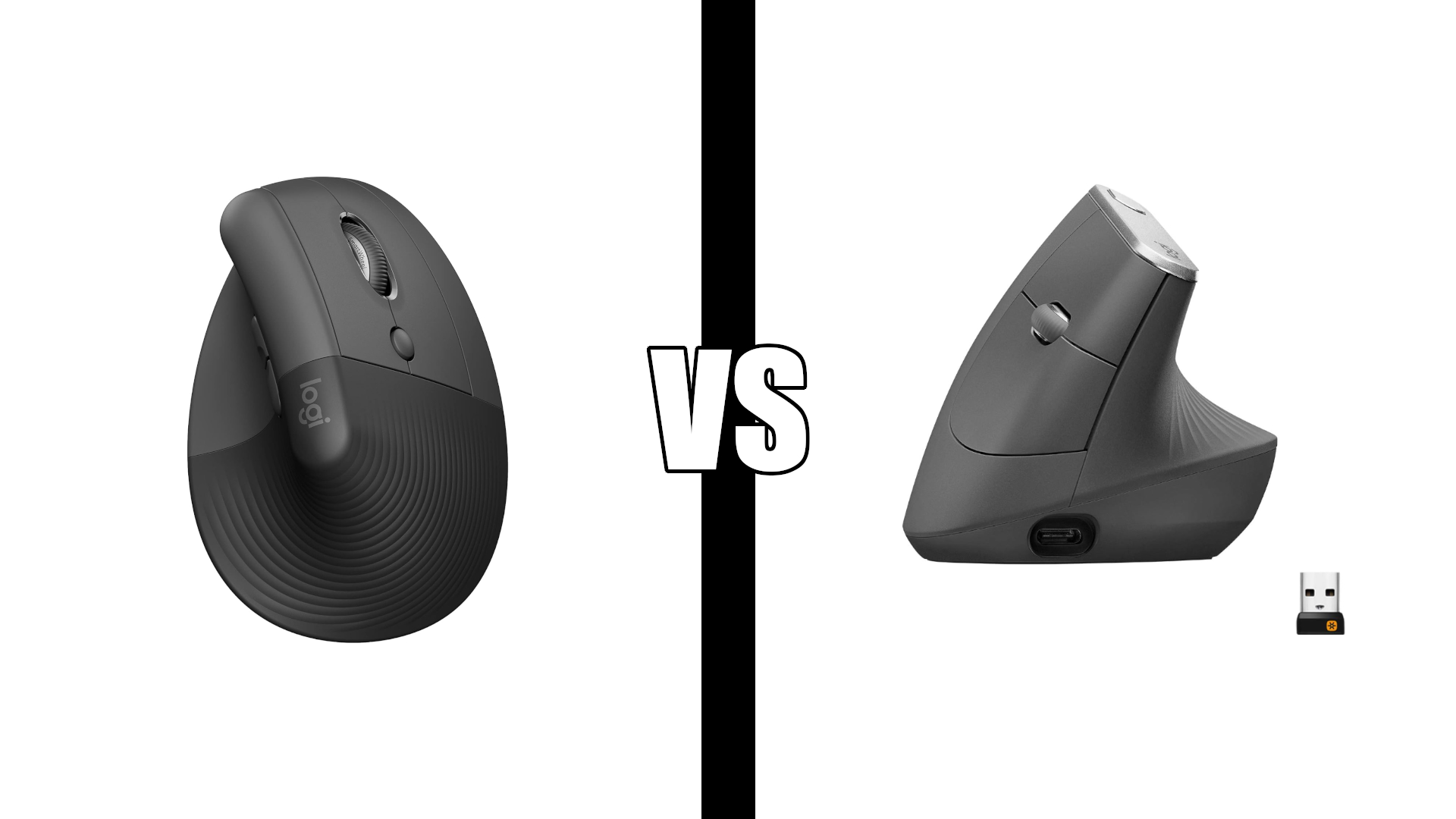
The Logitech Lift vs MX Vertical decision is closer than most comparisons suggest. Both use the same 57 degree vertical angle, both are ergonomist approved, both connect over Bluetooth or a USB receiver, and both pair with up to three devices. The real differences come down to size, click noise, battery, and which hand you use.
In this comparison
Key differences
Size. The MX Vertical is the larger mouse, about 11 percent longer and wider than the Lift. It fills a medium to large hand. The Lift is built for small to medium hands.
Clicks. The Lift has quiet clicks. The MX Vertical has standard clicks that a microphone can pick up on calls.
Battery. The Lift runs on one AA battery for up to two years. The MX Vertical has a rechargeable battery that lasts up to four months per charge over USB-C, and a one minute quick charge gives about three hours of use.
Left-handed option. The Lift comes in a left-handed version. The MX Vertical is right-handed only.
Receiver. The Lift uses a Logi Bolt receiver. The MX Vertical uses a Unifying receiver. Both also connect over Bluetooth, and the MX Vertical can run wired through its USB-C cable.
Colors. The Lift comes in several colors, including Graphite, Rose, and Off White. The MX Vertical comes in graphite only.
Size and hand fit
Size is where most buyers go wrong. A vertical mouse that’s too big forces your fingers to stretch, and one that’s too small leaves your hand cramped. Either one undoes the ergonomic benefit.
| Dimension | Logitech Lift | Logitech MX Vertical |
|---|---|---|
| Length | 108 mm (4.25 in) | 120 mm (4.7 in) |
| Width | 70 mm (2.75 in) | 79 mm (3.1 in) |
| Height | 71 mm (2.8 in) | 78.5 mm (3.1 in) |
| Weight | 125 g | 135 g |
Medium hands are the gray area. If your fingertips reach past the end of your current mouse, the MX Vertical will likely feel more natural. If your hand rests fully on your current mouse with your fingertips on the buttons, the Lift is the safer choice.
Logitech Lift: Best for small to medium hands

The Lift is Logitech’s answer to a real gap. Most vertical mice are sized for average to large hands, and the Lift is built for everyone else. The grip is softly textured, the thumb rest is snug, and the buttons are easy to reach without stretching.
It has two practical advantages over the MX Vertical beyond size. The clicks are quiet, which matters in shared spaces and on video calls where a microphone picks up every click. And it’s the only one of the two available for left hands, sold as the Lift Left. The single AA battery lasts up to two years, so there’s no charging to keep track of.
“Great mouse if you have wrist or arm pain. Easy to install using the USB dongle, comfortable grip, and buttons on both the top and side of the unit. Only negative is the custom button software does not work on Linux or Windows 7. Didn’t even know vertical mice existed ten days ago, glad I found this one.”
Who it’s for: Anyone with small to medium hands, left-handed users, and anyone who wants a quiet mouse for calls or shared spaces.
Pros:
- Sized for small to medium hands
- Quiet clicks
- Left-handed version available
- Up to 2 years on one AA battery
- Several color options
- Lighter at 125 g
Cons:
- Too small for large hands
- Uses disposable AA batteries
- Button customization software doesn’t support Linux or Windows 7
| Spec | Detail |
|---|---|
| Hand size | Small to medium |
| Handedness | Right or left (Lift Left) |
| Connectivity | Bluetooth, Logi Bolt USB |
| Battery | 1 AA, up to 2 years |
| Clicks | Quiet |
| Weight | 125 g |
Logitech MX Vertical: Best for medium to large hands

The MX Vertical is Logitech’s flagship ergonomic mouse, and it’s the better fit for larger hands. Logitech says the handshake position reduces muscular strain by 10 percent compared to a standard mouse, and the 4000 DPI sensor means about four times less hand movement than a standard 1000 DPI mouse. A cursor speed switch on top changes sensitivity instantly without opening any software.
It’s also the more flexible mouse for connecting. You can use Bluetooth, the included Unifying receiver, or plug it in with the USB-C cable, which also charges it. A full charge lasts up to four months, and one minute of charging gives about three hours of use if you get caught with a dead battery. With nearly 15,000 reviews, it has the longer track record of the two.
“Definitely reduces fatigue and easy to use. Great response with less space needed for mouse movement. Stays charged for months, you actually forget to charge it. Since my car accident where I broke my thumb, this is the only mouse that gave me the same abilities as before the accident.”
Who it’s for: Anyone with medium to large hands who wants a rechargeable mouse and the option to use it wired.
Pros:
- Sized for medium to large hands
- Rechargeable, with quick charge
- Bluetooth, Unifying receiver, or wired USB-C
- Cursor speed switch on the mouse
- Textured rubber grip
- Nearly 15,000 reviews
Cons:
- Right-handed only
- No quiet clicks
- Graphite only
- Heavier at 135 g
| Spec | Detail |
|---|---|
| Hand size | Medium to large |
| Handedness | Right only |
| Connectivity | Bluetooth, Unifying USB, wired USB-C |
| Battery | Rechargeable, up to 4 months |
| Clicks | Standard |
| Weight | 135 g |
Also considering the MX Master 3S? Our MX Master 3S vs MX Vertical comparison covers how Logitech’s two premium mice compare.
Specs comparison
| Feature | Logitech Lift | Logitech MX Vertical |
|---|---|---|
| Hand size | Small to medium | Medium to large |
| Vertical angle | 57 degrees | 57 degrees |
| Dimensions | 108 x 70 x 71 mm | 120 x 79 x 78.5 mm |
| Weight | 125 g | 135 g |
| Max DPI | 4000 | 4000 |
| Connectivity | Bluetooth, Logi Bolt | Bluetooth, Unifying, wired USB-C |
| Multi-device | Up to 3 | Up to 3 |
| Battery | 1 AA, up to 2 years | Rechargeable, up to 4 months |
| Quiet clicks | Yes | No |
| Left-handed version | Yes | No |
| Colors | Several | Graphite |
| Reviews | 7,596 | 14,907 |
Who should buy which
Buy the Logitech Lift if:
- You have small to medium hands
- You’re left-handed (get the Lift Left)
- You want quiet clicks for calls or shared spaces
- You’d rather swap a battery every couple of years than charge
- You want a color other than graphite
Buy the Logitech MX Vertical if:
- You have medium to large hands
- You prefer a rechargeable mouse
- You want the option to use it wired
- You want a cursor speed switch on the mouse itself
Consider a different mouse if:
- You have very small hands. The ProtoArc EM11 and SABLUTE MAM3 are sized smaller still.
- You want to stop moving your arm altogether. The Logitech M575S trackball is the better fit.
- You want the basic vertical benefit for less. The Anker vertical mouse covers the essentials.
See our full ergonomic mouse guide for all seven options across every hand size. Pairing it with a keyboard? Our best ergonomic keyboard guide covers the Logitech ERGO K860 and Wave Keys, and our MX Keys vs MX Keys S comparison covers the keyboard version of this decision.
You don’t need a vertical mouse at all. Our MX Master 4 vs MX Master 3S comparison covers Logitech’s two flagship horizontal mice.
Frequently asked questions
Is the Logitech Lift or MX Vertical better for medium hands?
Either can work. Medium hands on the larger side usually prefer the MX Vertical, and medium hands on the smaller side usually prefer the Lift. Compare the dimensions above to your current mouse. If your fingertips reach past the end of it, lean toward the MX Vertical.
Is the MX Vertical bigger than the Lift?
Yes. The MX Vertical is 120 mm long and 79 mm wide, compared with 108 mm and 70 mm for the Lift. It’s also taller and 10 g heavier.
Does the MX Vertical have a battery?
Yes. It has a built-in rechargeable battery that lasts up to four months per charge and charges over USB-C. You can keep using it while it charges. The Lift uses one replaceable AA battery that lasts up to two years.
Is there a left-handed version?
The Lift comes in a left-handed version, the Lift Left, with the same features as the right-handed model. The MX Vertical is right-handed only.
Do both work with Bluetooth?
Yes. Both connect over Bluetooth and both pair with up to three devices. The Lift also includes a Logi Bolt receiver, and the MX Vertical includes a Unifying receiver and can run wired over USB-C.
Is the Lift or MX Vertical better for wrist pain?
Both use the same 57 degree angle, which keeps your wrist in a natural handshake position instead of turned palm down. Research on vertical mouse ergonomics supports this posture for reducing forearm strain. The better choice for your wrist is the one that fits your hand, since a mouse that’s the wrong size can add strain of its own.
What’s the difference between the Lift and Lift for Business?
Lift for Business is the business channel version of the same mouse, sold for company deployments. For home use, the standard Lift is the one to get.
Which is better value?
Neither wins on value alone. Both are priced close enough that fit and features should decide it: hand size first, then quiet clicks and left-hand availability for the Lift, or rechargeable battery and wired use for the MX Vertical.
Does the Lift work with Mac?
Yes. Both mice work with macOS over Bluetooth or their USB receivers, and Logi Options+ button customization is available for Mac.
Continue reading
Prices change often. Check current pricing at checkout. Last updated September 2026.