Best Wireless Keyboards and Mice for Home Office 2026
Category: Tech & Gear | Reading time: 13 min | Last updated: June 2026
Disclosure: This post contains affiliate links. If you buy through our links we may earn a small commission at no extra cost to you.
Quick picks
- Best budget combo: Logitech MK470 (~$35) — Check price →
- Best premium combo: Logitech MX Keys S + MX Master 3S (~$200) — Check price →
- Best budget keyboard: Logitech Pebble Keys 2 K380s (~$34) — Check price →
- Best ergonomic keyboard: Microsoft Ergonomic Keyboard (~$80) — Check price →
- Best mechanical keyboard: Keychron K2 (~$80) — Check price →
- Best premium mouse: Logitech MX Master 3S (~$90) — Check price →
Why wireless matters for a home office
A wired keyboard and mouse isn’t broken. But wireless changes your desk in ways that are hard to appreciate until you’ve made the switch.
No cables means your desk pad stays clean. No cables means you can push your keyboard back when you need space and pull it forward when you need to type. No cables means when you switch between your laptop and desktop you’re not unplugging and replugging — you press a button. For a home office where you spend 6-8 hours a day at the same surface, these small frictions add up over a year more than they sound.
The other thing wireless does: it forces you to think about what’s actually on your desk. Cable management is a workaround. Going wireless is the solution.
This guide covers the best wireless keyboards and mice for home office use in 2026 — from a $35 combo that does everything you need to a $200 premium pairing that makes typing feel like a different activity.
Going wireless is the solution — and if you want to take it further our complete $500 home office setup guide covers everything.
If you specifically want an ergonomic split design our best ergonomic keyboard guide covers seven options including budget picks under $55 and premium options up to $319.
Part 1 — Combos
For most people a combo is the right call. You get a matched keyboard and mouse designed to work together, share a single USB receiver, and arrive at the same price as buying separately. The only reason to buy separately is if you have specific requirements for either the keyboard or mouse that a combo doesn’t meet.
1. Logitech MK470 — Best budget combo
Check current price on Amazon →
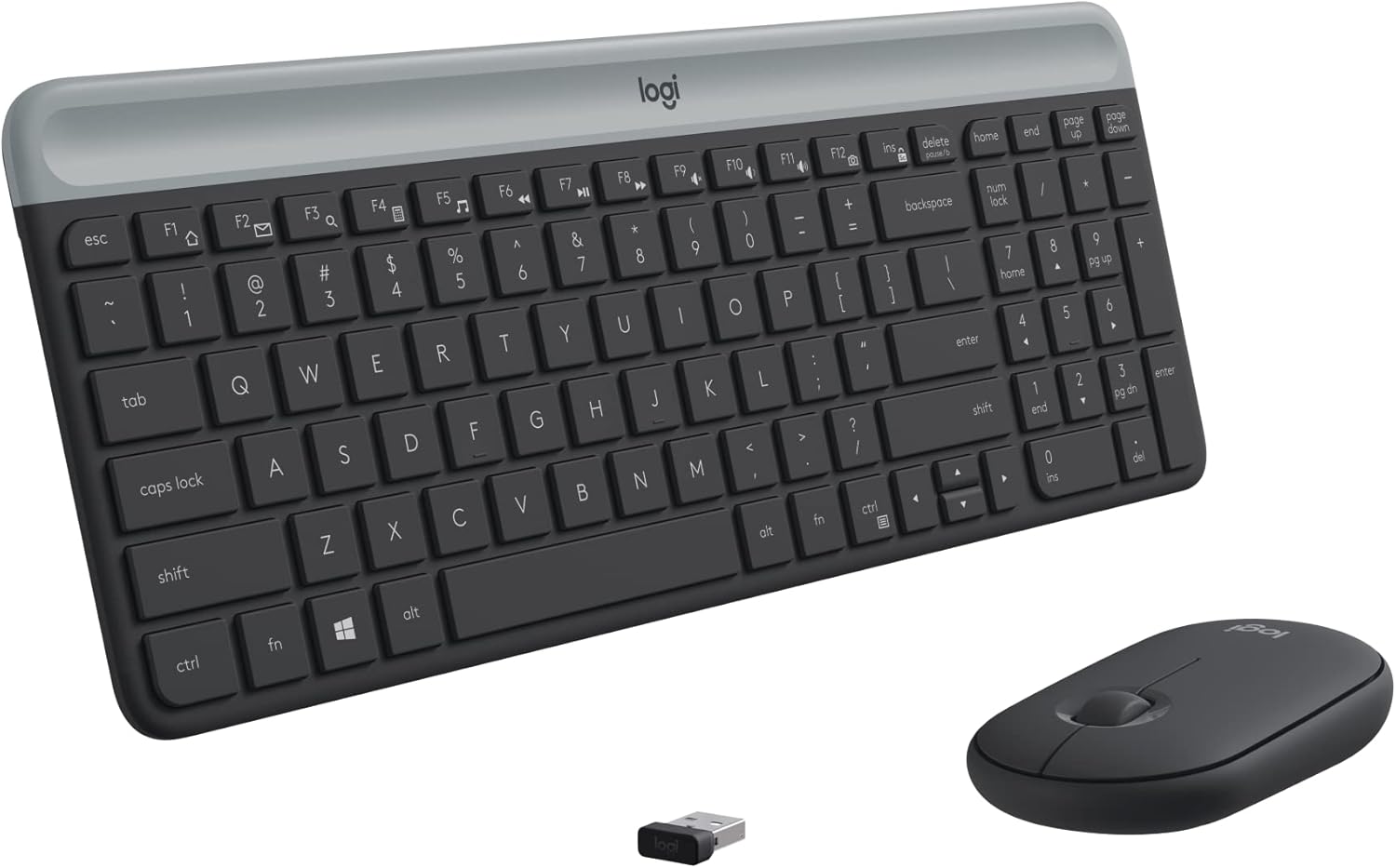
At $35 on sale the MK470 is the honest answer to “what’s the cheapest wireless keyboard and mouse worth buying.” Not the cheapest combo with wireless in the name — the cheapest one where the wireless actually works reliably and you won’t be replacing it in six months.
The keyboard is low-profile with scissor keys — the same mechanism used in laptop keyboards. If you’re coming from a laptop keyboard the transition is immediate and comfortable. The layout is compact and modern with a number pad included, which matters for anyone doing spreadsheet work.
The quiet keys are a genuine feature not marketing language. The MK470 is one of the quieter keyboards at any price — relevant if you’re on video calls and don’t want your typing audible to the other person, or if you share a space with someone who’d rather not hear keyboard clicks all day.
The mouse is ambidextrous, 3-button, 1000 DPI — functional and nothing more. Don’t expect an ergonomic shape or customizable buttons. It does the job without being remarkable.
Battery life is genuinely exceptional — 36 months for the keyboard and 18 months for the mouse. You will forget this keyboard needs batteries.
Single USB nano receiver for both devices. Plug it in and it works. No software required though the Logi Options app lets you customize the 12 FN keys if you want.
“Small footprint while still having a full number pad — that combination is harder to find than it sounds. Keys have a nice bouncy feel and the mouse shape looked awkward in photos but feels fine in hand. Connected seamlessly to both my old MacBook Pro and new MacBook without any setup hassle. One minor complaint: no indicator light for caps lock. Not a dealbreaker but worth knowing.”
— Verified Amazon Buyer, April 2026 · ⭐⭐⭐⭐⭐ · Logitech MK470
Who it’s for: Anyone who needs a clean wireless setup without spending serious money. Perfect first wireless combo, solid permanent solution for light office use.
For a dedicated honest review of the most popular budget wireless keyboard our Logitech K270 review covers two weeks of real daily use.
Pros:
- Quiet keys — genuinely quiet not just quieter
- Exceptional battery life — 36 months keyboard, 18 months mouse
- Compact modern layout with number pad
- Single USB receiver for both devices
- Available in black, white, and pink
Cons:
- Mouse is basic — no ergonomic shaping, limited to 1000 DPI
- No multi-device support — one computer only
- Not rechargeable — uses AA/AAA batteries
| Spec | Detail |
|---|---|
| Price | ~$34.99 (from $49.99) |
| Connection | 2.4 GHz USB nano receiver |
| Keyboard battery | 36 months |
| Mouse battery | 18 months |
| Mouse DPI | 1000 |
| Colors | Black, White, Pink |
2. Logitech MX Keys S + MX Master 3S — Best premium combo
Check current price on Amazon →

At $200 for the pair this is a significant jump from the MK470. It’s also a completely different class of product — not a better version of a budget combo but a professional tool designed for people who type and click for a living.
The MX Keys S keyboard has spherically-dished keys — each key has a slight concave indent shaped for your fingertip. If you’ve never typed on one it sounds like a minor detail. After a day of use it becomes the thing you notice most about every other keyboard. Backlighting that activates when your hands approach and adapts to ambient lighting is genuinely useful for early morning or late evening sessions.
The real value of this pairing is the Logi Options+ software integration. Both devices connect through the same app and unlock features that justify the price for heavy users: Smart Actions that trigger multiple commands from a single keystroke, seamless FLOW control that lets you use one keyboard and mouse across up to three computers simultaneously — moving your cursor from one screen to another and transferring files between machines as if they were one.
Deciding between the 3S and the newer model? See our MX Master 4 vs MX Master 3S comparison.
For remote workers who use a work laptop alongside a personal desktop this is transformative. One keyboard, one mouse, three computers, zero switching friction.
The MX Master 3S mouse deserves its own section below — but in this pairing the combination is worth more than the sum of its parts.
“Over a month of daily use for 3-8 hours and both keyboard and mouse are still holding strong on battery. I use the same monitor for my gaming PC and work laptop — the PC runs through the USB receiver and the laptop connects via Bluetooth. Switching between them is a single button push. That alone is worth the price for anyone running a dual-computer setup. Best keyboard and mouse combo I’ve ever owned, hands down.”
— Verified Amazon Buyer, January 2026 · ⭐⭐⭐⭐⭐ · Logitech MX Keys S + MX Master 3S Combo
Who it’s for: Remote workers who type seriously, use multiple computers, or want the best typing experience available at a non-audiophile price. The upgrade that makes you realize what you were missing.
Can’t decide between the MX Keys and MX Keys S? Our MX Keys vs MX Keys S comparison breaks down exactly what changed and whether the upgrade is worth it.
Pros:
- Spherically-dished keys shaped for fingertips
- Backlit keys that adapt to ambient light
- FLOW multi-computer control
- Connects to 3 devices via Bluetooth or USB receiver
- USB-C rechargeable — no batteries
- Smart Actions for automation
Cons:
- $200 is real money
- Requires Logi Options+ for full feature set
- MX Keys S is a full-size keyboard — no compact option in this pairing
| Spec | Detail |
|---|---|
| Price | ~$200 (combo) |
| Connection | Bluetooth or Logi Bolt USB |
| Keyboard battery | 10 days backlit, 5 months without |
| Charging | USB-C |
| Multi-device | Up to 3 devices |
| OS support | Windows, macOS, Linux, Chrome OS |
Part 2 — Keyboards
3. Logitech Pebble Keys 2 K380s — Best budget multi-device keyboard
Check current price on Amazon →

The K380s is the keyboard for people who work across multiple devices. At $34 it connects to up to three devices via Bluetooth — laptop, tablet, phone — and switches between them with one button press. The Easy-Switch buttons are labeled 1, 2, 3 and switching is instant.
For a remote worker who types on a work laptop, uses a personal Mac, and occasionally answers messages on an iPad — the K380s solves the “which keyboard am I on” problem cleanly and cheaply.
The round keycaps are the K380’s signature look — distinctive enough that people notice it on video calls, comfortable enough that the round shape doesn’t affect typing accuracy after a short adjustment period. Quiet typing, laptop-like key travel, 3-year battery life on two AAA batteries.
The 10 programmable FN keys through Logi Options+ are a genuine productivity feature at this price point — customize shortcuts for search, screen capture, emoji, and whatever else you reach for constantly.
Made with 49% recycled plastic if sustainability factors into your purchasing decisions.
If you’re also choosing between Logitech’s ergonomic mice our Lift vs MX Vertical comparison covers the key differences clearly.
“Does its job as a multi-device keyboard — easy to switch between devices and works without needing the Logi software which is a plus. The circular keys look unusual but don’t interfere with typing at all. Quiet and smooth for a membrane keyboard, doesn’t feel cheap for the price. Two honest complaints: the key legends appear to be stickers rather than printed which raises long-term durability questions, and there are no indicator lights for caps lock or fn lock. For the price though it’s worth it — don’t see it failing anytime soon.”
— Verified Amazon Buyer, May 2026 · ⭐⭐⭐⭐ · Logitech Pebble Keys 2 K380s
Who it’s for: Anyone who works across multiple devices and wants a clean, portable keyboard that handles the switching without thinking about it.
Pros:
- Three-device Bluetooth switching with one button press
- 3-year battery life
- Compact and portable
- Quiet keys
- 10 programmable FN keys
- Available in white and pink
Cons:
- No number pad
- Round keycaps take brief adjustment period
- Bluetooth only — no USB receiver option
- Stickers on keys might impact longevity
| Spec | Detail |
|---|---|
| Price | ~$34 (from $39.99) |
| Connection | Bluetooth |
| Multi-device | Up to 3 devices |
| Battery | 3 years (AAA batteries) |
| Colors | White, Pink |
4. Logitech MX Keys S — Best premium standalone keyboard
Check current price on Amazon →

Everything said about the MX Keys S in the combo section applies here as a standalone. If you already have a mouse you’re happy with and just want to upgrade the keyboard — this is the answer at $129.
The typing experience on the MX Keys S is the reference point that most premium keyboards get compared to. Spherically-dished keys, perfect key travel, satisfying but quiet actuation. If you type for hours every day this keyboard makes those hours noticeably more comfortable.
The backlighting is smart — proximity detection activates the backlight when your hands approach and turns it off when you step away. Adapts brightness to ambient light automatically. Small detail that becomes something you notice every time you sit down.
USB-C rechargeable with up to 10 days on a full charge with backlighting enabled or up to 5 months with backlighting off. For most people plugging in once a week is the rhythm.
“Best keyboard I’ve owned for serious typing. Build quality is exceptional — feels like a piece of serious hardware, not a consumer peripheral. The backlight is excellent and when the battery dies it works as a wired keyboard which is a nice backup. Multi-device setup with multiple Logi dongles plus Bluetooth gives you real flexibility across computers. One honest quirk: after sitting idle with the backlight off it can take half a second to wake up — the first keypress sometimes wakes it rather than registers. Easy workaround is hitting Ctrl first to wake it before typing, but worth knowing if you’re sensitive to that kind of thing. I’m a programmer who types heavily all day and this is the keyboard I reach for when I want quiet without sacrificing build quality.”
— Verified Amazon Buyer, January 2026 · ⭐⭐⭐⭐⭐ · Logitech MX Keys S
Who it’s for: Anyone who wants the best typing experience at a reasonable price and doesn’t need to buy a new mouse. Pairs particularly well with the MX Master 3S if you want to build the premium combo incrementally.
Pros:
- Spherically-dished keys shaped for fingertips
- Backlit keys that adapt to ambient light
- Works as wired keyboard when battery dies
- Connects to 3 devices via Bluetooth or USB receiver
- USB-C rechargeable
- Exceptional build quality — feels premium
- Smart Actions for automation via Logi Options+
Cons:
- Half-second wake-up delay after sitting idle — first keypress may not register
- $130 is a real investment for a keyboard
- Full size only — no compact version
- Requires Logi Options+ for full feature set
| Spec | Detail |
|---|---|
| Price | ~$129.99 |
| Connection | Bluetooth or Logi Bolt USB |
| Multi-device | Up to 3 devices |
| Battery | 10 days (backlit), 5 months (no backlight) |
| Charging | USB-C |
| Colors | Graphite, White |
5. Microsoft Ergonomic Keyboard — Best for wrist health
Check current price on Amazon →

Most keyboards are designed for how a keyboard looks, not how your wrists feel after eight hours of use. The Microsoft Ergonomic Keyboard is designed the other way around — ergonomist-approved split keyset layout that promotes a natural wrist posture and reduces the risk of fatigue and injury over long sessions.
The split design looks unusual until you use it. Your hands angle slightly outward in a more natural position rather than being forced flat and parallel as standard keyboards require. The cushioned palm rest covered in premium fabric keeps your wrists elevated and neutral throughout the day.
Real talk: there’s an adjustment period. If you’ve typed on a standard keyboard layout for years the split takes about a week to feel natural. Most people who push through that week say they can’t go back to a standard layout.
Dedicated function keys for Microsoft 365, emojis, search, and media controls are genuinely useful if you live in the Microsoft ecosystem. Integrated number pad for anyone doing spreadsheet-heavy work.
At $80 it’s wired — the one limitation worth knowing upfront. If wireless is a hard requirement this isn’t your keyboard. But for anyone who sits at a fixed desk setup and has chronic wrist discomfort from typing, the ergonomic benefit outweighs the cable.
“Bought this specifically for carpal tunnel — needed an ergonomic keyboard with a Windows key, which narrowed the options significantly. The split design does help with wrist positioning. A few honest frustrations: no calculator key which I use constantly for online banking. The caps lock and num lock indicators are unreliable — sometimes doesn’t register the lock state and requires other keyboard commands to reset. The keys are also slightly smaller than a standard keyboard which caused typos during the adjustment period. If you’re coming from a full-size keyboard budget extra time to adapt to the layout.”
— Verified Amazon Buyer, July 2025 · ⭐⭐⭐⭐ · Microsoft Ergonomic Keyboard
Who it’s for: Remote workers with wrist pain, fatigue, or anyone who types heavily and wants to prevent RSI before it starts. The investment in wrist health that pays off in year two.
Pros:
- Ergonomist-approved split design
- Premium cushioned palm rest
- Reduces wrist fatigue over long sessions
- Dedicated Microsoft 365 shortcut keys
- Integrated number pad
Cons:
- Wired only — no wireless version at this price
- Split layout requires adjustment period
- Windows optimized — limited Mac compatibility
| Spec | Detail |
|---|---|
| Price | ~$80 |
| Connection | Wired USB |
| Layout | Split ergonomic |
| Palm rest | Cushioned fabric |
| OS | Windows optimized |
| Warranty | 1 year |
6. Keychron K2 — Best mechanical keyboard
Check current price on Amazon →

Mechanical keyboards are polarizing. People who type on them become evangelical about them. People who haven’t tried one think the mechanical click sound is the whole point.
The actual point is feedback. Mechanical switches give you a tactile response — a physical bump or click — that tells your fingers a keystroke has registered before the key bottoms out. You stop pressing earlier, type faster, and fatigue less over long sessions. The Keychron K2 with Brown switches gives you the tactile bump without the loud audible click — office and call-friendly.
The K2 is a 75% layout — compact enough to sit comfortably on a desk without taking over, but it keeps the arrow keys and function row that full 65% layouts sacrifice. For remote workers who live in spreadsheets or use keyboard shortcuts heavily this layout hits the sweet spot.
Bluetooth 5.1 connects to three devices, 4000mAh battery lasts up to 72 hours of continuous typing or 7 days of normal use. USB-C wired mode available too. Mac and Windows compatible with included keycap sets for both operating systems.
72 hours of battery is not a typo. You will charge this keyboard roughly once a week under heavy use.
“Got the K2 because most mechanical keyboards look like gaming rigs — this one actually looks professional. Multi-device support over both cable and Bluetooth is the standout feature, and the OS-specific modes for Windows and macOS work well. Brown switches give you the tactile feedback without the loud click. USB-C cable is a nice touch. Two honest quirks worth knowing: it doesn’t play nicely with Bluetooth on some older macOS devices, and the backlight has multiple flash patterns on the non-RGB version which is annoying if you just want a simple on/off. A firmware update reportedly fixes the backlight issue. Battery life with backlight active is about 2 days — most people just keep it plugged in. If you can get it on sale it’s a very good keyboard. Just be sure mechanical switches are what you actually want before committing — they’re not for everyone.”
— Verified Amazon Buyer, May 2020 · ⭐⭐⭐⭐ · Keychron K2 Brown Switch
Who it’s for: Anyone curious about mechanical keyboards who wants a reliable, well-regarded entry point. Also the right pick for anyone who types heavily and finds standard membrane keyboards fatiguing after long sessions.
Pros:
- Tactile Brown switches — feedback without loud click
- 75% layout keeps arrow keys and function row
- 72-hour battery life
- Three-device Bluetooth
- Mac and Windows compatible with included keycaps
- USB-C wired mode available
Cons:
- Mechanical switches louder than membrane keyboards even with Browns
- Takes adjustment if coming from a laptop keyboard
- No backlighting on base model — white LED only
| Spec | Detail |
|---|---|
| Price | ~$79.99 |
| Switch | Keychron Brown (tactile) |
| Layout | 75% — 84 keys |
| Battery | 4000mAh, 72 hours |
| Connection | Bluetooth 5.1 or USB-C |
| Multi-device | Up to 3 devices |
7. Apple Magic Keyboard — Best for Mac users
Check current price on Amazon →

If your home office runs on a Mac the Magic Keyboard is the obvious choice — not because it’s the best keyboard available but because it integrates with macOS in ways no third-party keyboard fully replicates. Automatic pairing, Touch ID on supported models, and a layout that mirrors what’s on your MacBook keyboard exactly.
The typing experience is good — the same low-profile scissor mechanism as the MacBook keyboard with slightly more key travel. If you’re coming from a MacBook this feels immediately familiar. If you’re coming from a mechanical keyboard it will feel shallow.
Up to a month of battery life on the internal rechargeable battery. USB-C charging. The white version is $64 on sale — the most affordable way into a premium Apple peripheral.
One honest limitation: the Magic Keyboard is optimized for single-device Mac use. No multi-device Bluetooth switching, no Windows support worth mentioning. If you work across platforms the K380s or MX Keys S serve you better.
“Pairs effortlessly with both iPad and MacBook — switching between devices is quick and convenient with no setup friction. Connected immediately without any issues. The keyboard feels genuinely high quality: solid, well-built, and comfortable for both quick tasks and longer typing sessions. Keys are responsive and smooth. If you’re already in the Apple ecosystem and want a keyboard that just works across your devices without thinking about it, this delivers exactly that.”
— Verified Amazon Buyer, February 2026 · ⭐⭐⭐⭐⭐ · Apple Magic Keyboard USB-C
Who it’s for: Mac-only users who want seamless integration and the familiar MacBook typing experience on an external keyboard.
Pros:
- Automatic pairing with Mac
- Up to 1 month battery life
- Familiar MacBook key layout
- USB-C rechargeable
- Clean minimal design
Cons:
- Mac only — poor Windows experience
- No multi-device switching
- No number pad on standard version
- Expensive for what you get vs third-party options
| Spec | Detail |
|---|---|
| Price | ~$86 (from $99) |
| Connection | Bluetooth |
| Battery | Up to 1 month |
| Charging | USB-C |
| OS | macOS optimized |
| Colors | White/Silver |
Part 3 — Mice
Pairing an ergonomic keyboard with an ergonomic mouse makes a real difference — our ergonomic mouse guide covers seven options from $14.99 to $71.
For a direct comparison of Logitech’s two premium mice our MX Master 3S vs MX Vertical guide covers which one is right for your wrists and workflow.
8. Logitech MX Master 3S — Best premium mouse
Check current price on Amazon →

The MX Master 3S is the mouse that ends the mouse conversation. Once you’ve used it for a month you won’t want to use anything else — and you’ll notice every other mouse feels like a step down.
The MagSpeed scroll wheel is the feature that gets talked about most. It operates in two modes: ratchet (click-by-click for precise navigation) and free-spinning (frictionless momentum for scrolling through long documents). It switches between them automatically based on scroll speed. Scrolling through a 50-page document takes two seconds. Precise line-by-line navigation is equally easy. 90% faster than a standard scroll wheel and significantly more precise.
8000 DPI any-surface tracking works on glass — useful if you have a glass desk or want to use it on any surface without a mouse pad. Quiet clicks at 90% less noise than standard mouse clicks.
Seven customizable buttons. The thumb rest has a configurable back-forward button and a gesture button that triggers Actions based on mouse movement direction — useful for switching between desktops, controlling media, or triggering application-specific shortcuts.
FLOW multi-computer control — move your cursor off the edge of one screen onto another computer’s screen. Transfer files by dragging between computers. This feature alone converts skeptics.
USB-C rechargeable. One charge lasts roughly 70 days of normal use.
“Hands-down the best mouse I’ve ever used. The ergonomics are excellent — fits perfectly in the hand and makes long work sessions noticeably more comfortable. The scroll wheel is incredibly smooth and precise, and the side scroll wheel is a genuine game changer for spreadsheet work or anything that requires horizontal scrolling. Worth every penny.”
— Verified Amazon Buyer, October 2025 · ⭐⭐⭐⭐⭐ · Logitech MX Master 3S
Who it’s for: Anyone who uses a mouse for hours every day and wants the best ergonomic, feature-rich option available without going into audiophile territory. The last mouse you’ll buy for years.
Pros:
- MagSpeed scroll wheel — genuinely different from any other mouse
- 8000 DPI any-surface tracking including glass
- FLOW multi-computer control
- 70-day battery life
- Quiet clicks
- 7 customizable buttons
- USB-C rechargeable
Cons:
- $90 on sale — real money for a mouse
- Right-handed only — not ambidextrous
- Requires Logi Options+ for full feature set
| Spec | Detail |
|---|---|
| Price | ~$89.99 (from $119.99) |
| DPI | 8000 |
| Buttons | 7 customizable |
| Battery | 70 days |
| Charging | USB-C |
| Connection | Bluetooth or Logi Bolt USB |
| Colors | Graphite |
9. Apple Magic Mouse — Best for Mac users
Check current price on Amazon →

The Magic Mouse is simultaneously one of Apple’s most loved and most criticized products — and both reactions make sense.
What it does brilliantly: the entire top surface is a Multi-Touch trackpad. Swipe between pages, scroll through documents, switch between full-screen apps — all with natural finger gestures that feel like using a MacBook trackpad. For Mac users who are used to trackpad gestures this is the most natural mouse transition available.
What it does badly: the charging port is on the bottom, which means you cannot use it while charging. This is a genuine design flaw that Apple has inexplicably kept for years. You need to remember to charge it before you need it — the month-long battery life mostly saves you from this being a daily problem, but when you forget, you’re waiting.
The white version at $64 on sale is the better value. The black version at $94 is the same mouse with an anodized aluminum finish.
Real talk: if you’re not in the Apple ecosystem the Magic Mouse makes no sense. The gestures only work properly on macOS. On Windows it’s an expensive basic mouse.
“Upgraded from the replaceable battery version after years of use — the rechargeable USB-C version eliminates the disposable battery hassle entirely. MacOS shows the charge status under the Bluetooth icon at the top of the screen which is a nice touch. Ergonomics are just as good as the older version and it retains charge well. Two honest downsides: the charging port is on the bottom so you have to plan ahead and charge it during a non-working period — you cannot use it while charging. And when the battery eventually exhausts its charge cycles the mouse will need to be replaced rather than just swapping batteries. Neither is a dealbreaker but both are worth knowing before buying.”
— Verified Amazon Buyer, March 2026 · ⭐⭐⭐⭐⭐ · Apple Magic Mouse USB-C White
Who it’s for: Mac users who want trackpad-style gestures on a mouse and are willing to work around the charging limitation.
Pros:
- Full Multi-Touch surface for Mac gestures
- Up to 1 month battery life
- Automatic Mac pairing
- Slim, minimal design
- White version good value at $64
Cons:
- Charges on the bottom — cannot use while charging
- Mac only — poor Windows experience
- No ergonomic shaping — flat profile
- No customizable buttons
| Spec | Detail |
|---|---|
| Price | ~$64 white / ~$94 black |
| Surface | Full Multi-Touch |
| Battery | Up to 1 month |
| Charging | USB-C (bottom — cannot use while charging) |
| OS | macOS optimized |
| Colors | White, Black |
How to choose
You just need something that works and don’t want to think about it:
→ Logitech MK470 combo. $35, plug in the receiver, done. Replace the batteries in three years.
You work across multiple devices:
→ Logitech Pebble Keys 2 K380s keyboard. Three-device switching with one button press at $34.
You want the best typing experience available:
→ Logitech MX Keys S. Spherically-dished keys change how typing feels after one day.
You have wrist pain or type heavily all day:
→ Microsoft Ergonomic Keyboard. The split layout takes a week to adjust to and then you wonder why you waited.
You want to try mechanical keyboards:
→ Keychron K2. The right entry point — reliable, well-regarded, Brown switches won’t annoy your household.
You want the best mouse available:
→ Logitech MX Master 3S. The MagSpeed scroll wheel alone is worth the price if you scroll through long documents daily.
You’re all-in on Apple:
→ Apple Magic Keyboard + Magic Mouse. The integration is worth the premium if you’re Mac-only. Remember to charge the mouse before you need it.
You want the best of everything in one purchase:
→ Logitech MX Keys S + MX Master 3S combo at $200. Two best-in-class products that work better together than separately.
Sort your audio while you’re at it
Ready to upgrade your desk too?
Frequently asked questions
Do wireless keyboards and mice have input lag?
Modern 2.4 GHz wireless keyboards and mice have input lag measured in milliseconds — imperceptible in everyday use. The Logitech Bolt and Unifying receivers specifically are engineered for reliable, low-latency connections. For office work the difference between wired and wireless is not noticeable.
Can I use a Mac keyboard with Windows?
Technically yes but some keys won’t map correctly and you’ll lose Mac-specific features. The reverse is also true. If you work across platforms choose a keyboard explicitly designed for both — the K380s, MX Keys S, and Keychron K2 all handle Mac and Windows properly.
How long do wireless keyboard batteries last?
It varies significantly. The MK470 keyboard gets 36 months on AA batteries. The K380s gets 3 years on AAA batteries. Rechargeable keyboards like the MX Keys S get 10 days with backlighting or 5 months without. Battery anxiety is mostly unfounded with modern wireless peripherals.
Is a mechanical keyboard worth it for office work?
For some people yes — particularly heavy typists who find membrane keyboards fatiguing. The tactile feedback of mechanical switches reduces finger effort over long sessions. The Keychron K2 with Brown switches is a reasonable entry point that won’t drive your household or video call participants to distraction.
What’s the difference between Bluetooth and a USB receiver?
Bluetooth connects directly to your device without a dongle but can occasionally have interference in crowded wireless environments. A USB nano receiver uses a dedicated 2.4 GHz frequency that’s more reliable in office environments with lots of Bluetooth devices competing. Most premium wireless keyboards and mice support both.
The full comparison
| Product | Price | Type | Best for |
|---|---|---|---|
| Logitech MK470 | ~$35 | Combo | Budget, simplicity |
| MX Keys S + MX Master 3S | ~$200 | Combo | Premium, multi-computer |
| Logitech K380s | ~$34 | Keyboard | Multi-device, portability |
| Logitech MX Keys S | ~$130 | Keyboard | Best typing experience |
| Microsoft Ergonomic | ~$80 | Keyboard | Wrist health, RSI prevention |
| Keychron K2 | ~$80 | Keyboard | Mechanical, tactile feedback |
| Apple Magic Keyboard | ~$86 | Keyboard | Mac ecosystem |
| Logitech MX Master 3S | ~$90 | Mouse | Best overall mouse |
| Apple Magic Mouse | ~$64–$94 | Mouse | Mac gestures |
All prices approximate and subject to change. Check current pricing at checkout.